

Plugin info
Maintenance & Compatibility
Maintenance score
Possibly abandoned • Last updated 4126 days ago • 2 reviews
Is Post Thumbnail Extras abandoned?
Possibly abandoned (last update 4126 days ago).
Compatibility
Similar & Alternatives
Explore plugins with similar tags, and compare key metrics like downloads, ratings, updates, support, and WP/PHP compatibility.
Description
Features
- Provides a shortcode for embedding post-thumbnails. Authors can quickly change pictures in posts without wading through HTML. This can be awesome in several ways: if your post-thumbnails change the width or height due to a theme change, or if you have cropped them with another tool — this will always pull wordpress’ latest image).
- Includes a hook into the media library to create the above shortcode.
- Add new post thumbnails via WordPress Settings → Media.
Future Plans
Submit any other ideas at https://github.com/sewpafly/post-thumbnail-extras/issues.
Installation
Shortcode
Use the shortcode [pt] in your posts to quickly embed the featured image as a thumbnail. Use the attribute ‘size’ to change to a different post-thumbnail size (e.g. [pt size='medium']). You can also use any image in your media gallery if you know the id, by using the id attribute ([pt id='100']).
Use the link attribute to wrap the image in a link.
link='file'will create a link to the full size image.link='post'will create a link to the attachment page.link='http...'creates a link to any URL.
Use the media library to quickly add this shortcode for the selected image by pressing the “Insert shortcode” button.
Add/Delete Post Thumbnails
- In Settings → Media, click the plus sign to add a new post thumbnail.
- Update the width/height and whether or not the post-thumbnail should be cropped to an exact size. (If the width or height is set to 0, that boundary constraint is not enforced — effectively, it’s infinite). Make sure you click the “save” button so that the changes are stored in the database.
Frequently Asked Questions
Did you even test this?
Yes. No. Sort of. Thanks for asking. But let me know if you’re having problems and I’ll see what I can do.
Review feed
Screenshots

In Settings → Media, click the plus sign to add a new post thumbnail.
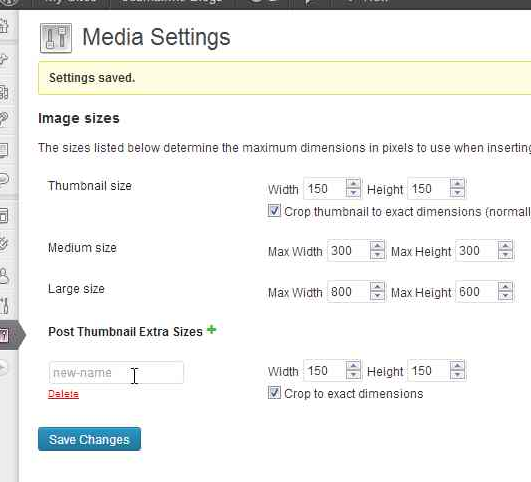
Update the width/height and whether or not the post-thumbnail should be cropped to an exact size. (If the width or height is set to 0, that boundary constraint is not enforced). Make sure you click the "Save Changes" button so that the changes are stored in the database.

In the media editor, you can choose to insert a shortcode of a single picture with the "Insert shortcode" button.
Changelog
6.0
- Added
ptx_html_attrsfilter for modifying the html output - Fixed the
shortcode_attsso that theshortcode_atts_ptxfilter will fire
5.0
- Updated for wordpress 3.8
- Added code to check for pending operations on the Options → Media screen.
4.0
- Added alignment and link options to the shortcode
- WordPress 3.6-beta2 fix
3.0
- Shortcode Creation with the Media Library
- Display post thumbnail information for thumbnails created by other plugins and themes
2.0
- CRUD (Create/Read/Update/Delete) operations on post-thumbnails
1.0
- Initial cut