

PostSummary
Postsummary creates a widget that contains a list of posts with title and the beginning of the text. You can style and add a thumbnail.
Plugin info
Maintenance & Compatibility
Maintenance score
Possibly abandoned • Last updated 5308 days ago
Is PostSummary abandoned?
Possibly abandoned (last update 5308 days ago).
Compatibility
Similar & Alternatives
Explore plugins with similar tags, and compare key metrics like downloads, ratings, updates, support, and WP/PHP compatibility.
Description
PostSummary allow you to add a widget with a kind of preview of your posts. You can add a list like the newspaper sites
or a list of posts really similar to adsense style. You can mix your posts and adsense with the same aspect.
Every instance of the widget is independent and can be configured separately.
You can choose the categories to be displayed or if the lias is made of the most recent posts or, if you have statpresscn plugin,
the most read posts.
Installation
- Upload
postsummary.zipto the/wp-content/plugins/directory - Activate the plugin through the ‘Plugins’ menu in WordPress
- go to apparence/widget page and add the PostSummary widget in your page
Frequently Asked Questions
How can I define the apparence style?
You have to manually edit the postsummary.css file or any css used in your theme.
In the Widget parameters page you write the style name
Review feed
Screenshots
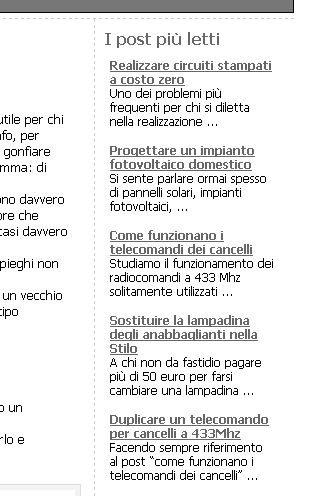
This is an example of the list (vertical, text only)

This is an horizontal list

This is a list with thumbnail

Options for widget configuration

Thumbnail options
Changelog
1.2
- Added the thumbnail management
1.2.1
- Fix: error when thumbnail enabled and there are no images in the post