

Pretty Theme Files
Organizes theme files in WP-Admin -> Appearance -> Editor, using jQuery.
Plugin info
Maintenance & Compatibility
Maintenance score
Possibly abandoned • Last updated 4119 days ago • 2 reviews
Is Pretty Theme Files abandoned?
Possibly abandoned (last update 4119 days ago).
Compatibility
Similar & Alternatives
Explore plugins with similar tags, and compare key metrics like downloads, ratings, updates, support, and WP/PHP compatibility.
Description
Pretty Theme Files will organize your theme files in editing panel.
It lists theme main files first, with sublisting of every other file related to main files.
This plugin will make so much easier to deal with themes that have many files.
License
This file is part of Pretty Theme Files.
Pretty Theme Files is free software: you can redistribute it and/or modify it under the terms of the GNU General Public License as published by the Free Software Foundation, either version 3 of the License, or (at your option) any later version.
Pretty Theme Files is distributed in the hope that it will be useful, but WITHOUT ANY WARRANTY; without even the implied warranty of MERCHANTABILITY or FITNESS FOR A PARTICULAR PURPOSE. See the GNU General Public License for more details.
You should have received a copy of the GNU General Public License along with Pretty Theme Files. If not, see http://www.gnu.org/licenses/.
Installation
- Upload the whole plugin folder to your /wp-content/plugins/ folder.
- Go to the Plugins page and activate the plugin.
- When you visit theme editor the files will be organized now
Frequently Asked Questions
Review feed
Screenshots
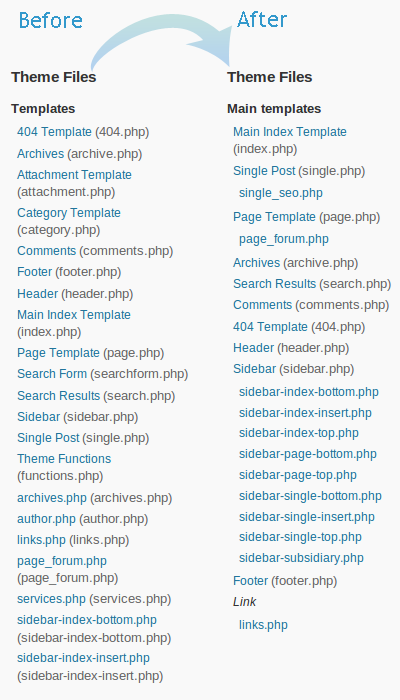
Result of using the plugin
Changelog
1.0
- Initial release