

Plugin info
Maintenance & Compatibility
Maintenance score
Possibly abandoned • Last updated 3931 days ago • Support resolved 0% • 23 reviews
Is PS Auto Sitemap abandoned?
Possibly abandoned (last update 3931 days ago).
Compatibility
Similar & Alternatives
Explore plugins with similar tags, and compare key metrics like downloads, ratings, updates, support, and WP/PHP compatibility.
Description
“PS Auto Sitemap” is a plugin that automatically generates a site map page from your WordPress site.
It is easy to install for beginners and easy to customize for experts.
It can change the settings of the display of the lists from administration page, several neat CSS skins for the site map tree are prepared.
When you use WordPress as CMS of the Web site, you can expect the effect of SEO, improvement of the usability, and so on.
Functions of “PS Auto Sitemap”:
- Display/hide of particular home.
- Display/hide of particular categories and posts.
- Display/hide of pages.
- Limitation of the depth of the list.
- Set the display order of the page list and the post list.
- Combine/Divide category & post
- Set the excluded categories from the list.
- Set the excluded posts and pages from the list.
- Select the display style of the site map from 12 prepared designs (or no style).
- Use or not caching sitemap content.
Latest change
-
1.1.9
- Compatible up to WordPress 4.2.2
- bugfix: Strict Standards error.
- change: Detele developper link option(force no link)
-
1.1.8
- Compatible up to WordPress 3.7
- bugfix: Deprecated error.
-
1.1.7
- Compatible up to WordPress 3.6
-
1.1.6
- Compatible up to WordPress 3.4
-
1.1.5
- bug fix: Notice error and Deprecated functions and arguments.
-
1.1.4
- Compatible with WordPress 3.3
- bug fix: Notice error and Deprecated functions and arguments.
-
1.1.3
- bug fix: Fatal error has occurred in PHP4
Links
“PS Disable Auto Formatting“Stops the automatic forming and the HTML tag removal in the html mode of WordPress, and generates a natural paragraph and changing line.
“CMS service with WordPress” provides you service that uses WordPress as a CMS.
Special Thanks
= Translation: =
* English dacelo
* Spanish Alejandro
Sitemap style:
- Cube Alejandro
Installation
- Unzip the downloaded package and upload into your WordPress plugins directory.
If you use WordPress 2.7 or later, you can install from admin page. - Go to plugins list and activate “PS Auto Sitemap”.
- Post a page that will use as the sitemap page.
- Insert following code in the content area. (Use HTML mode)
<!-- SITEMAP CONTENT REPLACE POINT --> - Define the sitemap’s ID at “PostID of the sitemap” field of the setings.
Frequently Asked Questions
The sitemap does not appear.
Check the page ID of the sitemap page.
Check the system code that you pasted.(Surely used HTML mode?)
When the sitemap is still not displayed, other plugins might be conflicts. de-activate the other plugins and check the sitemap page.
(If there are conflicted plugins, please tell us.)
The selected style have collapsed.
The CSS of using theme may be interfere in the selected style.
Select the style “no style” and write CSS yourself or use another themes.
Or, if you tell us the theme and your selected style, we might help you.
Review feed
Screenshots

Administration interface of PS Auto Sitemap
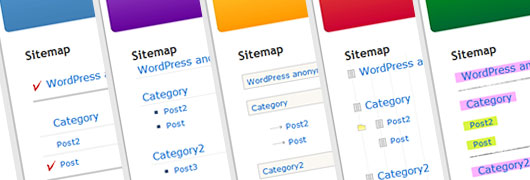
Preset sitemap styles.