
PuzzleSync – Multilingual Content Manager
Manage multilingual content with automatic hreflang tags, translation groups, and dynamic language detection for better SEO.
Plugin info
Maintenance & Compatibility
Maintenance score
Maintained • Last updated 164 days ago
Is PuzzleSync – Multilingual Content Manager abandoned?
Likely maintained (last update 164 days ago).
Compatibility
Similar & Alternatives
Explore plugins with similar tags, and compare key metrics like downloads, ratings, updates, support, and WP/PHP compatibility.
Description
PuzzleSync helps you rank in multiple countries by properly managing multilingual content for search engines.
If you run a multilingual WordPress site, you need proper hreflang implementation to tell Google which language version to show in each country. PuzzleSync makes this easy with automatic hreflang tag generation, translation management, and SEO validation – without requiring expensive translation plugins or complex configurations.
Why Choose PuzzleSync?
🎯 Simple Language Detection
Just add a category or tag to your posts (like “English” or “Deutsch”) and PuzzleSync automatically:
* Detects the content language
* Generates proper hreflang tags
* Sets the correct HTML lang attribute
* Creates JSON-LD structured data for search engines
No need for complex language codes or technical setup!
🌍 Truly Multilingual
Unlike plugins limited to 2-3 languages, PuzzleSync supports ANY language you configure:
* English, German, French, Spanish, Italian, Portuguese, Dutch, Polish, Russian
* Japanese, Chinese, Korean, Arabic, Turkish, Swedish, Danish, Norwegian
* 30+ built-in language mappings, easily add more in settings
* Automatic locale conversion (en en-US, de de-DE, etc.)
⚡ Fast & Lightweight
* Custom database storage (not post meta) for instant queries
* No impact on page load speed
* Works with any theme or page builder (Gutenberg, Elementor, Bricks, etc.)
✅ Built-in Validation
* Automatic detection of broken translation links
* One-click fixes for common issues
* Validation dashboard shows exactly what needs attention
🔧 Flexible & Developer-Friendly
* Works with categories OR tags (your choice)
* Tag naming is flexible: “english”, “English”, “en”, “english-version” all work!
* Translation Groups for automatic linking
* Clean, modern PHP code with namespaces
* Shortcodes for language switchers
Perfect For
- Multilingual blogs and business sites
- International e-commerce stores
- Content creators targeting multiple countries
- SEO professionals managing multilingual sites
- Agencies building sites for international clients
How It Works
- Add languages in settings (English, German, French, etc.)
- Tag your content with categories or tags (e.g., “english”, “deutsch”)
- Link translations using Translation Groups or manual URLs
- Done! PuzzleSync automatically generates all hreflang tags and SEO markup
Language Support
Supports ANY language – just add it in settings! Built-in support includes:
- European: English, German, French, Spanish, Italian, Portuguese, Dutch, Polish, Russian, Czech, Hungarian, Romanian, Greek, Ukrainian, Croatian, Slovak, Bulgarian, Swedish, Danish, Norwegian, Finnish
- Asian: Japanese, Chinese, Korean, Thai, Vietnamese, Indonesian, Hebrew
- Middle Eastern: Arabic, Turkish
- And more – easily add any language you need!
PuzzleSync automatically handles proper locale formatting (en en-US, de de-DE, ja ja-JP, etc.)
Installation
Automatic Installation (Recommended)
- Go to Plugins > Add New in your WordPress admin
- Search for “PuzzleSync”
- Click Install Now, then Activate
- Go to PuzzleSync > Language Management to add your languages
- Start tagging your content!
Manual Installation
- Download the plugin zip file
- Go to Plugins > Add New > Upload Plugin
- Choose the zip file and click Install Now
- Click Activate Plugin
- Go to PuzzleSync > Language Management to configure
First Steps After Installation
- Add Languages: Go to PuzzleSync > Language Management and add the languages your site uses
- Tag Your Content: Add a category or tag to your posts matching the language (e.g., “english”, “deutsch”)
- Link Translations: Use the same Translation Group name in the PuzzleSync meta box for related posts
- Verify Setup: Go to PuzzleSync > Validator to check everything is working correctly
Frequently Asked Questions
- Go to PuzzleSync > Language Management and add your languages (e.g., English, German)
- Create/edit a post and assign it a category or tag matching the language (e.g., “English” category or “english” tag)
- Create the translation post and assign it the other language (e.g., “German” category)
- Give both posts the same Translation Group name in the PuzzleSync meta box
- Done! PuzzleSync automatically generates hreflang tags linking them together
Very flexible! All of these work:
* Categories: “english”, “English”, “deutsch”, “Deutsch”
* Tags: “english”, “en”, “EN”, “english-version” (all work!)
* Language codes: “en”, “de”, “fr”, “es” etc.
PuzzleSync detects them all automatically. Use whatever makes sense for your workflow!
Either one! You can use:
* Categories only (easier if you organize content by language)
* Tags only (if you prefer to keep categories for other things)
* Both (PuzzleSync checks both)
Choose what fits your site structure best.
Absolutely! Go to PuzzleSync > Language Management and add any language:
* French, Spanish, Italian, Portuguese, Dutch, Polish
* Japanese, Chinese, Korean, Arabic, Russian
* Any language you need – PuzzleSync supports them all!
Just add the language, then tag your content with that language name.
No! PuzzleSync uses a custom database table (not WordPress post meta) for lightning-fast queries. The hreflang tags are generated server-side with zero JavaScript, so there’s no impact on page load speed.
Display current language information:
[puzzlesync_current_language format=”name”]
Available formats: name, code, flag
Display language switcher with flags and text:
[puzzlesync_language_switcher show_flags=”true” show_names=”true”]
Display compact flag-only language switcher:
[puzzlesync_language_flags size=”medium” style=”inline”]
Available sizes: small, medium, large
Available styles: inline, block
PuzzleSync automatically generates JSON-LD structured data for improved SEO. This includes:
* WebPage schema markup with language information
* Multilingual content relationships
* Proper language annotations for search engines
The JSON-LD data is automatically added to the page header when translations are available.
Yes, several functions are available:
* puzzlesync_get_current_language() – Get current language
* puzzlesync_get_translations($post_id) – Get available translations for a post
* puzzlesync_get_hreflang_tags() – Get hreflang tags for current post
Review feed
Screenshots

Settings page overview

Post editor meta box

Validation results
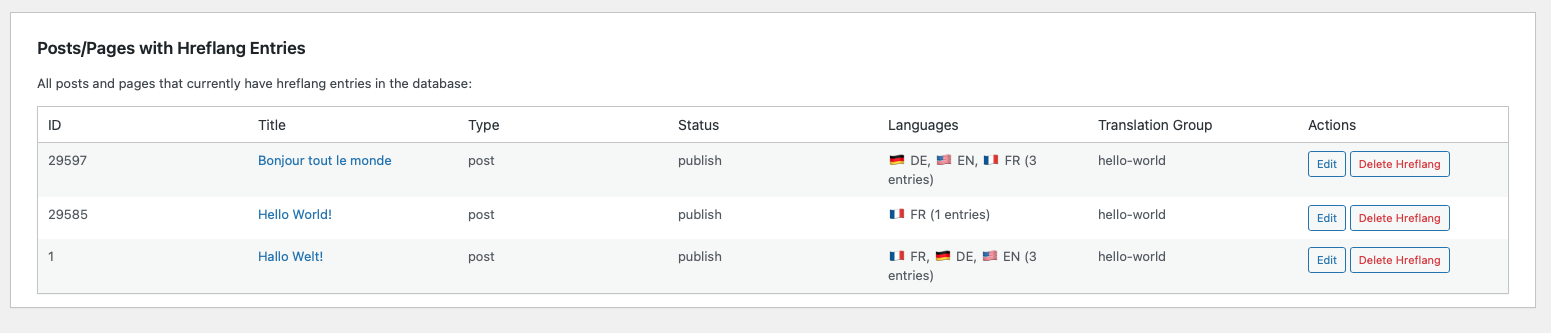
Statistics dashboard

Changelog
1.0.5
- Fixed: Critical error in Frontend.php – missing Database namespace import
- Fixed: Broken asset paths for logo and CSS files after directory restructuring
- Fixed: CSS class names updated from chrmrtns-pml-* to chrmrtns-puzzlesync-*
- Fixed: All JavaScript paths now use correct plugin URL constants
- Improved: Dynamic language detection – now supports ALL configured languages, not just English/German
- Improved: Flexible tag naming – tags work with OR without “-version” suffix (e.g., both “english” and “english-version”)
- Improved: Standardized language code handling – uses ISO codes (en, de) in database, locale format (en-US, de-DE) for HTML lang attribute
- Added: Support for 30+ language locale mappings (French, Spanish, Italian, Portuguese, Dutch, Polish, Russian, Japanese, Chinese, Korean, Arabic, and more)
- Added: Complete dynamic language detection system across all plugin components
- Changed: Language detection now configuration-driven instead of hardcoded
- Note: All fixes maintain backward compatibility – no data migration required
1.0.4
- Added: Proper PHP namespaces (Chrmrtns\PuzzleSync) for better code organization
- Added: PSR-4 compliant autoloader
- Added: Automatic migration from old chrmrtns_pml_ prefix to chrmrtns_puzzlesync_
- Changed: All internal prefixes updated from chrmrtns_pml_ to chrmrtns_puzzlesync_
- Changed: Database table renamed from chrmrtns_pml_hreflang to chrmrtns_puzzlesync_hreflang
- Changed: All option names and meta keys updated to use chrmrtns_puzzlesync_ prefix
- Fixed: JavaScript object naming (pressmlMetaBox puzzlesyncMetaBox, pressmlSettings puzzlesyncSettings)
- Improved: Code structure and maintainability with namespaced classes
- Note: Automatic migration preserves all existing data and settings
1.0.3
- Changed: Plugin renamed from “PressML” to “PuzzleSync” to comply with WordPress.org trademark guidelines
- Changed: Text domain updated from ‘pressml’ to ‘puzzlesync’
- Changed: All shortcodes renamed (pressml_* puzzlesync_*)
- Changed: Plugin slug updated from ‘pressml’ to ‘puzzlesync’
- Note: Database tables and internal functions remain unchanged (chrmrtns_pml_*) – no migration needed
- Note: This is a branding change only – all functionality remains identical to v1.0.2
1.0.2
- Fixed: Hreflang tags now correctly output both language-specific tags (en, de) AND x-default tag
- Fixed: JSON-LD structured data now includes translations even when marked as x-default
- Improved: Better SEO compliance with complete hreflang tag implementation
1.0.1
- Fixed: Removed inline scripts and styles to comply with WordPress.org plugin guidelines
- Improved: Properly enqueued CSS and JavaScript assets using WordPress standards
- Improved: Added wp_localize_script() for JavaScript translations and data passing
- Code quality: Enhanced security and maintainability by following WordPress best practices
1.0.0
- Initial release as “PressML”
- Custom database storage for hreflang data
- Translation group management
- Validation system with auto-fix capabilities
- Admin interface for content management
- Security hardening and WordPress standards compliance