

Template Debugger
Intended for Developers: This template debugger helps you identify what template files are being used on the page you're viewing.
Plugin info
Maintenance & Compatibility
Maintenance score
Possibly abandoned • Last updated 2137 days ago • 7 reviews
Is Template Debugger abandoned?
Possibly abandoned (last update 2137 days ago).
Compatibility
Similar & Alternatives
Explore plugins with similar tags, and compare key metrics like downloads, ratings, updates, support, and WP/PHP compatibility.
Description
Do you get frustrated trying to work out what the template file you’re editing is? Ever had to echo/print some text to see if WordPress is picking up the file you expect it to?
If yes, then give this plugin a try, it simply adds a handy dropdown at the top of the admin bar giving you the ability to quickly see what theme template file(s) is being used, as well as what other files are being included, from themes and plugins.
Never get frustrated with creating child themes again, using Template Debugger you can generate a new child theme based on one of the installed parent themes, and Template Debugger does all the leg work! Just fill out the input fields and Template Debugger will create the theme directory, add in the style.css and functions.php
Plugin features:
-
Quickly find out what template file(s) are being used
-
See where they’re included
-
See what plugin template files are in use
-
Create new page templates from post editing screen
-
Create child themes from a parent theme
-
… Got an idea for a feature?? Cool! Drop me a message in the support forum
Installation
The simplest way to install
- In your WordPress Admin click on ‘Plugins’ then ‘Add New’
- Type ‘Template Debugger’ in the search field.
- Navigate to the front end of your website, you’ll see a new part to the admin bar showing you the current template and included files.
Alternatively,
- Upload the plugin to the ‘/wp-content/plugins/’ directory
- Activate the plugin through the ‘Plugins’ menu in WordPress
If you want to show the plugins, and/or exclude certain plugins from showing in this dropdown, go to your WP Dashboard, Settings > Template Debugger
Frequently Asked Questions
Can Editors and Subscribers view the template?
They can see the name of the template in the admin bar, but they cannot click the link into the theme editor unless you have given them capabilities
Review feed
A must have
useful
Screenshots

Quickly find out what templates are being used, and in the order they're loaded

Exclude plugins from showing up in the admin bar, or include them!

Easily generate child themes

Easily generate child themes

Create page templates from the page edit screen
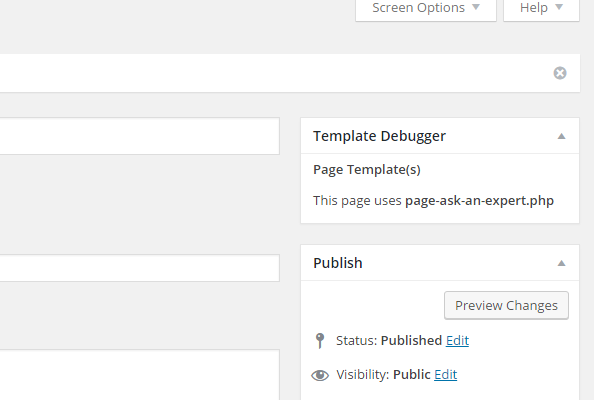
Create page templates from the page edit screen

View information about get_template_part()
Changelog
3.1.2
- New: Now honours custom wp-admin and wp-content paths.
- Fixed: Broken theme editor link.
3.1.1
- New: Show information about which block is being used (gutenberg editor).
- Fixed: Execution timer echoing in the footer.
- Fixed: Checkbox not unchecking.
- Removed: Adsense from settings area
3.1.0
- New: Get information about where the template part is being included.
3.0.0
- New: Major rewrite of codebase
- New: Optimized for performance
- Fixed: PHP Undefined Warnings
- Changed: Moved execTime to menu bar
2.2.3
- Checked: Stable for version 4.8.2
2.2.2
- New: Create custom post type templates from inside the post editing screen
2.2.1
- New: Plugin ready for translations
- Changed: Improved page template creating
2.2.0
- New: Create page templates from inside the post editing screen
2.1.3
- Fixed: PHP Notice
- Fixed: Top nav item broken link
- Changed: Script enqueue label
2.1.2
- Fixed: Show theme slug when name not set
- Changed: Removed PHP short tags
2.1.1
- New: Current template file highlighted with an asterisks (*)
- Fixed: Link to theme editor broken
2.1.0
- New: You can now generate a child theme inside Template Debugger
- Fixed: Missing minified CSS file
2.0.1
- Updated: Name changed from Template Quick Edit Link (a bit of a mouthful!) to Template Debugger
- Updated: Add minified version of CSS
- Updated: Reformatted code
- Updated: Updated settings page
2.0
- New: Ability to see what plugin files are being included
- New: Ability to navigate recursively through directories
- New: Settings Page to exclude specific plugins from showing
- New: Specify level of recursive in settings
- Fixed: Plugin running while in the dashboard
- Fixed: Overflow issues
1.1
- Fixed: Dropdown items missing when list too long for viewport
1.0.1
- Now shows a dropdown of all template includes, if you are using a parent and child theme combo it will nest them nicely by theme location
1.0.0
- Initial Release