

Random Post Box
The Random Post Box plugin places a box anywhere on the blog, where it loads random posts one-after-the-other.
Plugin info
Maintenance & Compatibility
Maintenance score
Possibly abandoned • Last updated 5728 days ago
Is Random Post Box abandoned?
Possibly abandoned (last update 5728 days ago).
Compatibility
Similar & Alternatives
Explore plugins with similar tags, and compare key metrics like downloads, ratings, updates, support, and WP/PHP compatibility.
Description
Random Post Box is a plugin that lets you place a box anywhere on your blog, with template tag or shortcode, and
load random posts with an interval and fade effect. It uses jQuery (Ajax) which means that the content is loaded without
loading the rest of the page. The timings can be set in the admin options-panel.
The template tag is . You can also use the shortcode [random-post-box] in a page or post.
Features
- Insert placeholder with template tag
- Insert placeholder with shortcode
- Set time for displaying the post
- Set times for fade in and fade out affect
- Exclude or include posts by category
- Exclude posts by age (in days)
- Use title only
- Use post excerpt or bodycontent
- Strip tags from body
- Show/hide post metadata
Installation
The installation is like mosts plugins:
- Download and extract the files
- Upload
random-post-boxfolder to the/wp-content/plugins/directory - Activate the plugin through the ‘Plugins’ menu in WordPress
- Place
<?php random_post_box(); ?>in your templates, or [random-post-box] in a page or post. - Important is to style the #random-post-box-frame with CSS and set the height and width in your theme.
The install doesn’t touch the database much, it just adds one option post.
Frequently Asked Questions
Is there an option to display several posts?
Not at the moment, but it might be included in future versions. It’s not recommended to use the
template tag several times on the same page.
How can I style the box?
The box is a div with id “random-post-box-frame”, and the markup inside is quite similar to the
default theme.
The box changes size when loading a new post
You need to set the size to something static with CSS, or use some means to control the size. Use the id “random-post-box-frame” as described
in the previous answer.
Review feed
Screenshots
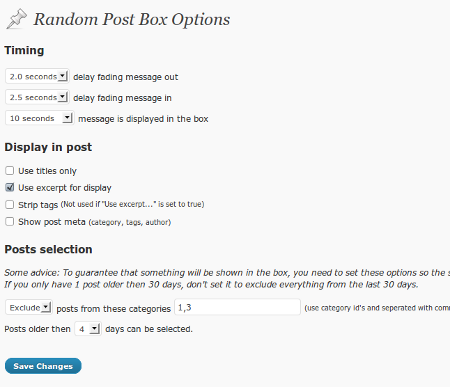
The options page

In use at Retrocamera blog
Changelog
1.0.3
- Updated to work with WP 3.0
1.0.2
- Framing div-tag
1.0.1
- Fix bug: Query args stopped random post to work on pages.
1.0
- This is the first release