

Random Posts with Thumbnails
Puts a list of clickable random posts with their featured image in your sidebar as a widget, this list is customizable.
Plugin info
Maintenance & Compatibility
Maintenance score
Possibly abandoned • Last updated 4927 days ago
Is Random Posts with Thumbnails abandoned?
Possibly abandoned (last update 4927 days ago).
Compatibility
Similar & Alternatives
Explore plugins with similar tags, and compare key metrics like downloads, ratings, updates, support, and WP/PHP compatibility.
Description
If you want to graphically display a random list of your posts with their featured image in the side bar, then this is the plugin for you. This plugin allows you to set the category IDs (or all categories) you want to pull the random posts from, the number of random posts to display, the maximum width and height of the featured image thumbnail, the widget title, and the colors of the surrounding box.
Installation
How do I install and use:
-
Activate the Plugin ‘Random Posts with Thumbnails’ in the Plugins List.
-
Click ‘Appearance’ in the WordPress admin menu and then click ‘Widgets’ in the sub-menu of ‘Appearance’.
-
Drag ‘Random Posts with Thumbnails’ from Available Widgets to the Widget area you want it to display it in (the Primary Widget Area is my side bar and where I put this Widget).
-
The widget has pre-settings to start with but you can change them to your liking.
(side note: This plugin uses the Featured Image of a Post to display a thumbnail image in the Random Posts list, if your Posts do not have a Featured Image set then there will be no thumbnail image on that post in the list.)
Frequently Asked Questions
Review feed
Screenshots
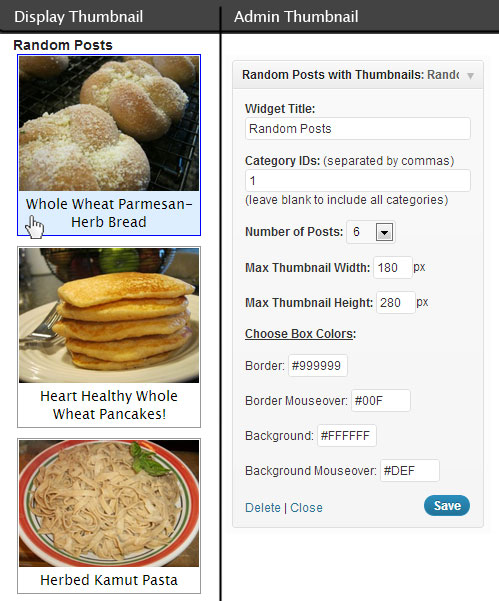
Here's a screenshot of it in action
Changelog
1.0
- First Release