

RSS with Images
Seamlessly adds featured images to your RSS feed with customizable sizing options.
Plugin info
Maintenance & Compatibility
Maintenance score
Possibly abandoned • Last updated 2078 days ago • 6 reviews
Is RSS with Images abandoned?
Possibly abandoned (last update 2078 days ago).
Compatibility
Similar & Alternatives
Explore plugins with similar tags, and compare key metrics like downloads, ratings, updates, support, and WP/PHP compatibility.
Description
A simple and easy way to add featured images in your site’s RSS feed with customizable sizing options.
Adds featured images to Mailchimp emails, Infusionsoft, Hubspot, Constant Contact, Zoho, Feedburner, Bloglovin’, Feedly, and other services that use RSS feed data.
Works great with Mailchimp’s RSS-to-Email campaigns, allowing you to be more creative and get the most value from your email newsletters. You can even set the xml encoding of your RSS feed. (the default setting is UTF-8).
For more information on setting up and using RSS with Images, view the documentation here.
note: RSS with Images will not add already existing images to your feed. Once the plugin is activated, any new image added to a post will be included in the feed.
Rate this plugin, I would LOVE the feedback!
ENJOY!
Installation
- Simply download the plugin and install.
- Set your image dimensions to that of your mailchimp email template.
- Choose your character encoding type. (Default is UTF-8)
- Save your options!
Frequently Asked Questions
Q:What are the Differences in encoding types?
A: Refer to http://www.w3.org/TR/REC-xml/ for more information on xml
Review feed
Does what it says on the tin
Screenshots
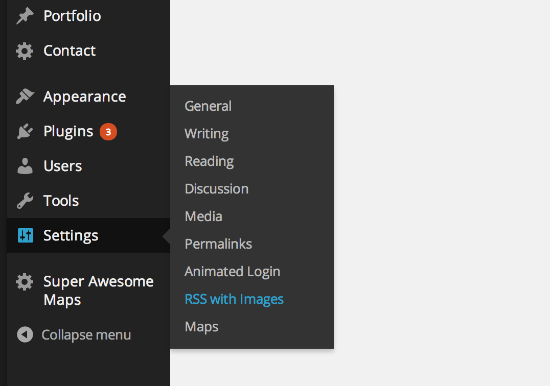
To access the RSS with Images Settings Page, click Settings > RSS with Images.

Here is a screenshot of the Settings Page. The options form is simple to use.
Changelog
1.4.0
- Move addition of media xml and namespaces into hook.
- Cleanup custom RSS template
- Security updates
1.3.6
- Security Updates
- Added Support for WP version 4.7.1
1.3.5
- Added Support for WP version 4.3.1
1.3
- Security Updates
- Added Support for WP version 4.2.4
1.2
- Security Updates
- Feed template updated
- Added Support for WP version 4.1
1.1
- Removed wptexturize filter from RSS content and title
- Added support for WP version 3.9
1.0
- First release.