
Disable REST API for Real
Really prevents the REST API from handling requests (default) or require user to be logged in.
Plugin info
Maintenance & Compatibility
Maintenance score
Possibly abandoned • Last updated 2331 days ago • 3 reviews
Is Disable REST API for Real abandoned?
Possibly abandoned (last update 2331 days ago).
Compatibility
Similar & Alternatives
Explore plugins with similar tags, and compare key metrics like downloads, ratings, updates, support, and WP/PHP compatibility.
Description
The WordPress REST API is a great resource, but if you don’t want to use it probably you will want to close this door to your WordPress.
Unlike other popular plugins that aims to disable the REST API but only return an error, processed by the REST API, when a request is received, by default, this plugin removes all filters and actions related to WordPress REST API, and returns a 404 error for requests sent to the REST API URL endpoints, effectively blocking any use of the REST API.
Optionally you can set the REST API setting in Settings -> General page to “Logged In Only” for a less drastical action, to keep REST API access enabled but require the user to be logged in to accept the requests.
If you’re happy with the plugin please don’t forget to give it a good rating, it will motivate me to keep sharing and improving this plugin (and others).
SUPPORT: If you have any support question, please create an issue at the Github repository.
Requirements
- WordPress 4.7 or higher.
Features
- Disable WordPress core REST API for real by removing all filters and actions related to it and returning a 404 error for requests sent to REST API URL endpoints (e.g. https://example.com/wp-json/whatever ).
- Option to require user to be logged in to use the REST API instead of completely disable it.
Usage
To disable the REST API completely simply install the plugin from the Plugins page and enable it.
If you don’t want to disable the REST API but require user to be logged in instead, go to Settings -> General page and set the REST API to option to “Logged In Only”, and click Save Changes.
You can change the option back to “Off” if you want to disable the REST API again.
To return to WordPress default, simply deactivate the plugin.
Installation
Frequently Asked Questions
How can I test if the plugin is working?
Use your browser to go to http://example.com/wp-json (replace example.com with your site domain). Your site will return a 404 error.
You can also check any regular page of your site to confirm the link to the REST API URL was removed from the HTTP header and from the HTML header.
If you have set the plugin to “Logged In Only”, no changes are made to the page headers, but you will receive the following response if you try the REST API without being logged in:
{"code":"rest_not_logged_in","message":"External REST API requests not allowed for this site.","data":{"status":401}}
Review feed
One click plugin
Screenshots
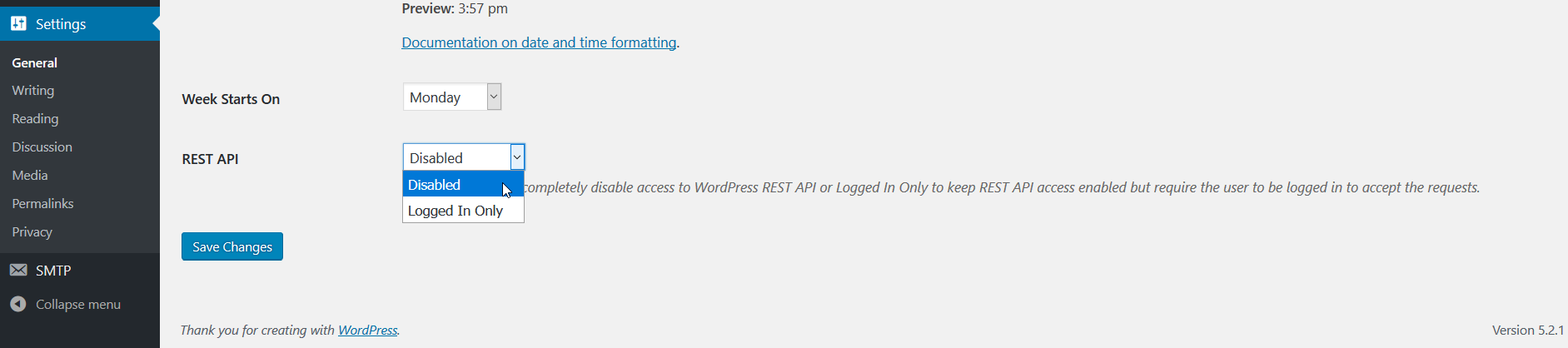
REST API option in Settings -> General page.

Jetpack's settings page confirming REST API is disabled.
Changelog
2.1.1
- Fixed typo. Thanks to Mike D for reporting it.
2.1
- Minor changes to make code 100% WordPress Coding Standards compliant.
2.0
- Added option in Settings -> General page to choose between completely disable the REST API (default), or “Logged In Only” to keep REST API access enabled but require the user to be logged in to accept the requests.
- Removed support for WordPress 4.6.1 and older.
1.0
- Initial release.