

Plugin info
Maintenance & Compatibility
Maintenance score
Maintained • Last updated 132 days ago • 4 reviews
Is Simply Disable Comments abandoned?
Likely maintained (last update 132 days ago).
Compatibility
Languages
Similar & Alternatives
Explore plugins with similar tags, and compare key metrics like downloads, ratings, updates, support, and WP/PHP compatibility.
Description
This plugin simply removes the commenting feature on your WordPress. It’s a simple plugin; just setup and forget – no configuration is needed.
If you like our Simply Disable Comments plugin, then consider checking out our other projects:
- Magic Login Pro – Easy, secure, and passwordless authentication for WordPress.
- Easy Text-to-Speech for WordPress – Transform your textual content into high-quality synthesized speech with AI.
- Handywriter – AI-powered writing assistant that can help you create content for your WordPress.
- PaddlePress PRO – Paddle Plugin for WordPress
- Powered Cache – Caching and Optimization for WordPress – Easily Improve PageSpeed & Web Vitals Score
- WP Accessibility Toolkit – A collection of tools to help you make your WordPress more accessible.
Contributing & Bug Report
Bug reports and pull requests are welcome on Github.
Installation
From within WordPress
- Visit ‘Plugins > Add New’
- Search for ‘Simply Disable Comments’
- Activate Simply Disable Comments from your Plugins page.
- That’s all.
Manual Installation
- Upload the
simply-disable-commentsfolder to the/wp-content/plugins/directory - Activate the Simply Disable Comments plugin through the ‘Plugins’ menu in WordPress
- That’s all.
Frequently Asked Questions
This plugin doesn’t have a settings page. It’s just a simple plugin to disable comments. However, on multisite it registers an option under general settings when it is activated network-wide. This way, site admins can enable/disable comments on a per-site basis.
Yes! It’s compatible with both single sites and multisite.
Review feed
A simple, focused plugin, does it's job wonderfully
Screenshots
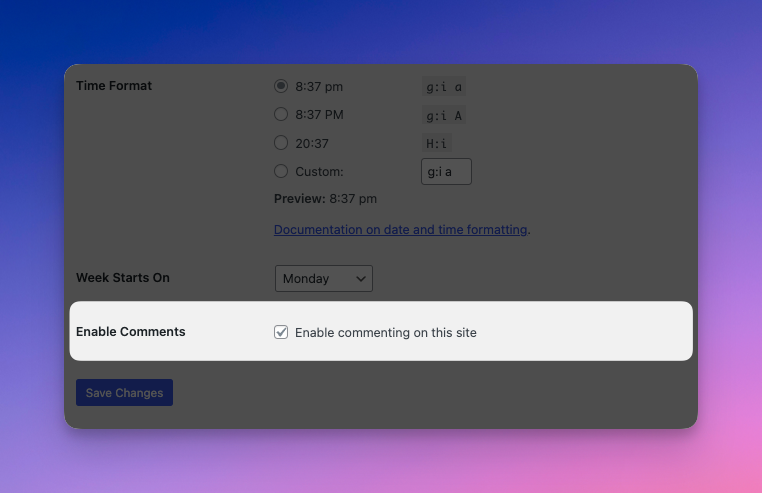
A general settings item on multisite when activated network-wide to allow site owners can control the commenting.
Changelog
0.3 (2025-11-21)
- Remove
core/post-comments-countandcore/post-comments-linkblocks. - Dependency updates.
- Tested with WP 6.9
0.2 (2025-08-30)
- Dependency updates.
- Improved compatibility with ClassicPress.
0.1.4 (2025-04-12)
- Dependency updates.
- Tested with WP 6.8
0.1.3 (2024-07-11)
- Added playground blueprint.
- Dependency updates.
- Tested with WP 6.6
0.1.2 (2024-03-19)
- Dependency updates.
- Tested with WP 6.5
0.1.1 (2023-07-19)
- Bugfix
- Tested with WP 6.3
0.1.0
- Initial release