

SMTP Mailer
Configure a SMTP server to send email from your WordPress site. Configure the wp_mail() function to use SMTP instead of the PHP mail() function.
Plugin info
Maintenance & Compatibility
Maintenance score
Maintained • Last updated 156 days ago • Support resolved 0% • 65 reviews
Is SMTP Mailer abandoned?
Likely maintained (last update 156 days ago).
Compatibility
Developers
Languages
Similar & Alternatives
Explore plugins with similar tags, and compare key metrics like downloads, ratings, updates, support, and WP/PHP compatibility.
Description
SMTP Mailer plugin allows you to configure a mail server which handles all outgoing email from your website. It takes control of the wp_mail function and use SMTP instead.
SMTP Mailer Add-ons
SMTP Mailer Settings
- SMTP Host: Your outgoing mail server (e.g. smtp.gmail.com).
- SMTP Authentication: Whether to use SMTP authentication when sending an email (True/False). If you choose to authenticate you will also need to provide your username and password.
- SMTP Username: The username to connect to your SMTP server.
- SMTP Password: The password to connect to your SMTP server.
- Type of Encryption: The encryption to be used when sending an email (TLS/SSL/No Encryption. TLS is recommended).
- SMTP Port: The port to be used when sending an email (587/465/25). If you choose TLS the port should be set to 587. For SSL use port 465 instead.
- From Email Address: The email address to be used as the From Email when sending a test email.
- From Name: The name to be used as the From Name when sending a test email.
- Force From Name: The From name in the settings is set for all outgoing email messages.
- Force From Email: The From email in the settings is set for all outgoing email messages.
- Force From Address: The From address in the settings is set for all outgoing email messages.
- Disable SSL Certificate Verification: As of PHP 5.6 a warning/error is shown if the SSL certificate on the server is not properly configured. This option lets you disable that behaviour.
SMTP Mailer Test Email
Once you have configured the settings you can send a test email to check the functionality of the plugin.
- To: Email address of the recipient.
- Subject: Subject of the email.
- Message: Email body.
Known Compatibility
SMTP Mailer should work with any plugin that uses the WordPress Mail function. However, It has been tested with the following form and contact form plugins:
- Contact Form 7
- Jetpack Contact Form
- Visual Form Builder
- Fast Secure Contact Form
- Formidable Forms
- Contact Form by BestWebSoft
For detailed setup instructions please visit the SMTP Mailer plugin page.
Installation
- Go to the Add New plugins screen in your WordPress Dashboard
- Click the upload tab
- Browse for the plugin file (smtp-mailer.zip) on your computer
- Click “Install Now” and then hit the activate button
Frequently Asked Questions
none
Review feed
Minimalistic, Does the job
The #1 SMTP plugin today
Best SMTP plugin
Screenshots
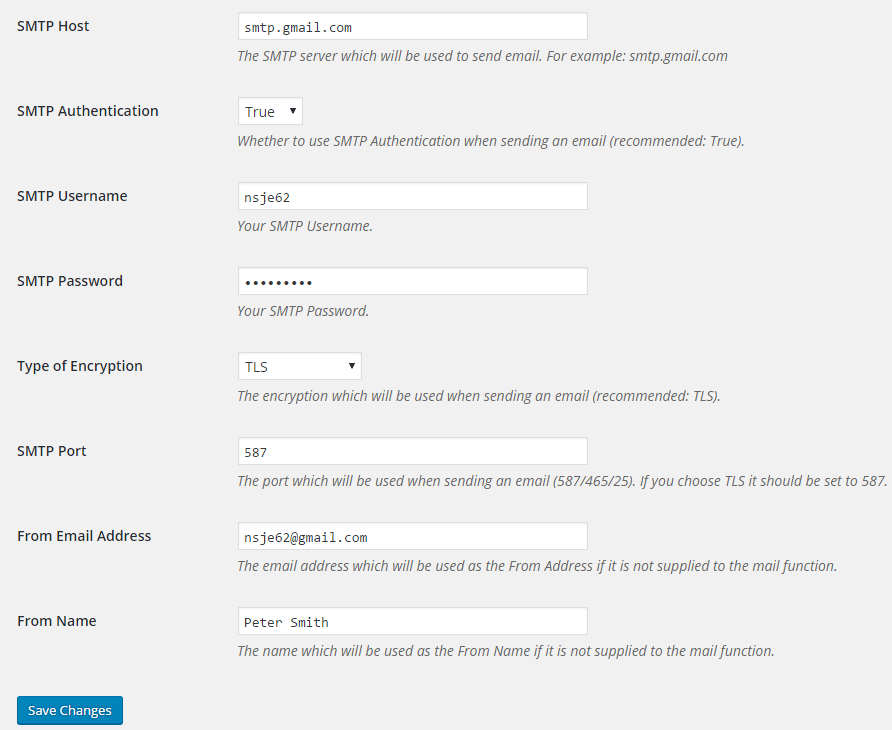
SMTP Mailer Settings
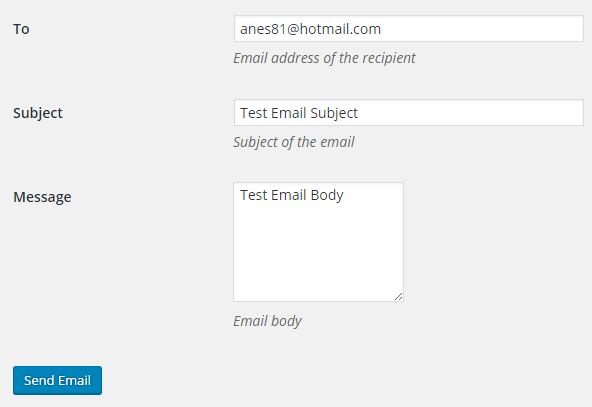
SMTP Mailer Test Email Tab
Changelog
1.1.23
- Added options to force from name and from email.
1.1.22
- Added minimum WordPress requirements to main file.
1.1.21
- Added an option to delete saved options.
1.1.20
- Restored older settings.
1.1.19
- Added a menu for easy configuration.
1.1.18
- WordPress 6.8 compatibility update.
1.1.17
- WordPress 6.7 compatibility update.
1.1.16
- Removed php_uname from server info.
1.1.15
- Updated the code for sanitizing password.
1.1.14
- Added support for the email logger add-on.
1.1.13
- WordPress 6.5 compatibility update.
1.1.12
- Added support for the reply-to add-on.
1.1.11
- WordPress 6.4 compatibility update.
1.1.10
- Added an option to set the configured from address for all outgoing email messages.
1.1.9
- Additional check for the settings link.
1.1.8
- Removed admin notices to avoid confusion since configurations can vary on different servers.
1.1.7
- WordPress 6.3 compatibility update.
1.1.6
- WordPress 6.2 compatibility update.
1.1.5
- Compatibility update for WordPress 6.1.
1.1.4
- Updated the mail function for WordPress 6.0.
1.1.3
- Updated the mail function for WordPress 5.9.
1.1.2
- Fixed an issue that could cause an Undefined variable error if $attachments was not set.
1.1.1
- WordPress 5.7 compatibility update.
1.1.0
- The password field can be left empty when updating the settings.
1.0.9
- Updated the code to be compatible with WordPress 5.5.
1.0.8
- SMTP Mailer is compatible with WordPress 5.3.
1.0.7
- SMTP Mailer now checks for a valid nonce when sending a test email.
1.0.6
- SMTP Mailer no longer shows the saved password in the settings.
1.0.5
- SMTP Mailer is now compatible with WordPress 4.9.
1.0.4
- Updated the mail() function by setting its minimum requirements to WordPress 4.8.
- “phpmailer_init” action hook is now enabled so it can be used by other plugins.
1.0.3
- Fixed a bug where an apostrophe in the password would cause SMTP authentication failure.
1.0.2
- SMTP Mailer now supports the “wp_mail_failed” hook which fires after a phpmailerException is caught.
- Added a new option to bypass this error on some servers where the SSL certificate is not properly configured – Warning: stream_socket_enable_crypto(): SSL operation failed with code 1. OpenSSL Error messages: error:14090086:SSL routines:SSL3_GET_SERVER_CERTIFICATE:certificate verify failed.
1.0.1
- First commit