

Simple Email Form
Simple Email Form creates a simple email contact form to your WordPress site.
Maintenance 22/1003297d since update
Active installs
30
Downloads
4,180
Reviews
2
Age
15.1y
Plugin info
Total downloads: 4,180
Active installs: 30
Total reviews: 2
Average rating: 5
Support threads opened: 0
Support threads resolved: 0 (0%)
Available in: 2 language(s)
Contributors: 1
Last updated: 3/22/2017 (3297 days ago)
Added to WordPress: 2/25/2011 (15 years old)
Minimum WordPress version: 4.1
Tested up to WordPress version: 4.7.31
Minimum PHP version: f
Maintenance & Compatibility
Maintenance score
Possibly abandoned • Last updated 3297 days ago • 2 reviews
22/100
Is Simple Email Form abandoned?
Possibly abandoned (last update 3297 days ago).
Compatibility
Requires WordPress: 4.1
Tested up to: 4.7.31
Requires PHP: f
Similar & Alternatives
Explore plugins with similar tags, and compare key metrics like downloads, ratings, updates, support, and WP/PHP compatibility.
Advanced Google reCAPTCHA
Rating 4.8/5 (427 reviews) • Active installs 200,000
ReCaptcha v2 for Contact Form 7
Rating 5.0/5 (89 reviews) • Active installs 200,000
reCaptcha by BestWebSoft
Rating 4.0/5 (388 reviews) • Active installs 100,000
CAPTCHA 4WP – Antispam CAPTCHA solution for WordPress
Rating 3.2/5 (268 reviews) • Active installs 100,000
Contact Form 7 Captcha
Rating 4.1/5 (48 reviews) • Active installs 100,000
Captcha Code
Rating 3.9/5 (33 reviews) • Active installs 100,000
Description
Easily add a simple email contact form to your WordPress site.
Features
- Easily add the simple email form to a page or post using the shortcode “[simple-email-form]”.
- Add simple email form to a template using the “simple-email-form” action.
- Customize the template by adding simple-email-form.php to your theme.
- Ability to display your email address above the form (optional, your email address is encoded with HTML entities if shown).
- Google reCAPTCHA (optional).
- Responsive, so it looks good on any device.
- Client and server side validation.
- AJAX form submission.
- Scripts and Styles are minified and only loaded when used.
Installation
1. Upload to your plugins folder, usually `wp-content/plugins/`
The plugin is in the form of a directory called ‘simple-email-form’.
2. Activate the plugin on the plugin screen.
3. Change settings on the “Settings > Simple Email Form” options screen.
Frequently Asked Questions
No FAQ available
Review feed
No reviews available
Screenshots
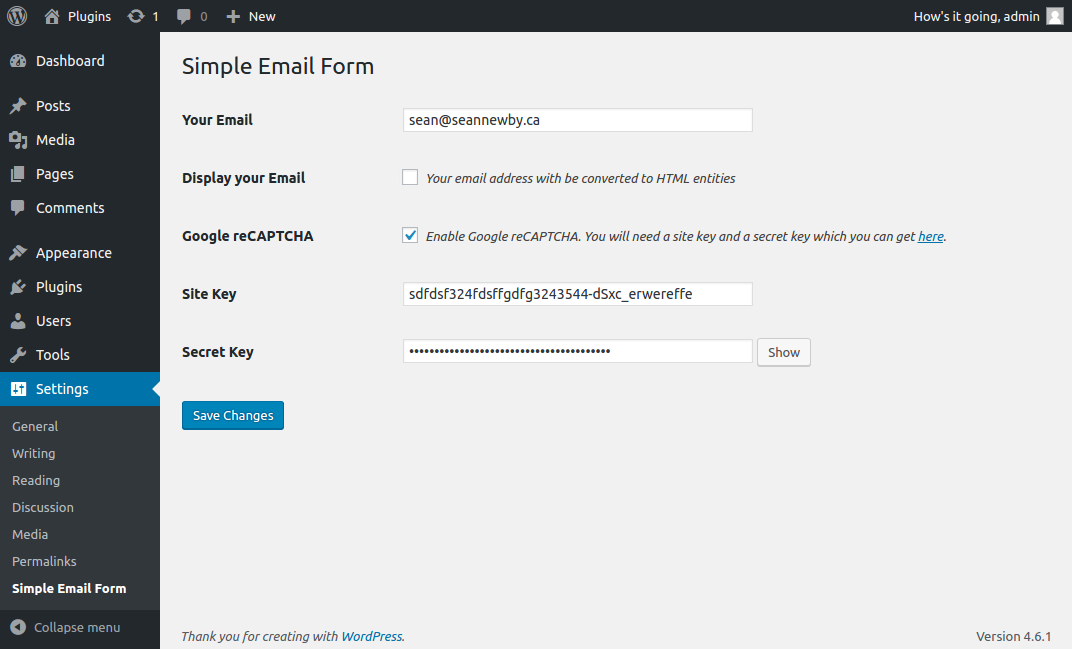
Simple Email Form options page.

Simple Email Form in action using the Twenty Sixteen theme.
Changelog
v1.0
- First Stable version
v2.0
- Rewrote plugin to work with latest version of WordPress (4.6.1).
- Removed TinyMCE button to insert shortcode.
- Replaced captcha with Google reCAPTCHA v2.
- Added AJAX form submission.
v2.0.1
- Fixed bugs with some translations (updated .pot).
- Added language code support for Google Recaptcha.
- Fixed bug with new lines in email message body.
v2.0.2
- Fixed missing translation (updated .pot).
- Fixed email subject encoding issue.
-
Added “simple-email-form-headers” filter.
-
v2.0.3 =
-
Changed text domain from “simple-email-form” to “snsimple-email” for easier WP translations.
-
v2.0.4 =
-
Added German translation (thanks @bwaack).
- Fixed issue with right border of input/textarea sometimes getting cutoff.