

Plugin info
Maintenance & Compatibility
Maintenance score
Possibly abandoned • Last updated 2052 days ago • 10 reviews
Is Cart links for WooCommerce abandoned?
Possibly abandoned (last update 2052 days ago).
Compatibility
Similar & Alternatives
Explore plugins with similar tags, and compare key metrics like downloads, ratings, updates, support, and WP/PHP compatibility.
Description
“Cart links for WooCommerce” allows the shop manager to create urls that will redirect the customer to a fully populated cart. This is extremely useful for email campaigns or call to action buttons. If the customer already has items in the cart, they will be kept.
The shop manager can easily create the url by populating his own shopping cart, the cart url will be displayed on the cart page. The shop manager can copy this url to the clipboard and paste it anywhere he wants, for example in a promotional email.
The url looks like this: www.example.com?fill_cart=12,2x44
This url will populate the cart with 1x item with id 12, and 2x item with id 44.
Installation
- Upload the plugin in the
/wp-content/plugins/directory, or automatically install it through the ‘New Plugin’ menu in WordPress - Activate the plugin through the ‘Plugins’ menu in WordPress
Frequently Asked Questions
Review feed
Screenshots
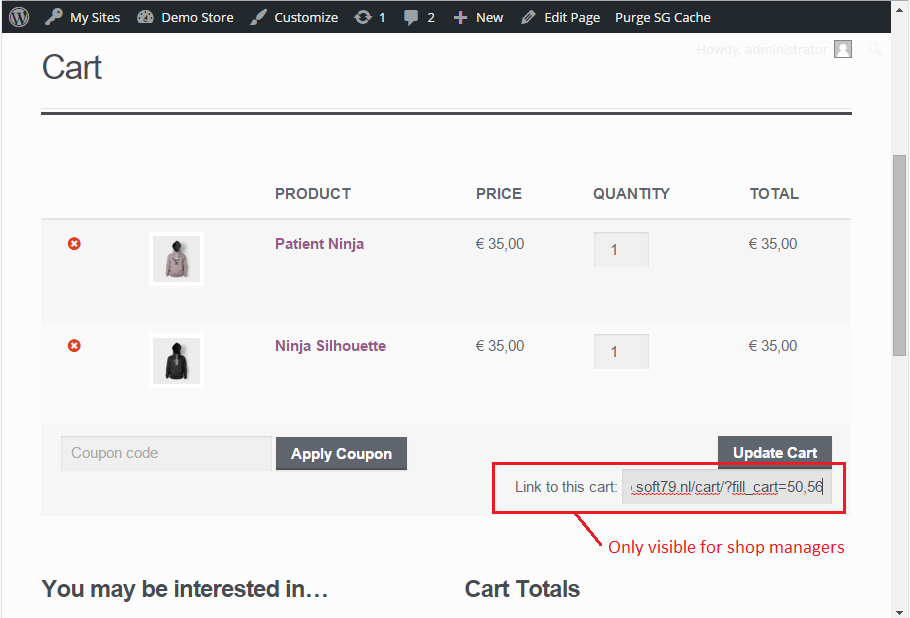
Shop manager can easily copy a cart link after populating a cart
Changelog
1.1.4
- FIX: Deprecation warning
- Added russian translation. Thank you Artem!
1.1.3
- FEATURE: Use ?set_cart= instead of ?fill_cart= to replace the cart contents (empty cart before adding the items)
1.1.2
- FIX: Fatal error
1.1.0
- FIX: WooCommerce 3.0 compatibility
1.0.1
- FIX: Possible fatal error. (get_plugin_data is only available on admin)
1.0.0
- FIX: jQuery dependency
0.1.2
- FIX: redirection to wrong url when home_url contained a subdirectory
0.1.1
- First public release