

Softech Addons for Elementor
Adds custom Elementor widgets like Loop Grid/Slider and Image Accordion to enhance your design flexibility.
Plugin info
Maintenance & Compatibility
Maintenance score
Maintained • Last updated 133 days ago
Is Softech Addons for Elementor abandoned?
Likely maintained (last update 133 days ago).
Compatibility
Similar & Alternatives
Explore plugins with similar tags, and compare key metrics like downloads, ratings, updates, support, and WP/PHP compatibility.
Description
Softech Addons for Elementor enhances the Elementor experience with a set of advanced widgets and UI utilities. Whether you’re building complex layouts using Loop Grid/Slider, Image Accordion, and more—this plugin makes it all possible.
Free Widgets:
- Loop Grid Slider
- Testimonial Slider
- Before After Slider
- Blob Shapes
- Flip Card
- Image Accordion
- Number Box
- Dual Color Heading
- PDF Viewer
How to Use Elementor Template Kit In Our Widgets
You can use templates in the Loop Grid Slider widget and Testimonial widget. When a template layout is selected, the Edit Template button becomes available in the widget options. If you need to edit the template, click the button to quickly navigate to the template inside the Template Library.
Pro Version
Want more powerful widgets and premium templates?
Get Softech Addons for Elementor Pro for exclusive features and advanced design tools.
Pro Widgets:
- Site Logo
- Post Info
- Post Comments
- Call To Action
- Image Shapes
- Popup Widget
- Progress Bars
Widgets short Description:
1. Loop Grid Slider
Loop Grid Slider – A powerful and free Elementor grid slider widget. This widget can be used to showcase posts, products, portfolios, testimonials, or any custom content in a continuous loop layout. Supports multiple styles including carousel mode, multi-column layouts, card-style grids, responsive controls, autoplay, navigation arrows, and pagination options. Perfect for blog posts, listings, or dynamic content presentations with smooth transitions and full design flexibility.
2. Testimonial Slider
Testimonial Slider – A clean Elementor widget for displaying customer reviews in a slider format. Ideal for showcasing client feedback, star ratings, user photos, and detailed testimonials. Comes with text styling, avatar customization, autoplay options, loop mode, and elegant transitions. A perfect solution for trust-building sections on business, agency, or service-based websites.
3. Before After Slider
Before After Slider – An interactive Elementor image comparison widget. Allows users to drag a handle to compare two images side by side. Great for displaying transformations, edits, renovations, medical results, beauty treatments, restoration work, and more. Includes vertical/horizontal modes, label options, smooth animations, overlay styling, and full responsiveness.
4. Blob Shapes
Blob Shapes – A creative Elementor widget that generates organic, fluid-shaped blobs for modern website designs. Can be used as decorative elements, background highlights, image masks, or graphic accents in hero sections. Supports random shape generation, color controls, gradient backgrounds, SVG output, and full styling options to match your brand theme.
5. Flip Card
Flip Card – An interactive Elementor widget where the card flips on hover or click to reveal additional content. Ideal for service listings, team profiles, features, pricing boxes, or promotional content. Includes front/back design controls, flip directions, 3D animations, icons, images, and full typography customization.
6. Image Accordion
Image Accordion – A modern Elementor accordion made entirely of images. Expands smoothly on hover or click, revealing titles, descriptions, and call-to-action buttons. Perfect for galleries, category showcases, portfolios, headers, and storytelling layouts. Supports vertical/horizontal layouts, overlay colors, image effects, and advanced animation controls.
7. Number Box
Number Box – A simple and stylish Elementor widget for highlighting key numbers such as statistics, achievements, milestones, and business metrics. Includes icons, headings, number animations, description text, and customizable box layouts. Great for about pages, company highlights, service sections, and infographic-style displays.
8. Dual Color Heading
Dual Color Heading – An advanced heading widget for Elementor that lets you highlight specific words in a different color. Useful for hero titles, section headings, and marketing content. Includes typography controls, alignment options, gradient text, text backgrounds, and responsive design settings to enhance visual emphasis.
9. PDF Viewer
PDF Viewer – A convenient Elementor widget that displays PDF files directly on your webpage. Perfect for documents, menus, brochures, reports, forms, catalogs, or manuals. Supports zoom controls, scroll view, thumbnail navigation, and responsive adjustments. Eliminates the need for third-party PDF plugins or external viewer windows.
Credits
This plugin bundles the Swiper library (https://swiperjs.com/) licensed under the MIT license.
Support
If you find this plugin useful, consider supporting us via Softechure.
Installation
- Upload the plugin files to the
/wp-content/plugins/softech-addons-for-elementordirectory, or install it through the WordPress plugin screen directly. - Activate the plugin through the ‘Plugins’ menu in WordPress.
- Ensure Elementor is installed and activated.
- Navigate to Elementor Editor and explore the new widgets.
Frequently Asked Questions
You’re welcome to message us anytime using our Contact form.
No. Most widgets and features work with the free version of Elementor. However, for theme builder functionality, Elementor Pro is recommended.
Once activated, the new widgets (like Loop Grid slider, Testimonial Slider, Before After Slider, etc.) will appear in the Elementor Editor panel under a dedicated section called “SITS Widgets”.
We run tests to ensure the speed of the site is not affected when you activate our Elementor addons. We provide a way for you to deactivate those Elementor modules that you do not require for your site to avoid loading them unnecessarily on the pages.
YES! It will work with any theme where Elementor works.
Your existing Elementor elements & content will work with premium version. So you won’t lose your developed contents or any elementor elements.
Review feed
Screenshots

Admin
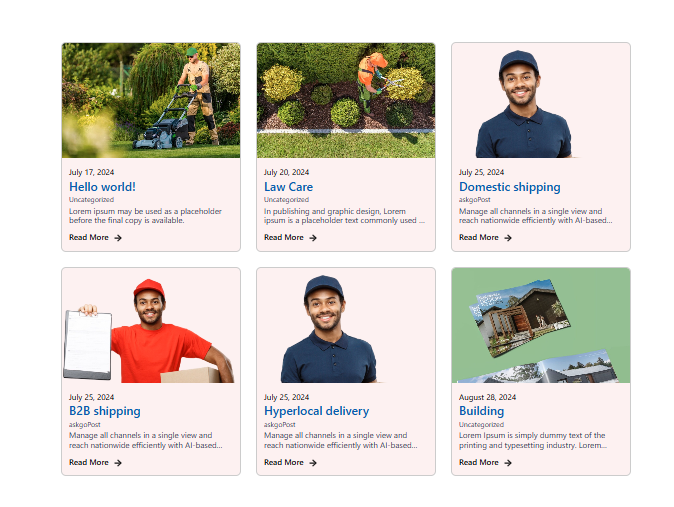
Loop Slider widget demo

Image Accordion widget

Testimonial
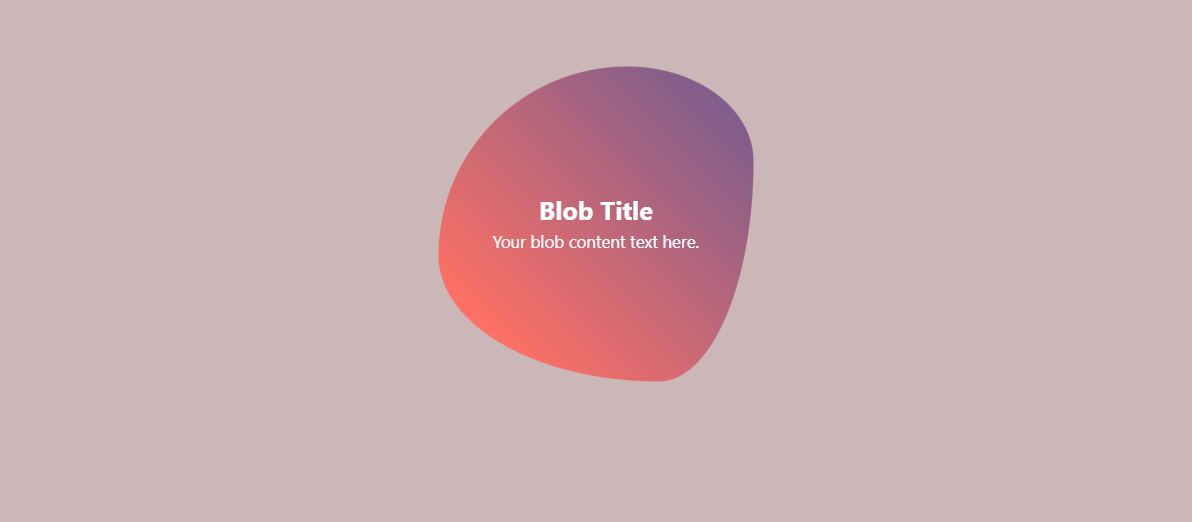
Blob Shapes

Before After Slider
Changelog
1.0.0
- Initial release
- Widgets: Before After Slider, Loop Grid slider, Image Accordion, Testimonial Slider, Blob Shapes, Number Box, Dual Color Heading, PDF Viewer, Flip card
1.0.1
- Improvements: Bug Fixes, Compatibility upgraded