

Staatic – Static Site Generator
Staatic lets you create and deploy a streamlined static version of your WordPress site.
Plugin info
Maintenance & Compatibility
Maintenance score
Stale • Last updated 202 days ago • 19 reviews
Is Staatic – Static Site Generator abandoned?
Likely maintained (last update 202 days ago).
Compatibility
Similar & Alternatives
Explore plugins with similar tags, and compare key metrics like downloads, ratings, updates, support, and WP/PHP compatibility.
Description
Staatic lets you create and deploy a streamlined static version of your WordPress site, enhancing performance, SEO, and security simultaneously.
Features of Staatic include:
- Powerful Crawler to transform your WordPress site quickly.
- Supports multiple deployment methods, e.g. GitHub, Netlify, AWS (Amazon Web Services) S3 or S3-compatible providers + CloudFront integration, or even your local server (dedicated or shared hosting).
- Very flexible out of the box (allows for additional urls, paths, redirects, exclude rules, etc.).
- Supports HTTP (301, 302, 307, 308) redirects, custom “404 not found” page and other HTTP headers.
- CLI command to publish from the command line.
- Compatible with WordPress MultiSite installations.
- Compatible with WPML (multilingual) installations.
- Supports HTTP basic auth protected WordPress installations.
- Various integrations to improve compatibility with popular WordPress plugins.
Depending on the chosen deployment method, additional features may be available.
Staatic Premium
In order to support ongoing development of Staatic, please consider going Premium. In addition to helping the authors maintain Staatic, Staatic Premium adds additional functionality.
For more information visit Staatic.
Installation
Installing Staatic is simple!
Install from within WordPress
- Visit the plugins page within your WordPress Admin dashboard and select ‘Add New’;
- Search for ‘Staatic’;
- Activate ‘Staatic’ from your Plugins page;
- Go to ‘After activation’ below.
Install manually
- Upload the ‘staatic’ folder to the
/wp-content/plugins/directory; - Activate the ‘Staatic’ plugin through the ‘Plugins’ menu in WordPress;
- Go to ‘After activation’ below.
After activation
- Click on the ‘Staatic’ menu item on the left side navigation menu;
- On the settings page, provide the relevant Build & Deployment settings;
- Start publishing to your static site!
Frequently Asked Questions
Staatic transforms your dynamic WordPress site into a streamlined static site. Starting at the homepage or a designated URL, Staatic uses a web crawler to methodically navigate through every link, post, and page. As it moves through the site, dynamically generated content is captured and converted into static HTML files, while simultaneously fetching related assets like images and scripts.
By eliminating both WordPress and PHP from the delivery process, pages from your site are served instantly, bypassing the delay of on-the-fly generation. This guarantees the quickest possible load times and significantly reduces the time to first byte (TTFB), offering an unparalleled browsing experience for your visitors and enhancing your site’s SEO positioning.
Caching plugins boost site performance by storing data for quicker access, yet they don’t fully bypass WordPress, introducing some latency. Additionally, after every update, these plugins need cache prewarming to serve the first requests quickly. In contrast, static sites are always ‘warmed up’, ensuring consistently rapid load times.
Furthermore, with Staatic, you gain the flexibility to host your site on any platform of your choice. This means you could opt for an ultra-fast cloud provider or a robust content delivery network, further amplifying your site’s performance and ensuring optimal user experience.
No, it shouldn’t. However, if there is a difference in the static version of your site, it might be due to invalid HTML in your original WordPress site that couldn’t be accurately converted. In such instances, consider checking your HTML’s validity using services like the W3C Markup Validation Service.
By converting your site into static HTML pages, you substantially minimize the potential attack surface. This strengthens your website’s security and reduces the ongoing need to update WordPress, its plugins, and themes constantly. As a result, you can enjoy greater peace of mind, knowing your site is resilient to most threats.
Not entirely. When your site undergoes conversion to a static format, dynamic server-side functionalities become unavailable. As a result, plugins relying on these features – such as those processing forms or fetching external data – might not function immediately or might be unsupported altogether.
To accommodate such features, adjustments or alternatives may be necessary. Alternatively, you can opt for Staatic Premium, which seamlessly integrates some of these functionalities. For detailed insights, visit staatic.com.
Staatic offers broad compatibility, only requiring the permissions to write to the working directory and to initiate an HTTP connection with your dynamic WordPress installation.
If you have any questions or issues, please have a look at our documentation and FAQ first.
If you cannot find an answer there, feel free to open a topic on our Support Forums.
Want to get in touch directly? Please feel free to contact us. We will get back to you as soon as possible.
Review feed
A powerful plugin
Highly Recommended, Works flawlessly
Fast publish with great support
Screenshots
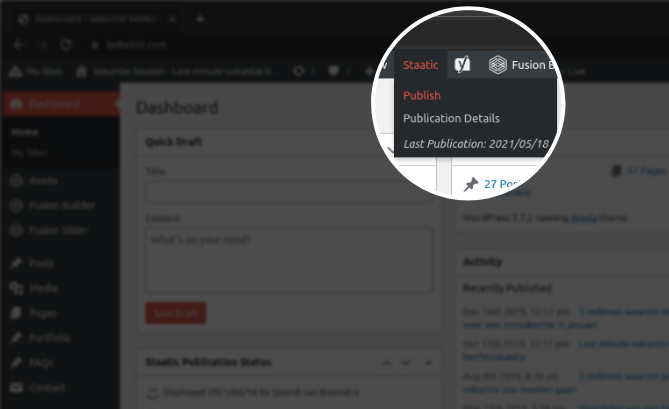
Use your WordPress installation as a private staging environment and make all of the modifications you need. Then publish these changes to your highly optimized and consumer facing static site with the click of a button.
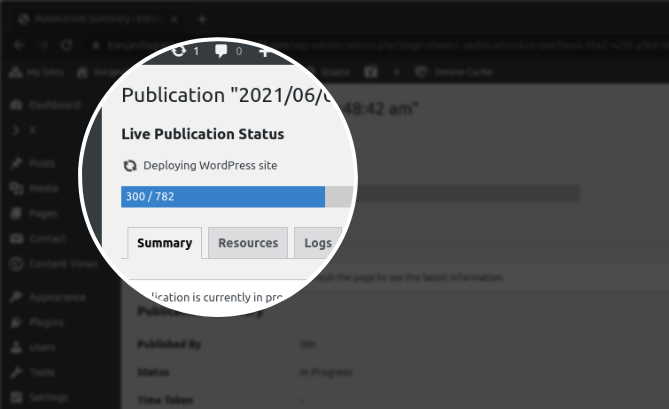
Monitor the status of your publications while they happen and review details of past publications to easily troubleshoot any issues.
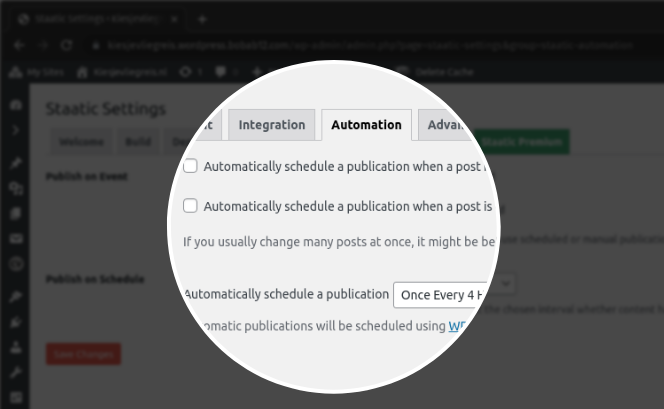
Configure and fine tune the way Staatic processes your site to suit your specific needs.
Changelog
1.12.0
Release date: September 12th, 2025.
Features
- Adds
staatic_should_transform_urlfilter for independent URL transformation control.
Bug Fixes
- Fixes SVG data URL fragment references being incorrectly extracted.
- Fixes Html5DomParser compatibility with extended URL context.
- Fixes URL extraction overlap bug when extended URL context is enabled.
- Fixes malformed URL rewriting when extended context captures partial protocols.
1.11.4
Release date: August 14th, 2025.
Improvements
- Updates external dependencies.
Bug Fixes
- Fixes an issue causing Safe Redirect Manager integration to not be activated.
1.11.3
Release date: June 10th, 2025.
Improvements
- Improves default URL exclusion rules for query parameters.
- Updates external dependencies.
Bug Fixes
- Fixes a warning on recent WordPress versions caused by translations being loaded too early.
1.11.2
Release date: April 3rd, 2025.
Bug Fixes
1.11.1
Release date: March 25th, 2025.
Bug Fixes
1.11.0
Release date: March 24th, 2025.
Improvements
- Updates external dependencies.
Fixes
- Canonicalized URLs with empty paths to ensure consistent behaviour.
Earlier releases
For the changelog of earlier releases, please refer to the changelog on staatic.com.