
Status Widget Restorer for WooCommerce
Restores/enables the classic WooCommerce Status widget on the WordPress Dashboard. It'd be helpful if a theme or plugin doesn't hide it.
Plugin info
Maintenance & Compatibility
Maintenance score
Maintained • Last updated 120 days ago
Is Status Widget Restorer for WooCommerce abandoned?
Likely maintained (last update 120 days ago).
Compatibility
Similar & Alternatives
Explore plugins with similar tags, and compare key metrics like downloads, ratings, updates, support, and WP/PHP compatibility.
Description
Sometimes, after installing and configuring the WooCommerce plugin, the WooCommerce Status (a.k.a. WooCommerce Overview) widget may not appear on your Dashboard Home screen — or it may suddenly disappear without any option to re-enable it.
Status Widget Restorer for WooCommerce is a lightweight and easy-to-use plugin that solves this issue instantly. It restores the missing WooCommerce Status widget and ensures it appears correctly on your dashboard after setup.
Features:
- Multiple restoration methods to ensure compatibility
- Intelligent WooCommerce setup completion detection
- Debug mode for troubleshooting (when WP_DEBUG is enabled)
- Automatic Screen Options management
- Permission-aware (respects user capabilities)
- Fallback custom widget creation
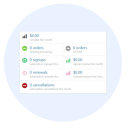
What the widget shows:
- Net sales this month
- Orders awaiting processing
- Orders on hold
- Subscription signups and renewals
- Subscription cancellations
- Revenue metrics
Why you might need this:
- Theme customizations that hide dashboard widgets
- Plugin conflicts that remove the widget
- WooCommerce setup issues
- Screen Options accidentally hiding the widget
Our WooCommerce Plugins
-
Variation Selector for WooCommerce: Variation Selector for WooCommerce replaces the default WooCommerce variation dropdowns with clean, user-friendly input types, beautiful radio buttons, checkboxes, and button selectors that improve the shopping experience and increase conversions.
-
Products Bundle for WooCommerce: Products Bundle for WooCommerce allows you to create bundle products where multiple items are sold together at a fixed price. The plugin automatically handles cart management, pricing, and checkout integration – making it perfect for payment gateway integrations.
Installation
Install directly from WP repository
- Go to your WordPress Dashboard.
- Log in to your site and navigate to Plugins Add New.
- Search for the Plugin. In the search bar, type “Status Widget Restorer for WooCommerce.”
- Once it appears in the search results, click Install Now.
- After installation, click Activate to enable it on your site.
That’s it!
The WooCommerce Status (Overview) widget should now reappear on your Dashboard Home screen automatically.
Manual Installation
- Upload the plugin files to
/wp-content/plugins/status widget restorer for woocommerce/directory - Activate Status Widget Restorer for WooCommerce through the ‘Plugins’ screen in WordPress
- Go to Dashboard Home and check Screen Options to ensure “WooCommerce Status” is enabled
Frequently Asked Questions
- Complete WooCommerce Setup: Ensure the WooCommerce setup wizard is completed
- Check Screen Options: Go to Dashboard Screen Options and ensure “WooCommerce Status” is checked
- User Permissions: Make sure your user has
manage_woocommerceormanage_optionscapability - Enable Debug Mode: Add
define('WP_DEBUG', true);to wp-config.php to see diagnostic information
- Plugin Conflicts: Temporarily deactivate other plugins to test for conflicts
- Theme Issues: Switch to a default WordPress theme to test
- WooCommerce Admin: Ensure the WooCommerce Admin plugin is active
- Re-run Setup: Try completing the WooCommerce setup wizard again
Review feed
Screenshots
Changelog
1.0.1
- Improved compatibility with the latest version of WooCommerce
- Updated to ensure full compatibility with WordPress 6.9
1.0.0
- Initial release
- Multiple widget restoration methods
- Setup completion detection
- Debug mode support
- Screen options management
- Proper plugin structure with includes, assets, and languages folders
- WooCommerce dependency management
- Unique plugin naming conventions to prevent conflicts