

Subpage as Expandable Text Shortcode
Add [subpages_expand] to any parent page. All child pages' titles are shown as links that expand to content when clicked
Plugin info
Maintenance & Compatibility
Maintenance score
Possibly abandoned • Last updated 375 days ago • 2 reviews
Is Subpage as Expandable Text Shortcode abandoned?
Possibly abandoned (last update 375 days ago).
Compatibility
Similar & Alternatives
Explore plugins with similar tags, and compare key metrics like downloads, ratings, updates, support, and WP/PHP compatibility.
Description
Intended users: editors, authors, contributors
This plugin will allow you to display the content of subpages as expandable links.
Simply add [subpages_expand] to any parent page. The titles of each of the subpages will be displayed there as clickable links. When the user clicks the link, it will expand, displaying the content of that child page.
Clicking the title again will collapse the content.
Acknowledgements
Plugin Icon (CC BY 3.0) by DinosoftLabs
Installation
If you have a single file (ending in “.zip”), then use the Upload method. If you have multiple files, use the Files method. If you’re installing from WordPress directly, just hit the big ‘Install Plugin’ button.
Upload
- From the plugins, add new screen, choose upload
- Navigate to where the .zip file is located and select it
- Make sure to activate the plugin once it is installed
Files
- Upload the entire directory (not just the files) to the
/wp-content/plugins/directory - Activate the plugin through the ‘Plugins’ menu in WordPress
Planned Enhancements
In no particular order
- Option to display arrows next to titles to show if they are expanded or not (option to pick arrow type)
- Option to display child page titles as links (will still expand when clicked)
- Option to lazy-load subpages when clicked
- Potentially move away from jQuery for performance
Frequently Asked Questions
A. No, only on pages
A1. Make sure you spelled it correctly
A2. Make sure you added the shortcode to a page, not a post.
A3. Make sure your page has sub-pages.
A4. Verify that your parent page and all child pages are published (not draft or pending)
A. You have an HTML error in one of your pages. If you have mismatched div tags, the child pages after that can get “trapped” in the first child’s content.
A. This error usually occurs when you try to have this shortcode on a child page.
You cannot nest this shortcode (i.e., have it on a parent page and one of the child pages).
A. The time it takes for the page to display is the time it takes for all of the subpages’ content to
load. If you have subpages with lots of content (or javascript that loads in content), it will take time for
WordPress to load that page.
Review feed
Screenshots
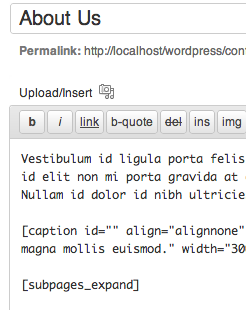
Shortcode in parent post

Public view showing each subpage's title with one expanded
Changelog
1.20 Verified it works on WP 6.7.2; fixed embarrassing typo
1.19 Verified it works on WP 5.4.2
1.17 Verified it works on WP 4.8.0. Code cleanup.
1.15 Verified it works on WP 4.6.1
1.13 Added support for WP 4.5
1.11 Button only appears on page editor now (shortcode doesn’t work on posts, so there’s no reason to show it there) – tested up to 4.3
1.10 Added button to page editor * Added l10n support to button
1.09a Not all child page links were displaying. Added additional FAQs that came up.
1.09 Fixed “Undefined variable: content” bug; cleaned up code
1.07 Fixed bug where shortcodes in the child pages weren’t rendering
1.05a Corrected spelling/grammar errors in documentation (no functionality change)
1.05 Fixed issue with missing subpages
1.03 Expanded readme with information about an issue; added screenshots to zip
1.01 Released with a debug fix, some formatting for the titles and code cleanup
0.90 CSS change to title cursor
0.70 Initial