

Tagged Gallery
Tagged Gallery enables you to easily generate a gallery in any post or page based on tagged media.
Plugin info
Maintenance & Compatibility
Maintenance score
Possibly abandoned • Last updated 4678 days ago
Is Tagged Gallery abandoned?
Possibly abandoned (last update 4678 days ago).
Compatibility
Similar & Alternatives
Explore plugins with similar tags, and compare key metrics like downloads, ratings, updates, support, and WP/PHP compatibility.
Description
Tagged Gallery enables you to easily generate a gallery in any post or page based on tagged media.
Useage
- Tag a image in your media library. For this example we use ‘Spring2013’
- Make a page or a blogpost where you want to display your images and tag that post/page with ‘tg:Spring2013’ and Tagged Gallery will create an image gallery of alle the images tagged with ‘Spring2013’
- Remeber to set thumb size in admin interface 🙂
Dependency
- [Tag Pages] (https://wordpress.org/extend/plugins/tag-pages/ “Tag Pages”) by Bjorn Wijers
- [WordPress Media Tags] (http://www.typomedia.org/wordpress/plugins/wordpress-media-tags/ “WordPress Media Tags”) by Typomedia Foundation
Tagged Gallery does NOT connect to any external servers. Just getting tags and images from your WordPress database
Demo
Click here for a [demo] (http://www.bergh.me/bilder/ “demo”)
0.7
- PHPImagic is completely replaced with jQuery
- New view image feature created in jQuery. That now fit to screen.
- Support for mobile screen rotation. Image resizes to fit window resize
Initial upload
Todo
- Next/previous function
- user defined CSS
- Lose pendency to Tag Pages and WordPress Media Tags
Version Log
0.7
- PHPImagic is completely replaced with jQuery
- New view image feature created in jQuery. That now fit to screen.
- Support for mobile screen rotation. Image resizes to fit window resize
0.6.1
Bugfix – in 0.6 i added the jQuery and forgot to add the values from Tagged Gallery settings.
0.6
Thumbs are now generated by jQuery and not phpimagick
0.5
Installation
Easiest installation
- In wordpress admin go to Plugins -> Add plugin
- Search for “tagged gallery” and add
- Set thumb size in Tagged Gallery settings
Alternative installation
- Upload the
tagged-galleryfolder to the/wp-content/plugins/directory - Activate the plugin through the ‘Plugins’ menu in WordPress
- Set thumb size in Tagged Gallery settings
Frequently Asked Questions
Does Tagged Gallery use WordPress thumbs or does it make its own?
Tagged Gallery make its own thumbs.
Does Tagged Gallery support Lightbox or jQuery-plugins like that?
Tagged Gallery har its own lightbox feature called tgbox.
Review feed
Screenshots

This is the thumbs in a gallery

In the admin interface you can define the size of your thumbs
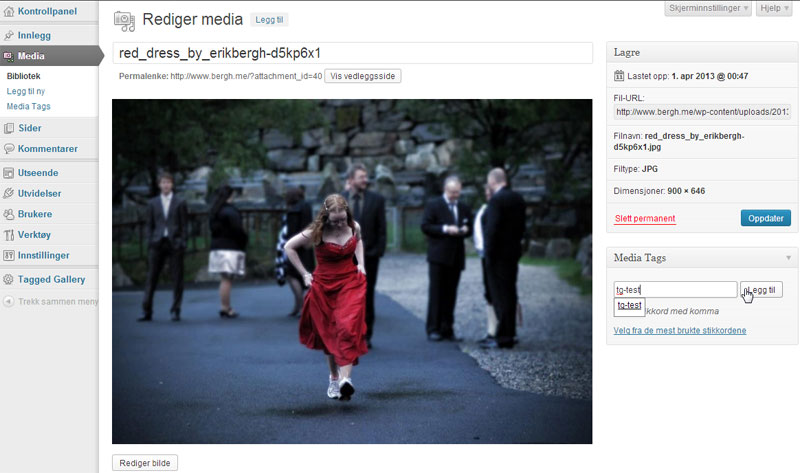
Tagging an image 'tg-test'

Tagging a page 'tg:tg-test' to generate a gallery of pictures tagged 'tg-test'

If you click on an image it will open like this