

TalkHours Widget
Adds online appointment booking to your Wordpress site ... for FREE !
Plugin info
Maintenance & Compatibility
Maintenance score
Possibly abandoned • Last updated 3559 days ago
Is TalkHours Widget abandoned?
Possibly abandoned (last update 3559 days ago).
Compatibility
Similar & Alternatives
Explore plugins with similar tags, and compare key metrics like downloads, ratings, updates, support, and WP/PHP compatibility.
Description
Add online booking to your WordPress © site … for FREE !
Want to connect with your visitors? TalkHours is a tool that gives you the power to add online booking to your WordPress © site. Sign-up and installation takes less than 5 minutes and the service is FREE ! TalkHours adds an elegant intuitive card or button that displays your schedule onto your site making it easy for clients to book your time.
Businesses love TalkHours. It is currently used by lawyers, accountants, financial planners and scores of other service professionals. Adding TalkHours helps businesses:
-
Convert more customers
Testing has shown the TalkHours button increased site conversion rates from 1% to 5% over just having a phone number on your site. For sites with a marketing budget this can be the difference between $500 per lead versus $100
-
Save time and money
People and businesses that don’t employ a receptionist spend time scheduling and coordinating with customers that they could use being productive. Big firms hire pricey phone banks to do this. By contrast TalkHours is free and takes less than a minute to set up
Features
* Syncs with Google Calendar
* Modal popup that doesn’t interfere with your site’s branding
* Automatic time-zone detection
* Schedule sharing via email, Facebook, and URL
* Optionally take credit card payments with TalkHours Pro
Installation
From your WordPress dashboard
- Sign up and set up your TalkHours account
- Visit ‘Plugins > Add New’ from your dashboard
- Search for ‘TalkHours’ and activate TalkHours from your Plugins page
- Visit ‘Appearance > Widgets’ from your dashboard
- Search for ‘TalkHours’ and set your Talkhours username in the configuration window
From your WordPress.org dashboard
- Sign up and set up your TalkHours account
- Download the TalkHours plugin
- Upload the ‘talkhours’ directory to your ‘/wp-content/plugins/’ directory, using your favorite method (ftp, sftp, scp, etc…)
- Activate TalkHours from your Plugins page
- Visit ‘Appearance > Widgets’ from your dashboard
- Search for ‘TalkHours’ and set your Talkhours username in the configuration window
Frequently Asked Questions
What is TalkHours?
TalkHours like having a online receptionist 24/7. It’s a tool people and businesses can use to:
- Manage their availability schedule
- Publish those schedules online for customers to book
- Coordinate communication and payment logistics
Free? What’s the catch?
No catch – our basic service is free. We just ask that you spread the love. We do charge for pro features like credit card billing, custom branding, and questionnaires.
To learn more about pro, click here
How do I manage my schedule?
- You set times of the day which you available to talk and then link you Google Calendar to TalkHours
- A TalkHours schedule is generated that makes booking your time a simple point-and-click activity.
- Scheduling conflicts are automatically detected and only available times are displayed.
- You share your TalkHours schedule by simply adding a few lines of code to your website, blog or email, or WordPress page
Review feed
Screenshots

Add online booking to your sidebar with the TalkHours Widget

Schedules display as modal dialogs that don't distract from your site's design

Clients simply pick a time and enter in their contact information
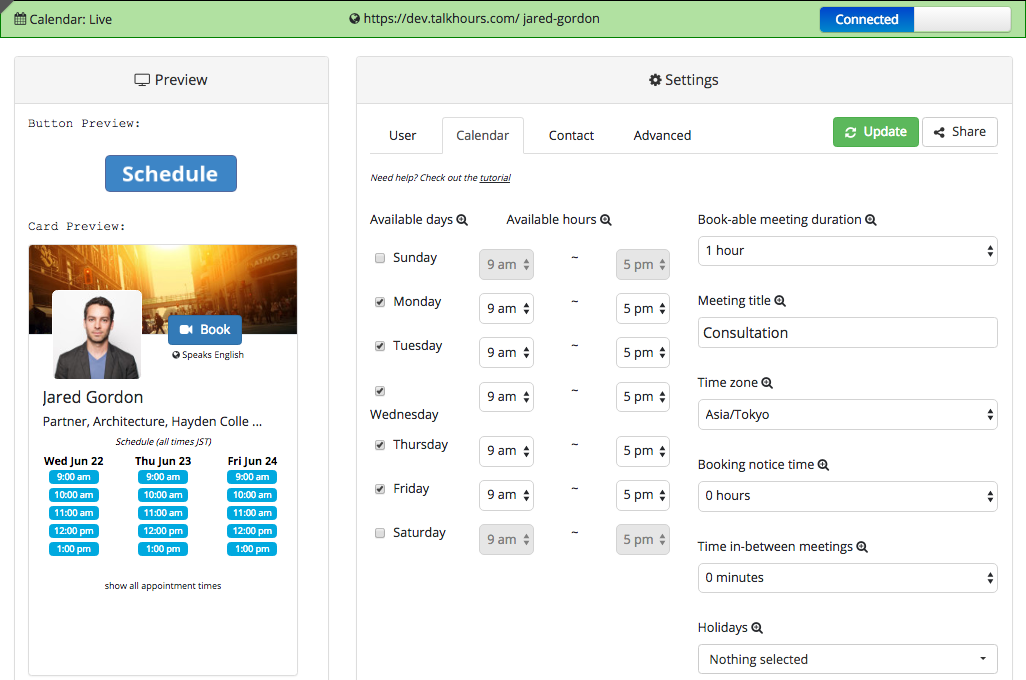
Signing up and setting up your availability is easy
Changelog
0.5
- Initial WordPress submission