

Thumblated Related Post
This plugin shows thumblated related posts. It allows you to design your own layout using simple and easy interface. Good for SEO and reducing bounce …
Plugin info
Maintenance & Compatibility
Maintenance score
Possibly abandoned • Last updated 5992 days ago
Is Thumblated Related Post abandoned?
Possibly abandoned (last update 5992 days ago).
Compatibility
Similar & Alternatives
Explore plugins with similar tags, and compare key metrics like downloads, ratings, updates, support, and WP/PHP compatibility.
Description
Thumblated Related Posts is a very simple plugin to use.. It shows related posts for the post user is reading. It also add the first picture in post as thumbnail beside the related post. This helps in increasing page views
It is good for internal link building and overall pagerank. It Lets you design the look of your related posts with thumbnails. It lets to write your own HTML and gives you access to some tags (link, title, image etc)
Installation
This section describes how to install the plugin and get it working.
- Upload all files contained in best-related-post.zip file to the
/wp-content/plugins/wp-thumblated-related-post/directory of your web server. - Activate the plugin through the ‘Plugins’ menu in WordPress
-
To add the related post list, usually you have to open the single.php of your current theme and add the PHP code:
<?php boposts_show(); ?>
or can use Post Layout plugin and add such line of code in the single post bottom.
Frequently Asked Questions
Do I have to create thumbnails for each post?
No, It takes first image of your post and displays it as thumbnail.
Review feed
Screenshots

Showing related posts to visitors.
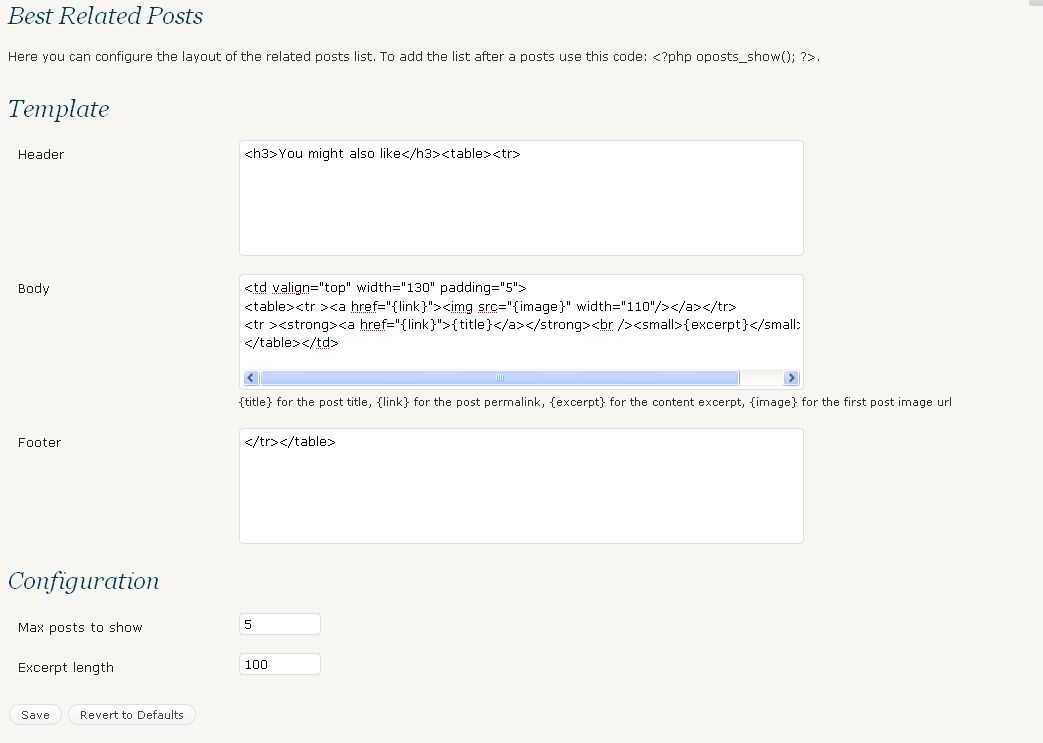
Plugin Options Page for Admin.