

Time Slot – Booking and Appointment Scheduling
Book appointments, organize your schedule, send notifications, and more. Keep booking simple for everyone with Time Slot.
Plugin info
Maintenance & Compatibility
Maintenance score
Maintained • Last updated 133 days ago • Support resolved 100% • 3 reviews
Is Time Slot – Booking and Appointment Scheduling abandoned?
Likely maintained (last update 133 days ago).
Compatibility
Developers
Languages
Similar & Alternatives
Explore plugins with similar tags, and compare key metrics like downloads, ratings, updates, support, and WP/PHP compatibility.
Description
Book appointments, organize your schedule, send notifications, and more. Keep booking simple for everyone with Time Slot.
Features
- Quick Setup – Use the guided setup to configure basic options and start booking right away
- Email – Send emails to customers and staff when appointments are booked or canceled
- Customize – Style your booking form to fit your brand and match the look and feel of your website
- Availability – Set business hours, breaks and holidays to block out dates and times on your booking form
- Coupons – Offer discounts or promotions as a percentage or flat rate with your own coupon codes
- Unlimited – Create an unlimited number of appointments, staff members, services, customers, and coupons
- Cut-Off Time – Set a minimum time that customers can book before each service
- Manage – Add, edit, cancel and delete appointments from the admin dashboard
- Staff – Manage employee contact info, services, and days off
- Customers – Manage customer contact info, with the option to export the list as a CSV
- Organize – Keep track of your appointments, payments, customers, services and staff in easy to use tables that can be exported as CSV files
- Buffer – Set a buffer time before each service
- Easy Display – Includes a Gutenberg block, Elementor widget and Beaver Builder module to easily display your booking form
- Shortcode – Use the
[timeslot-form]shortcode to display the booking form in Divi, WPBakery, Beaver Builder and more - iCal – Customer emails include an .ics file that can easily be imported into Microsoft Outlook, Apple Calendar and Google Calendar
- Languages – Translation ready, WPML and Polylang compatible, and fully available in English, Spanish, French, Dutch, German, Italian and Polish
Time Slot Pro Features
- Payments – Accept payments on your website with PayPal, Stripe or Mollie
- Google Calendar – Add, update and delete appointments in your Google Calendar or on your website with Google Calendar 2-way sync
- Custom Fields – Add fields to your booking form to gather extra client details before your appointments
- Import – Import customer contact info from a CSV file
- Reminders – Send reminder emails to customers on the day before an upcoming appointment
- Refunds – Issue refunds directly from your website
- Service Days Off – Configure your service days off to automatically block them on your booking form
Visit our website for more information about Time Slot Pro.
Organize appointments with a booking system for your business
Use Time Slot on your website to schedule all of your personal and professional appointments, including:
- Salons – Hair salons, barbershops, tattoo parlors, tanning salons
- Health & Fitness – Yoga classes, personal trainers, dance classes
- Professional – Consultants, lawyers, coaches, accountants, notaries
- Events – Photographers, caterers, wedding planners, musicians
- Home – Real estate agents, contractors, cleaning services, inspectors
- Repairs – Automotive technicians, plumbers, roofers
- Education – Private lessons, coaching, tutors, office hours
- Additional – Client meetings, club activities, much more
Documentation
For more information on first steps, check out the docs on our website.
- Get Started – Add your timezone, currency and company info
- Set Up Your Services – Add or edit unlimited services
- Set Up Your Staff – Add or edit unlimited staff members
- Customize Your Email – Add your subject and message
- More Guides – Add style, display your form and more
Installation
-
In your dashboard, go to the Plugins page and click the Add New button.
-
Search for Time Slot, and click the Install Now button in the plugin details box.
-
Click the Activate button, and you’re done!
Get Started Booking with Time Slot
Check out the guides on our website for detailed info on getting started.
Frequently Asked Questions
No! Time Slot was designed to be easy to use by everyone, so there’s no coding required.
Time Slot Pro includes all the features of Time Slot, plus advanced options like online payments, customer import, email reminders, Google Calendar sync, custom booking fields, and priority support and updates.
Simply add the shortcode [timeslot-form] to your content by pasting it into a text area. If you are using the block editor or Elementor builder, just add the Time Slot block or widget. Check out our docs for more info on how to get started.
Unfortunately not. This includes a booking form in the main page area and another booking form in the footer, for example.
Yes! Check out our docs or submit a question to the support forum here. For direct email support, upgrade to Time Slot Pro.
Review feed
The best (not enough known) booking plugin we found
Screenshots

Time Slot appointment booking form

Add color and style to your booking form

Customize the subject and message of your emails

Add or edit your services easily
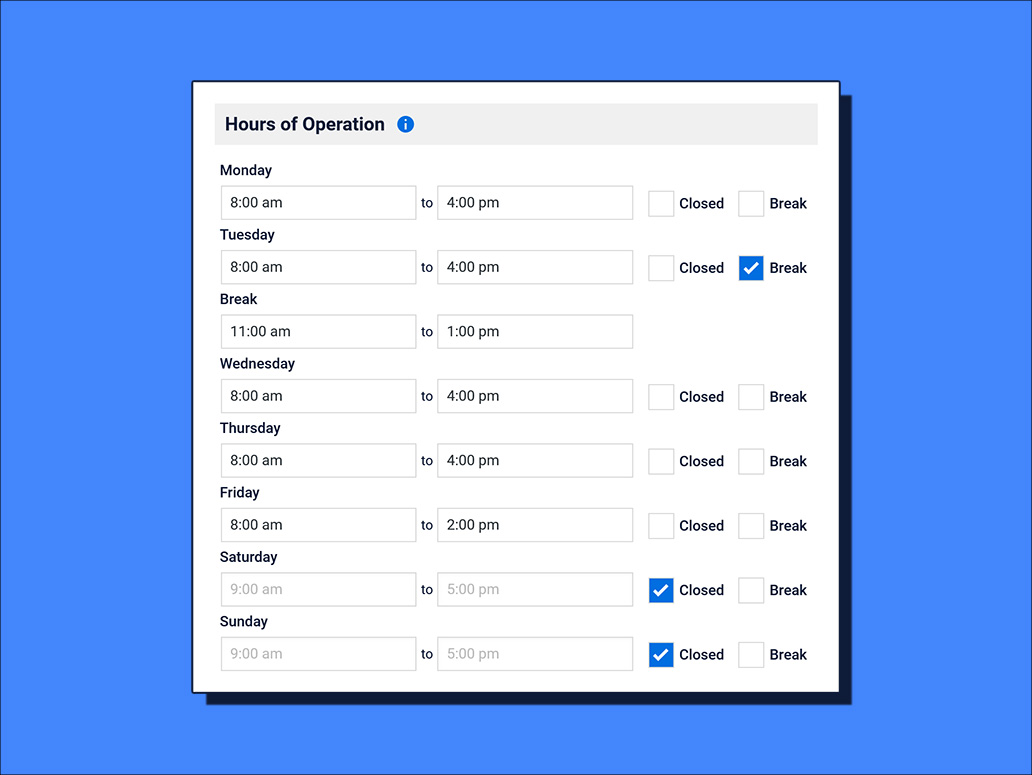
Set your business hours and add break times

Add or edit your staff members

Set your days off to occur one time or every year

Quickly add or edit an appointment
Changelog
Version: 1.4.8
Date: November 17, 2025
- Updated booking form email
- Added single service form option
Version: 1.4.7
Date: November 10, 2025
- Added setup wizard
- Updated appointment table
Version: 1.4.6
Date: October 13, 2025
- Added Select2 translations
- Updated DataTables
Version: 1.4.5
Date: September 22, 2025
- Organized general settings pages
- Updated database
- Updated time options on booking form
Version: 1.4.4
Date: August 12, 2025
- Updated time display on appointment table
- Fix for loading translations
Version: 1.4.3
Date: July 20, 2025
- Fix for any staff option on booking form
Version: 1.4.2
Date: June 19, 2025
- Added Pakistan rupee currency
Version: 1.4.1
Date: May 17, 2025
- Updated TinyMCE for email settings
Version: 1.4.0
Date: March 11, 2025
- Updated break hours
Version: 1.3.9
Date: December 15, 2024
- Validated break hours
Version: 1.3.8
Date: November 10, 2024
- Added Georgian lari currency
Version: 1.3.7
Date: October 6, 2024
- Escaped attributes on Elementor widget wrapper
Version: 1.3.6
Date: September 28, 2024
- Added booking form button text transform option
Version: 1.3.5
Date: July 22, 2024
- Updated date display on appointments data table
Version: 1.3.4
Date: July 19, 2024
- Updated date formats on the booking form and appointments data table
- Changed minimum supported php version to 8.0
Version: 1.3.3
Date: June 9, 2024
- Added i18n strings to admin placeholders
Version: 1.3.2
Date: May 9, 2024
- Improved time options for break hours on the booking form
Version: 1.3.0
Date: April 22, 2024
- Added Indian rupee currency
Version: 1.2.9
Date: March 31, 2024
- Updated to allow no staff
Version: 1.2.8
Date: January 28, 2024
- Updated rest route responses and permissions
Version: 1.2.7
Date: January 20, 2024
- Updated business hours rest route
- Added Moroccan dirham currency
- Improved zero staff error handling
Version: 1.2.6
Date: December 27, 2023
- Removed old version of jQuery Validate
- Updated i18n strings for breaks
Version: 1.2.5
Date: October 29, 2023
- Added break hours to business settings
- Updated business hour placeholder to use time format setting
Version: 1.2.4
Date: August 31, 2023
- Updated colors and urls
Version: 1.2.3
Date: August 9, 2023
Fix:
– Updated block to V3
Version: 1.2.2
Date: July 25, 2023
Fix:
– Required all php files
– Updated company address if null
– Added css for select background color
Version: 1.2.1
Date: July 2023
Feature:
– Added South African rand currency
Fix:
– Fixed staff days off i18n
– Updated staff database structure
– Updated modal window close settings
Version: 1.2.0
Date: June 23, 2023
Fix:
– Fixed script conflict
Version: 1.1.9
Date: June 20, 2023
Feature:
– Added Beaver Builder module
Fix:
– Updated table delete cascade
– Updated booking form style
Version: 1.1.8
Date: June 8, 2023
Fix:
– Updated email and ics
– Updated file structure
Version: 1.1.7
Date: May 18, 2023
Feature:
– Added multiple language compatibility
Version: 1.1.6
Date: April 21, 2023
Fix:
– Updated translation strings
Version: 1.1.5
Date: March 31, 2023
Fix:
– Updated jQuery DatePicker styles
Version: 1.1.4
Date: March 23, 2023
Features:
– Added autoloader
Fix:
– Added class to stop scripts from loading on frontend pages with no form
Version: 1.1.3
Date: March 11, 2023
Features:
– Added additional appearance settings
Version: 1.1.2
Date: February 17, 2023
Features:
– Updated email headers
Version: 1.1.1
Date: January 26, 2023
Features:
– Updated field validations
Version: 1.1.0
Date: December 15, 2022
Features:
– Added new data table class
Version: 1.0.8
Date: December 07, 2022
Fix:
– Updates to database structure
Version: 1.0.7
Date: November 30, 2022
Features:
– Internationalized currency
Version: 1.0.5
Date: November 11, 2022
Features:
– Internationalized dates
– Added success message for refunds
Version: 1.0.3
Date: October 28, 2022
Features:
– Improved tab navigation responsive styles
– Style updates for Gutenberg block preview
Version: 1.0.2
Date: October 20, 2022
Fix:
– Fixes a bug where date was becoming fully booked on frontend datepicker
Version: 1.0.1
Date: October 14, 2022
Features:
– Added translation support for JavaScript files
– Added Elementor booking form widget
Version: 1.0.0
Date: September 2022
Features:
– Launched Time Slot