

TZM Copyright Block
A simple block to display a copyright notice with a dynamically updated year.
Plugin info
Maintenance & Compatibility
Maintenance score
Maintained • Last updated 154 days ago
Is TZM Copyright Block abandoned?
Likely maintained (last update 154 days ago).
Compatibility
Similar & Alternatives
Explore plugins with similar tags, and compare key metrics like downloads, ratings, updates, support, and WP/PHP compatibility.
Description
The TZM Copyright Block is designed to streamline the display of copyright notices on websites. This block displays a copyright symbol with an automatically updated year, making it ideal for users who want a set-it-and-forget-it solution to keeping copyright information accurate and current.
You can customize the copyright display to fit your needs by:
- Adding prefixes and suffixes to personalize your copyright text
- Setting a year range to show start and end years (e.g., 2020–2024)
- Choosing between full-year or two-digit formats for a streamlined look
- Using the Block Editor’s built-in styling options to seamlessly match your site’s design
This plugin ensures that setting up your copyright information is quick, easy, and requires no coding knowledge. It dynamically displays the year, so there’s no need to manually update the date on each website every year — a convenient solution for both small individual sites and large-scale corporate websites.
Source Code
The source code for TZM Copyright Block is available on GitHub!
Follow the development, report issues, and get involved in improving the plugin. We welcome contributions, feedback, and feature requests from the community.
Installation
-
Upload the plugin files to the
/wp-content/plugins/tzm-copyright-blockdirectory, or install the plugin through the WordPress plugins screen directly. -
Activate the plugin through the ‘Plugins’ screen in WordPress
Frequently Asked Questions
Yes, TZM Copyright Block utilizes the Block Editor’s native styling options, allowing you to adjust font, color, alignment, and more to match your website’s look and feel.
No, TZM Copyright Block is specifically designed for the WordPress Block Editor (Gutenberg) and works like any other block. It is not compatible with classic themes that rely on the older Classic Editor.
Review feed
Screenshots
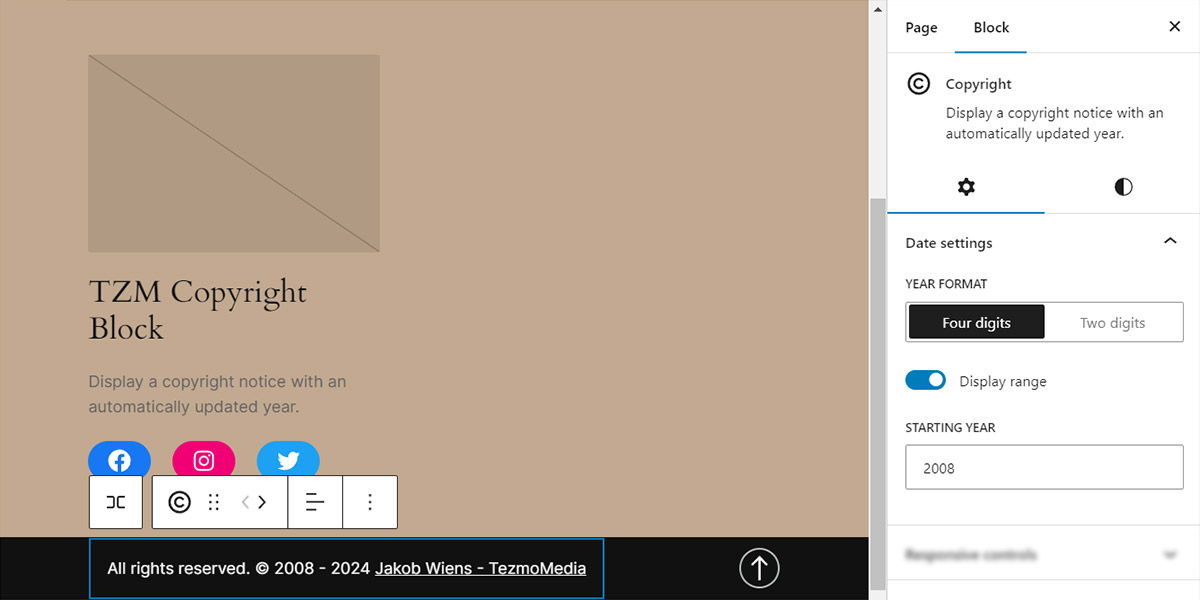
Quickly setup and customize your copyright notice using the native controls you’re familiar with.
Changelog
1.0.2
- Minor improvements
1.0.1
- Support WordPress 5.8
1.0.0
- Initial release 🙂