

User Access Expiration
A user's access to a site is disabled after a specified number of days. The admin can set the number of days since registration to deny access.
Plugin info
Maintenance & Compatibility
Maintenance score
Possibly abandoned • Last updated 4116 days ago • 1 reviews
Is User Access Expiration abandoned?
Possibly abandoned (last update 4116 days ago).
Compatibility
Similar & Alternatives
Explore plugins with similar tags, and compare key metrics like downloads, ratings, updates, support, and WP/PHP compatibility.
Description
Expires a user’s access to a site after a specified number of days. It uses the user registered date/time and an admin configured number of days to determine when to expire the users access. The administrator can restore a user’s access from the user’s profile page.
There is a filter available for developers to hook into and alter the expiration date of a specific user on the fly during authentication. The filter uae_expiration_date passes the current expiration date and the WP_User object.
Installation
Extract the zip file and just drop the contents in the wp-content/plugins/ directory of your WordPress installation and then activate the Plugin from Plugins page.
Frequently Asked Questions
Review feed
Screenshots
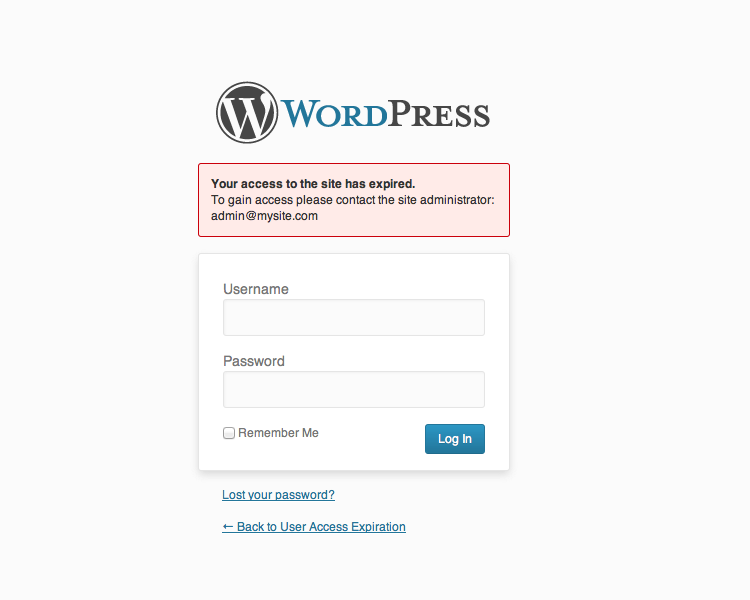
Access denied

Admin settings
Changelog
1.2
- Add a new filter to allow the expiration date to be changed for a specific user
1.1
- Compatible with 3.8
- Add support for WordPress language packs introduced in 3.7
- Add uninstall.php file to remove traces of the plugin once it has been deleted
1.0
- Display date registered on user’s profile page
- Bump minimum required version to 3.5
- Compatible with 3.7
0.4
- Exempt admins and super admins from expiration
0.3
- Fix log in issue
0.2
- Added expiration settings to Settings Menu
- Allow administrator to set number of days a user’s access should expire after
- Allow administrator to reset a user’s access from the user’s profile page
0.1
- First version