

User Activity Tracker
Track and monitor user activity effortlessly with User Activity Tracker. Stay informed about actions taken on your site.
Plugin info
Maintenance & Compatibility
Maintenance score
Stale • Last updated 294 days ago
Is User Activity Tracker abandoned?
Likely maintained (last update 294 days ago).
Compatibility
Languages
Similar & Alternatives
Explore plugins with similar tags, and compare key metrics like downloads, ratings, updates, support, and WP/PHP compatibility.
Description
User Activity Tracker is a lightweight and efficient WordPress plugin that allows you to track and log user activities on your site. Whether you need to monitor login attempts, content updates, or administrative changes, this plugin provides real-time tracking and reporting.
Features:
– Tracks user logins, post updates, and administrative actions.
– Displays recent user activity in an easy-to-read format.
– Secure and optimized for performance.
– Compatible with the latest version of WordPress.
Support
For support, visit the plugin support forum.
Credits
Developed by Hazrath Ali (https://github.com/Hazrath15).
Installation
- Upload the plugin folder to the
/wp-content/plugins/directory. - Activate the plugin through the ‘Plugins’ menu in WordPress.
- Configure the settings under Settings > User Activity Tracker.
Frequently Asked Questions
Go to Dashboard > User Activity to see the logged actions.
No, the plugin is optimized for minimal impact on performance.
Yes, logs can be exported as a CSV file from the settings page.
Review feed
Screenshots
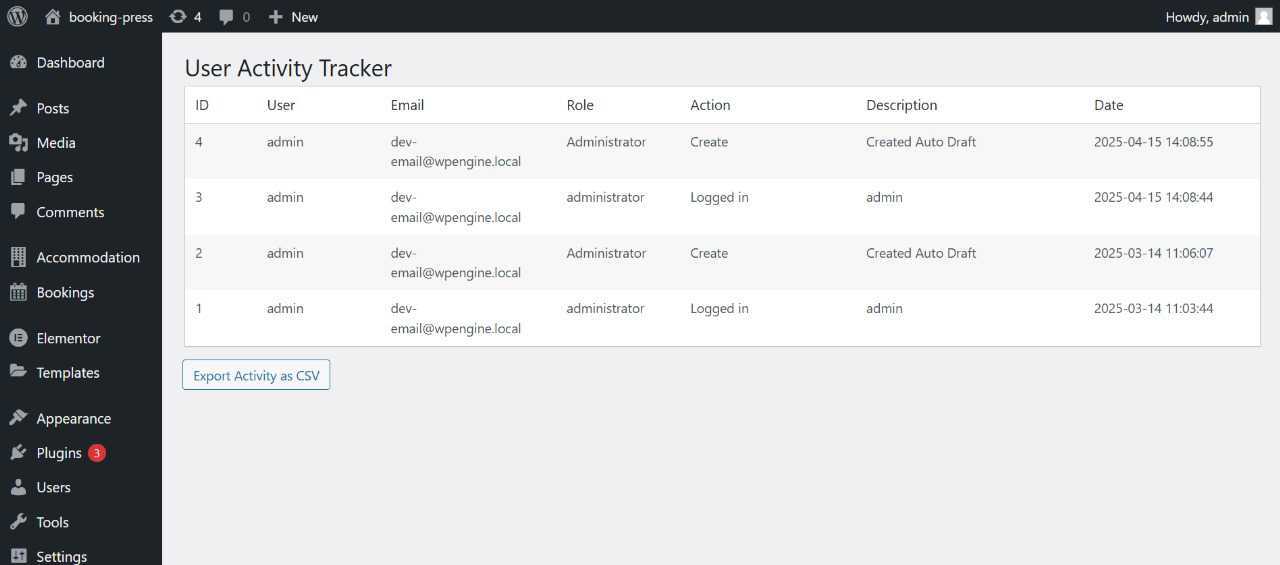
A screenshot of the activity log interface.

The plugin settings page.
Changelog
1.0.0
- Initial release.
- Added basic user activity tracking.
- Optimized database queries for better performance.