
Plugin info
Maintenance & Compatibility
Maintenance score
Maintained • Last updated 121 days ago • 21 reviews
Is Wider Admin Menu abandoned?
Likely maintained (last update 121 days ago).
Compatibility
Languages
Similar & Alternatives
Explore plugins with similar tags, and compare key metrics like downloads, ratings, updates, support, and WP/PHP compatibility.
Description
Wider Admin Menu is a standalone plugin built, maintained & operated by the friendly folks over at MachoThemes.
Wider Admin Menu is a lightweight plugin that lets you set the width of your admin menu from the default 160px up to 300px.
A separate stylesheet is also included if you wish to avoid Yet Another Plugin. See FAQ.
This plugin will leave no trace! If you delete the plugin, all settings will be removed from the database. Guaranteed. However, simply deactivating it will leave your settings in place, as expected.
Installation
Option A:
- Go to
Plugins > Add New. - Search for “wider admin menu”.
- Click “Install Now”.
Option B:
- Download the zip file.
- Unzip it on your hard drive.
- Upload the
wider-admin-menufolder to the/wp-content/plugins/directory.
Option C:
- Download the zip file.
- Upload the zip file via
Plugins > Add New > Upload.
Finally, activate the plugin.
By default, the plugin will set the width of the admin menu to 200px. Go to Settings > Wider Admin Menu to select a new width.
Frequently Asked Questions
Sure. That’s actually how this plugin started out. If you simply need a wider admin bar and you’re cool with CSS then try this:
Look in the plugin’s /css folder for the file wider-admin-menu.css.
Then either copy its contents to your theme’s stylesheet,
OR
copy the file to your theme folder and add this to your theme’s functions.php to load it:
function wider_admin_menu() {
  wp_enqueue_style( 'wider-admin-menu', get_stylesheet_directory_uri() . '/wider-admin-menu.css' );
}
add_action( 'admin_enqueue_scripts', 'wider_admin_menu' );
That covers WordPress 4.0 and up.
For WordPress 3.8 to 3.9.2, substitute wider-admin-menu-38.css.
For WordPress 3.5 to 3.7.1, substitute wider-admin-menu-35.css.
For WordPress 3.3 to 3.4.2, substitute wider-admin-menu-33.css.
Need a hand? I’m on the support forum.
Translate directly on wordpress.org. Thanks!
Some plugins and themes don’t fully uninstall everything they installed – things like settings, database tables, subdirectories. That bugs me. Sometimes, it bugs your WordPress too.
So this plugin will completely remove itself upon deletion. Deactivating the plugin will leave the settings intact, though. As an added bonus, you can switch off “Leave No Trace” so the settings remain after deletion, if you want.
Please report security bugs found in the source code of the Wider Admin Menu plugin through the Patchstack Vulnerability Disclosure Program. The Patchstack team will assist you with verification, CVE assignment, and notify the developers of this plugin.”
Review feed
Great helper
Should be default
Simple and it does help
Screenshots
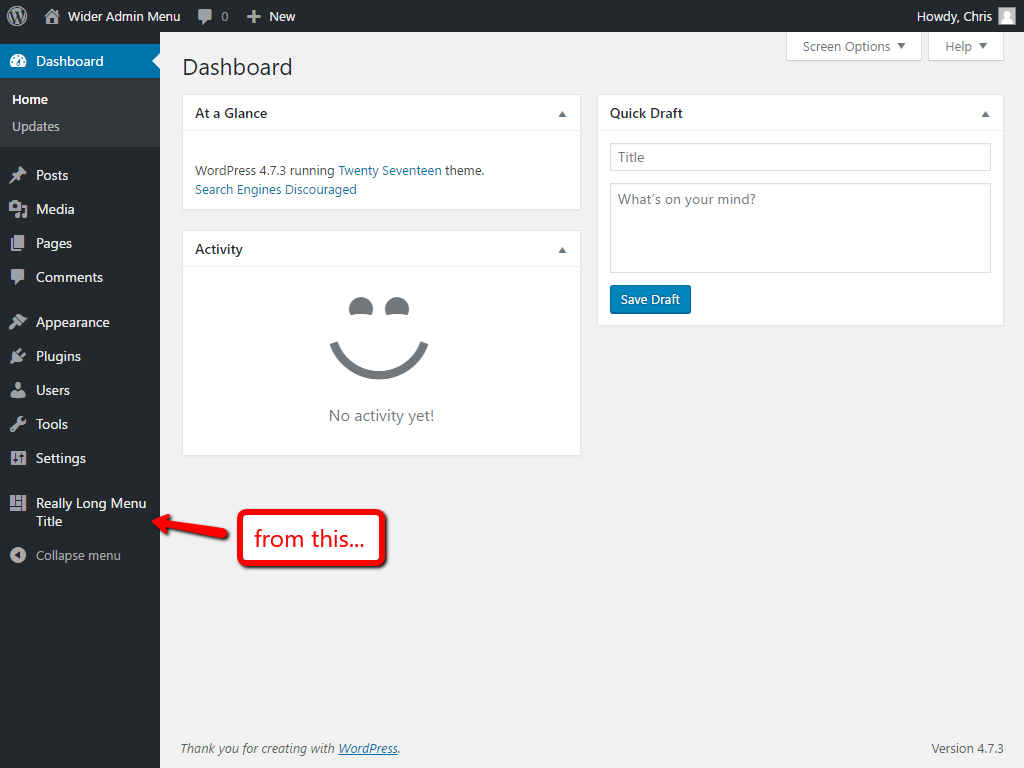
Before
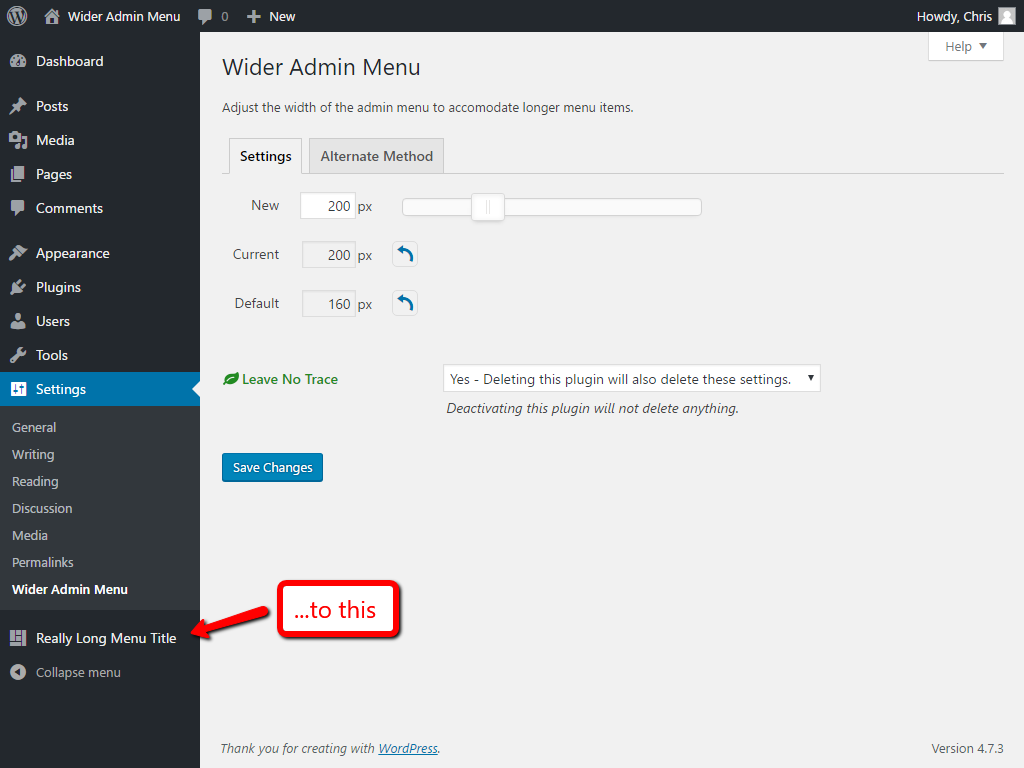
After
Changelog
1.4 – 2022-01-10
- Changed slider with jquery ui slide
- Removed extra script
- Removed extra style
- Added: Sanitization and escapes
1.3.2 – 2019-10-18
- Fix WP Side Menu going over Gutenberg/Editor
1.3.1 – 2019-09-12
- Translation ready
- Created pot file
1.3 – 2018-12-09
- Updated for WordPress version 5 and Gutenberg editor.
1.2.3 – 2017-11-16
- Minor refactoring.
- Removed translation file.
1.2.2 – 2017-09-04
- Update URLs.
1.2.1 – 2017-04-14
- Update URLs.
1.2 – 2016-06-24
- New “Leave No Trace” icon.
1.1.3 – 2016-04-29
- Add style for Query Monitor plugin.
1.1.2 – 2015-04-22
- Fix minor JavaScript bug on Settings page.
1.1.1
- Remove “RC” from version check.
- Add
uninstall.php.
1.1
- Updated for WordPress 4.0.
1.0
- Object-oriented refactor.
- Improved i18n, ready for translations.
0.3
- Use PHP
version_comparefunction. - Fix footer style for WordPress 3.5 to 3.7.1.
- Add “Alternate Method” instructions.
- Use WordPress coding standards.
0.2.3
- Updated for WordPress 3.8.2.
0.2.2
- Added empty
localizationdirectory.
0.2.1
- Version bump to trigger update message for anyone who downloaded my svn-fubar.
0.2
- Moved CSS from style.php to in-page section.
0.1
- First release.