

Free Shipping Per Product for WooCommerce
A simple way to set free shipping for certain products.
Maintenance 44/100207d since update
Active installs
3,000
Downloads
41,581
Reviews
33
Age
8.1y
Plugin info
Total downloads: 41,581
Active installs: 3,000
Total reviews: 33
Average rating: 4
Support threads opened: 0
Support threads resolved: 0 (0%)
Available in: 1 language(s)
Contributors: 4
Last updated: 9/8/2025 (207 days ago)
Added to WordPress: 3/12/2018 (8 years old)
Minimum WordPress version: 4.0
Tested up to WordPress version: 6.8.3
Minimum PHP version: 7.4
Maintenance & Compatibility
Maintenance score
Stale • Last updated 207 days ago • 33 reviews
44/100
Is Free Shipping Per Product for WooCommerce abandoned?
Likely maintained (last update 207 days ago).
Compatibility
Requires WordPress: 4.0
Tested up to: 6.8.3
Requires PHP: 7.4
Languages
Similar & Alternatives
Explore plugins with similar tags, and compare key metrics like downloads, ratings, updates, support, and WP/PHP compatibility.
Custom Payment Gateway for WooCommerce
Rating 4.3/5 (16 reviews) • Active installs 9,000
Australia Post WooCommerce Extension
Rating 4.4/5 (19 reviews) • Active installs 4,000
One Click Order Re-Order
Rating 4.3/5 (6 reviews) • Active installs 1,000
bpost shipping
Rating 3.6/5 (5 reviews) • Active installs 900
WooCommerce Stripe fee in Report
Rating 5.0/5 (4 reviews) • Active installs 300
Per Product Shipping for WooCommerce
Rating 2.3/5 (3 reviews) • Active installs 100
Description
The plugin acts as a regular WooCommerce shipping method. For setting up the plugin, please follow the instructions:
- Install and activate the plugin.
- Go to WooCommerce => Settings ⇒ Shipping ⇒ Shipping Zones.
- Assign Free Shipping Per Product to one or more of the shipping zones.
- At the method’s settings, you can choose if you want to hide other shipping methods at Checkout if the free shipping was available.
- To make a product eligible for free shipping, you can create a shipping class and name it free-shipping then, assign the class to any product you need.
Looking For More Flexibility?
Installation
Using The WordPress Dashboard
- Navigate to the ‘Add New’ in the plugins dashboard
- Search for ‘Free Shipping Per Product for WooCommerce’
- Click ‘Install Now’
- Activate the plugin on the Plugin dashboard
Uploading in WordPress Dashboard
- Navigate to the ‘Add New’ in the plugins dashboard
- Navigate to the ‘Upload’ area
- Select
free-shipping-per-product-for-woocommerce.zipfrom your computer - Click ‘Install Now’
- Activate the plugin in the Plugin dashboard
Using FTP
- Download
free-shipping-per-product-for-woocommerce.zip - Extract the
free-shipping-per-product-for-woocommercedirectory to your computer - Upload the
free-shipping-per-product-for-woocommercedirectory to the/wp-content/plugins/directory - Activate the plugin in the Plugin dashboard
Frequently Asked Questions
The plugin acts as a regular WooCommerce shipping method. For setting up the plugin, please follow the instructions:
- Install and activate the plugin.
- Go to WooCommerce ⇒ Settings ⇒ Shipping ⇒ Shipping Zones.
- Assign Free Shipping Per Product to one or more of the shipping zones.
- At the method’s settings, you can choose if you want to hide other shipping methods at Checkout if the free shipping was available.
- To make a product eligible for free shipping, you can create a shipping class and name it free-shipping then, assign the class to any product you need.
Review feed
titodevera
It works!
Works well for me, thanks :)
lfirth
Works well for my needs.
Just needed to offer free shipping on a single product but if it was bundled with products that required shipping the free shipping option needed to be removed and this plugin did just that. Very simple to use.
Screenshots
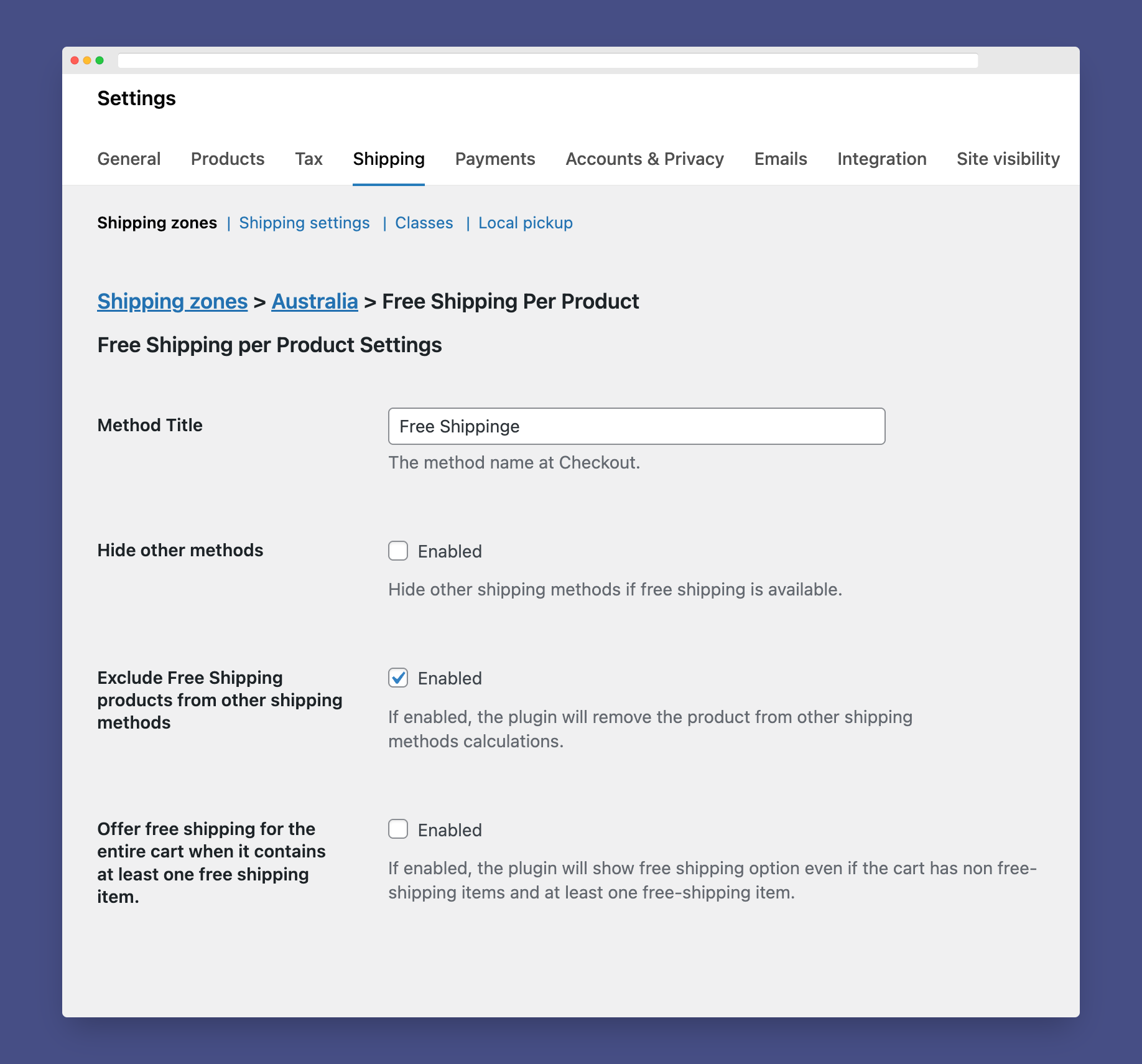
Settings Page.
Changelog
1.3.3
- Declaring WordPress 6.8 support.
- Declaring WooCommerce 10.1 support.
1.3.2
- Fixed: Offer free shipping for the entire cart when it contains at least one free shipping item.
1.3.1
- Fixed: detecting free-shipping class in shipping method availability.
1.3.0
- Added: Offer free shipping for the entire cart when it contains at least one free shipping item.
- Declaring WordPress 6.7 support.
- Declaring WooCommerce 9.4 support.
1.2.6
- Declaring WordPress 6.5 support.
- Declaring WooCommerce 9.1 support.
- Fixed: PHP 8.0+ deprecation notice.
1.2.5
- Declaring WordPress 6.4 support.
- Declaring WooCommerce 8.4 support.
- Declaring WooCommerce HPOS compatibility.
1.2.4
- Declaring WordPress 6.3 support.
- Declaring WooCommerce 8.0 support.
1.2.3
- declare WooCommerce 7.0 support.
1.2.2
- declare WordPress 6.0 support.
1.2.1
- declare WordPress 5.9 support.
1.2.0
- Added: Now, you can disable removing free shipping products from other shipping methods calculations
1.1.0
- The product will be also excluded from other shipping methods calculations.
1.0.0
- Initial release.