

WooCommerce Product Type Column
Displays a "product type" column (with icons) on the products admin screen in WooCommerce.
Plugin info
Maintenance & Compatibility
Maintenance score
Possibly abandoned • Last updated 2061 days ago • 1 reviews
Is WooCommerce Product Type Column abandoned?
Possibly abandoned (last update 2061 days ago).
Compatibility
Similar & Alternatives
Explore plugins with similar tags, and compare key metrics like downloads, ratings, updates, support, and WP/PHP compatibility.
Description
This plugin adds a “product type” column (with icons) on the products admin screen in WooCommerce which was removed in version 3.4.0 as a result of feedback in this post.
If you’d like the column back, simply install and activate this plugin and you’re set.
Requirements
- WooCommerce 3.4 or later.
- WordPress 4.7 or later.
- PHP 5.2 or later.
Installation
Automatic installation
Automatic installation is the easiest option as WordPress handles the file transfers itself and you don’t need to leave your web browser. To
do an automatic install of, log in to your WordPress dashboard, navigate to the Plugins menu and click Add New.
In the search field type “WooCommerce Product Type Column” and click Search Plugins. Once you’ve found our plugin you can view details about it such as the point release, rating and description. Most importantly of course, you can install it by simply clicking “Install Now”.
Manual installation
The manual installation method involves downloading our plugin and uploading it to your web server via your favorite FTP application. The WordPress codex contains instructions on how to do this here.
Frequently Asked Questions
Where can I get support or talk to other users?
If you get stuck, you can ask for help in the Plugin Forum.
Review feed
Useful plugin
Screenshots
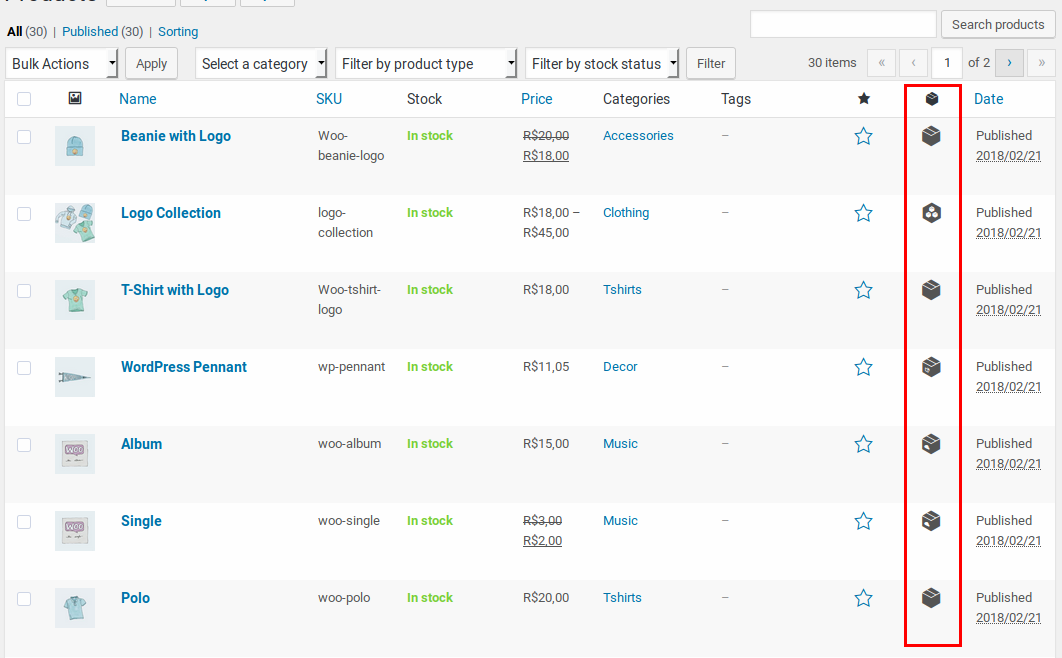
Example.
Changelog
1.0.0
- Initial release.