

Category Show
Shows all posts from a category/tag into a page/post with order support.
Plugin info
Maintenance & Compatibility
Maintenance score
Possibly abandoned • Last updated 5502 days ago • 1 reviews
Is Category Show abandoned?
Possibly abandoned (last update 5502 days ago).
Compatibility
Similar & Alternatives
Explore plugins with similar tags, and compare key metrics like downloads, ratings, updates, support, and WP/PHP compatibility.
Description
It’s an easy way to show and order all posts from category/tag into a page/post. Really handy for showing your tutorials, articles, etcetera.
It shows as a list(
- ) so it will apply your blog style-sheet as you wish.
Note: If the selected term(category or tag) has a description, it will be shown in a
tag.
To see it in action click here.
Usage:
-
Go to Category Show’s options page and generate the tag.
-
Insert your new tag into your post.
Tags to know:
If you want to apply some CSS, those are the tags you should know: ,
Output example:
Category
Category description, if exists
That’s it!
TODO
- Each topic content preview.
- Page support.
- A RSS edition of Category Show.
- Add widget support.
- Select user’s own category in options page. (DONE)
- Make it possible to get a date in front of each link.
- Create a definitely Category Show tag for the posts.
If you want to suggest some feature, please contact me here.
Changes
- 0.4.2: Date ordering bug fix.
- 0.4.1: Added support to show category description if exists. Now the tag generation uses term_id as the expression, not the tag slug anymore.
- 0.4: Now the user can generate his tag from the Category Show’s options page. No more writing your tag!
- 0.3.2: Deleted debug messages that was been printed on 0.3.1.
- 0.3.1: Fixed bug that the content was been all replaced by the list, not just the tag. Added Brazilian Portuguese translation.
- 0.3: Added support to change the ordering by title or date. Added options page to generate neat tags for the post. Even more optimized!
- 0.2.3: Fixing
- end tag bug. Updating readme.txt file nicely.
- 0.2.2: Adding screenshot showing how it works and adding pt_BR .mo translation file.
-
Installation
- Upload ‘wp-category-show’ directory to the ‘/wp-content/plugins/’ directory on your server
- Activate the plugin through the ‘Plugins’ menu in WordPress
- Go to Category Show’s options page and generate your tag
- Insert your new tag (something like ‘%%wpcs-category-slug%%’) into your post or page!
Frequently Asked Questions
Can I use it inside others HTML tag, such a table?
Yes. In version 0.3.1 was fixed a limitation that made impossible to do such a thing. So always use the latest version.
Can I use it more than one time per post?
Yes. Anytime you want. But remember that Category Show doesn’t have page support yet, it will be in its next versions.
When is going to have page support?
Page support is coming for 0.5.
Review feed
Screenshots
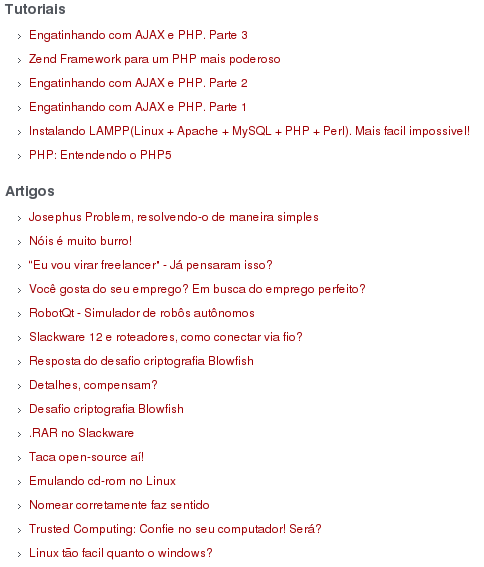
Plugin in action executing 2 times in the same post.
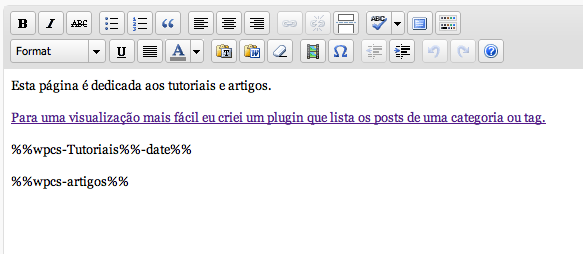
Listing 2 different categories in the same post. Screenshot-1 shows the post.

Category Show's options page.