Plugin info

Total downloads: 4,252
Active installs: 100
Total reviews: 6
Average rating: 5
Support threads opened: 0
Support threads resolved: 0 (0%)
Available in: 1 language(s)
Contributors: 3
Last updated: 9/21/2015 (3754 days ago)
Added to WordPress: 9/21/2015 (10 years old)
Minimum WordPress version: 4.3
Tested up to WordPress version: 4.3.34
Minimum PHP version: f

Maintenance & Compatibility

Maintenance score

Possibly abandoned • Last updated 3754 days ago • 6 reviews

22/100

Is WP Comment Humility abandoned?

Possibly abandoned (last update 3754 days ago).

Compatibility

Requires WordPress: 4.3
Tested up to: 4.3.34
Requires PHP: f

Similar & Alternatives

Explore plugins with similar tags, and compare key metrics like downloads, ratings, updates, support, and WP/PHP compatibility.

WP Downgrade | Specific Core Version
Rating 4.8/5 (167 reviews)Active installs 100,000
Advanced Automatic Updates
Rating 4.7/5 (61 reviews)Active installs 30,000
Disable All WordPress Updates
Rating 4.8/5 (68 reviews)Active installs 20,000
Core Rollback
Rating 4.6/5 (13 reviews)Active installs 10,000
Version Control for jQuery
Rating 4.9/5 (7 reviews)Active installs 6,000

Description

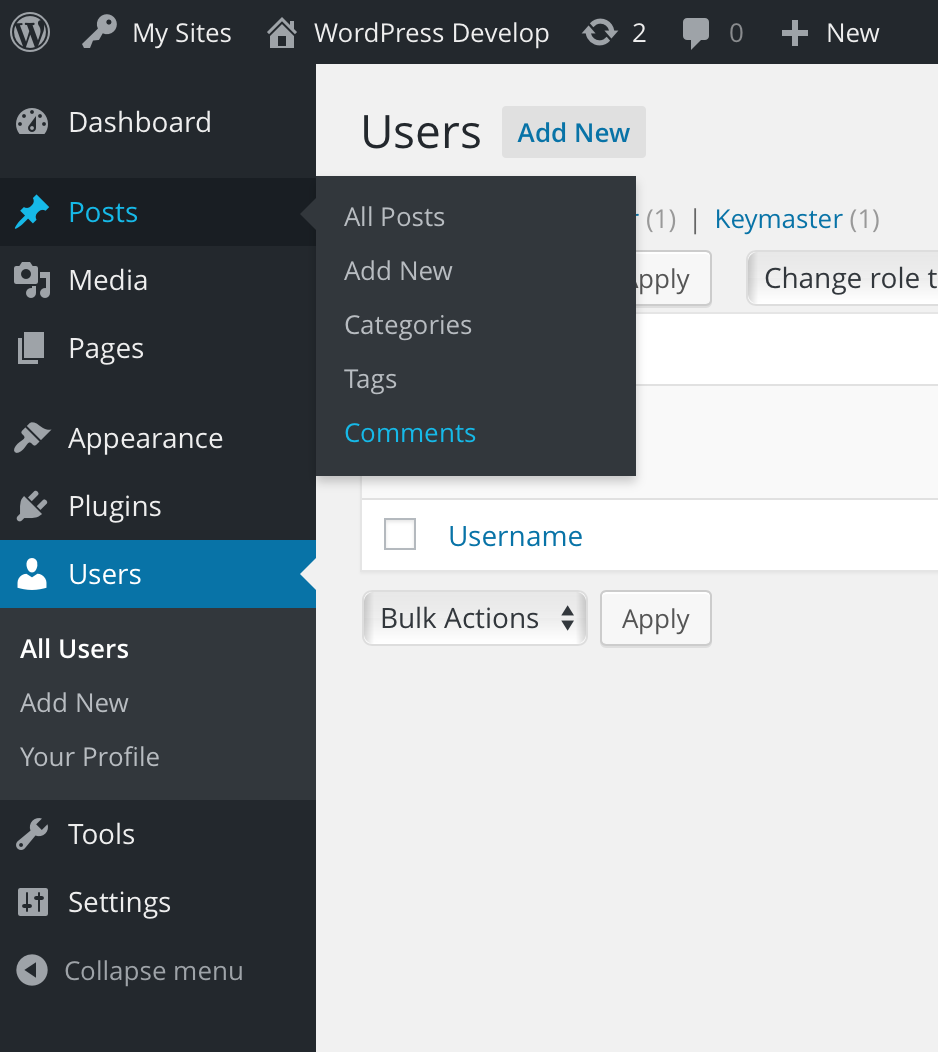
WP Comment Humility relocates the “Comments” top level menu underneath the “Posts” top level menu.

Because comments are off by default for Pages, this plugin puts comments where they make the most sense now.

Installation

  • Download and install using the built in WordPress plugin installer.
  • Activate in the “Plugins” area of your admin by clicking the “Activate” link.
  • No further setup or configuration is necessary.

Frequently Asked Questions

How does this work with custom post types?

Fine, but the user experience might be weird. If you have a post type (other than “post”) that supports comments, it may make more sense to not use this plugin.

Give it a try and deactivate it if it doesn’t seem right. This plugin is non-destructive, so you can toggle it without issue.

Where can I get support?

The WordPress support forums: https://wordpress.org/support/plugin/wp-comment-humility/

Where can I find documentation?

http://github.com/stuttter/wp-comment-humility/

Review feed

Japh
9/3/2016

Simple and brilliant

This never occurred to me before, but as soon as I saw the plugin I couldn't unsee it. Having "Comments" under "Posts" in the navigation of my personal site's admin just makes sense. I don't use custom post types that have comments.
Pieter Bos
9/3/2016

A good step to remove clutter from the Dashboard

I'm all for a clean WP Dashboard and since comments are finally exclusively for Posts (or at least by default disabled for Pages), it only makes sense to declutter the Dashboard and moving comments to where they belong. Thanks for developing WP Comment Humility! The only suggestion I have is to rename it as the word humility may make sense to native English speakers, it does much less to non-native English speaking people, the other 95% of the world population ;)
Steve Grunwell
9/3/2016

Nice UX enhancement

This plugin does exactly what's stated on the box, moving "Comments" under the "Posts" heading. @JJJ makes an excellent point regarding custom post types with comments enabled, but for standard WordPress installations this plugin's fantastic.
Tevya
5/18/2018

Should be in WP Core

I assume some people would freak if it got added in core! But it should be this way, then require a plugin to move it "back" out. Excellent plugin!
shawfactor
11/23/2020

Does what it says

Does exactly what is says, works well

Screenshots

  1. The menu

    The menu

Changelog

0.1.0

  • Initial release