

WP Event Map
Help to create events and show the events location on google map. All the events with their info can be listed with the use of a simple shortcode.
Plugin info
Maintenance & Compatibility
Maintenance score
Possibly abandoned • Last updated 3672 days ago
Is WP Event Map abandoned?
Possibly abandoned (last update 3672 days ago).
Compatibility
Similar & Alternatives
Explore plugins with similar tags, and compare key metrics like downloads, ratings, updates, support, and WP/PHP compatibility.
Description
Helps to create events and show the events location on google map. Use the given shortcode to show the location map with the location info in a list: [‘event-map-sc’] or
Features:
Events : You can create as many events as you want. Events will be a post type.
Map : Each of the events location will be shown in a single google map.
Map Icon : You can show your own custom map icon/pin for each of the events in a map.
Event Date : You can set event start date, event end date as well as time for each of the events.
Location Info : You just need to put latitude and longitude for each of the events location to show them in a map. You can also add additional details about the location.
Shortcode : Use the given shortcode to show the location map with their info in a list: ‘event-map-sc’. This will show all the events in a single map with their info such as start date, start time, end date, end time and location info in a list.
Event link : You can navigate to each of the events easily by clicking the event name from the list.
**Note: Al the timings will be shown according to the server’s time.
Installation
Using The WordPress Dashboard
- Navigate to the ‘Add New’ in the plugins dashboard
- Search for
wp-event-map - Click
Install Now - Activate the plugin on the Plugin dashboard
Uploading in WordPress Dashboard
- Navigate to the ‘Add New’ in the plugins dashboard
- Navigate to the ‘Upload’ area
- Select
wp-event-map.zipfrom your computer - Click ‘Install Now’
- Activate the plugin in the Plugin dashboard
Using FTP
- Download
wp-event-map.zip - Extract the
wp-event-mapdirectory to your computer - Upload the
wp-event-mapdirectory to the/wp-content/plugins/directory - Activate the plugin in the Plugin dashboard
Frequently Asked Questions
There is something cool you could add…
Nice, make a post on the Support Forum and let us know. We are always looking for ways to improve our plugins.
Review feed
Screenshots
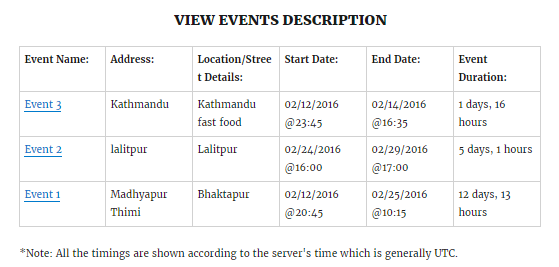
Events List.

Backend Fields.
Changelog
1.0.0
- Initial release