

WP Post Styling
Define custom styles for any post, page, or custom post type. Example: journal-style publications which want to create a unique design for articles.
Plugin info
Maintenance & Compatibility
Maintenance score
Possibly abandoned • Last updated 1356 days ago • 5 reviews
Is WP Post Styling abandoned?
Possibly abandoned (last update 1356 days ago).
Compatibility
Similar & Alternatives
Explore plugins with similar tags, and compare key metrics like downloads, ratings, updates, support, and WP/PHP compatibility.
Description
Adds a custom field to your post editing screens to add custom styles applied only on that page or post.
Attach custom styles to any page, post, or custom post type. Separate styles can be attached for print, screen, or mobile. You can also store your own library of frequently-used styles.
How to use the style library:
- Add the styles you want on your settings page.
- Navigate to an article which requires specific styles.
- Select the library style from the drop down, leaving the style textarea blank.
- Update or post the new document.
A newly-selected style from the style library will always overwrite any previous hand-written styles. If you wish to alter the library styles for a specific page, you can do this in the textarea after you’ve saved the page with the style library template.
By default, editing your saved stylesheets will have no impact on previously saved post-specific styles; set the option to pull styles from the library to change this.
Note: custom styles will not be included on archive pages; only on single post/Page views.
The use you’ll get out of this plugin depends on the flexibility of the theme you’re using and your own knowledge of CSS (Cascading Style Sheets).
Installation
- Upload the
wp-post-stylingfolder to your/wp-content/plugins/directory - Activate the plugin using the
Pluginsmenu in WordPress - Go to Settings > WP Post Styling
- Adjust the WP Post Styling options if necessary.
- Set up custom styles for your posts and pages as needed!
Frequently Asked Questions
You really do need to know CSS to get anywhere with this. Given the huge variety in styles provided by WordPress themes, it’s impractical to attempt to predict what kinds of styles you might need.
Well, this is just a stab in the dark, but it’s possible that the developer of your theme didn’t use the WordPress function wp_head, which needs to be in your theme for this plugin to work.
Review feed
Screenshots
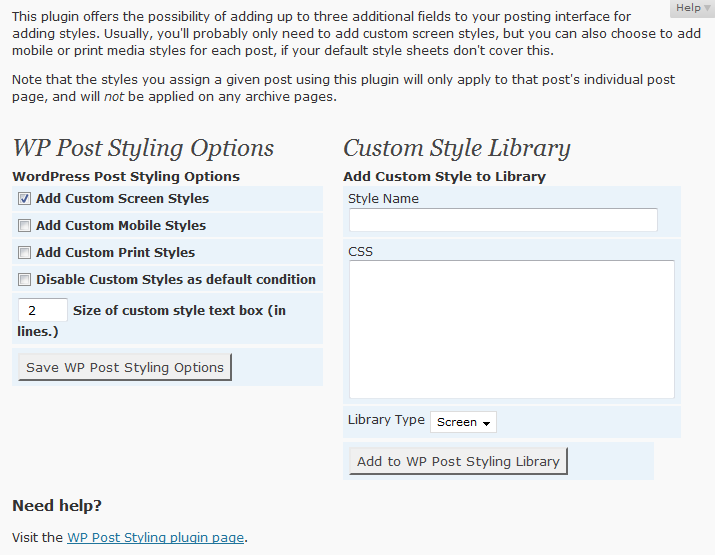
WP Post Styling Settings Page

WP Post Styling Custom Styles Box
Changelog
1.3.2
- Bug fix: Nonce required without a POST submission event broke creating new pages.
1.3.1
- Fix CSRF security issue & sanitization.
1.3.0
- Incorporate CSS editor from 4.9
- Fix issue when rendering a page without a post object
- Add activation hook execution for update cycle & version number
1.2.11
- Accessibility: duplicate IDs
- Update headings hierarchy
- If option to pull styles directly from library enabled, don’t display note
1.2.10
- Updated function prefixing
- Misc. minor updates
- Fix textdomain issues
1.2.9
- Removed some code for UI compatibility with WP previous to 2.7
- Added some missing textdomains
- Updated UI to match other plug-in UIs.
- Updated code usage
- Improved escaping
1.2.8
- PHP Notice when updating styles with format selector disabled
- Updated “Tested to” & Copyright date
- No longer claiming support for WordPress versions 2.5 – 2.9.x. May work anyway.
1.2.7
- Added languages: Irish Gaelic, Japanese
- New feature: Use styles directly from the library.
1.2.6
- Miscellaneous wpdb changes, updated coding style.
- Use of wpdb->prepare where appropriate.
- Minor style changes.
- Added plug-in page header image.
- Fixed a couple PHP notices
1.2.5
- Revised style editing layout to increase text box for editing custom styles.
- Bug fixes: removed PHP notices.
1.2.4
- Added support for custom post types (thanks to Jordi for suggestion)
1.2.3
- Clean up on deprecated calls
- Switch post meta to private
- Placed admin styles into separate file
- Bug fix: Custom styles would periodically disappear from post.
1.2.2
- Added stripslashes so that styles which require quotes will be consistently usable. (Background images, :before and :after, etc.)
1.2.1
- Added option to delete CSS in the style library
1.2.0
- Added Changelog
- Added ability to edit CSS in the style library
- Updated post interface to use post-2.6 drag-and-drop options
- Made translation ready
1.1.0
- Added a database to store pre-determined style groups.
- Corrected a few layout bugs.