

WP Similar Basic Auth
Protect WordPress admin page on similar Basic Auth without .htaccess.
Plugin info
Maintenance & Compatibility
Maintenance score
Possibly abandoned • Last updated 1770 days ago
Is WP Similar Basic Auth abandoned?
Possibly abandoned (last update 1770 days ago).
Compatibility
Similar & Alternatives
Explore plugins with similar tags, and compare key metrics like downloads, ratings, updates, support, and WP/PHP compatibility.
Description
Attackers trying to breakthrough WordPress admin page. Basic Authentication helps to prevent attacks.
But some case it can’t modify .htaccess or ssl.conf.
This plugin is useful for servers where prohibition modify Apache conf(.htaccess) or Nginx conf(ssl.conf).
Protect WordPress admin page on similar Basic Auth. It doesn’t need .htaccess or ssl.conf.
Features
- Auth log in with User Name and Password.
- Customization title and message in Login page.
Note
This plugin doesn’t replace Basic Authentication. If you can modify .htaccess or ssl.conf, I recommend using that. See differences running layer.
Running Layer
Fronts-end (ex: CSS, Javascript)
Application Plugin <- This plugin
Application (ex: WordPress)
Programming language (ex: PHP)
Middleware Web (ex: Apache, Nginx) <- .htaccess Basic Authentication
Middleware DB / OS
Installation
- Visit Plugins > Add New in your WordPress admin page.
- Search for “WP Similar Basic Auth”.
- Click Install Now then Activate plugin.
- Configure User Name and Password in Settings > WP Similar Basic Auth.
Note
- Staring WP Similar Basic Auth in WordPress admin page after settings User Name and Password.
- Enable cookie and JavaScript on your computer.
Frequently Asked Questions
Try to following steps.
- Delete wp-similar-basic-auth in your WordPress plugins directory.
(ex: [WordPress Installation Path]/wp-content/plugins/wp-similar-basic-auth) - Log in to your WordPress admin page.
- Reinstall WP Similar Basic Auth. (See Installation instructions)
- Configure new User Name and Password in the “WP Similar Basic Auth” settings.
No. WP Similar Basic Auth plugin use hash function.
“Remember logging in” for several weeks if you successful WP Similar Basic Auth log in page.
Ask log in again after log out WordPress admin page or several weeks.
Log out WordPress admin page.
Deactivate in the WordPress plugins menu.
No. WP Similar Basic Auth plugin automatically load your WordPress theme.
But you can customize style by CSS. Use ‘div id=”wsba”‘.
Review feed
Screenshots

Log in page.

Log in page wtih title and message.
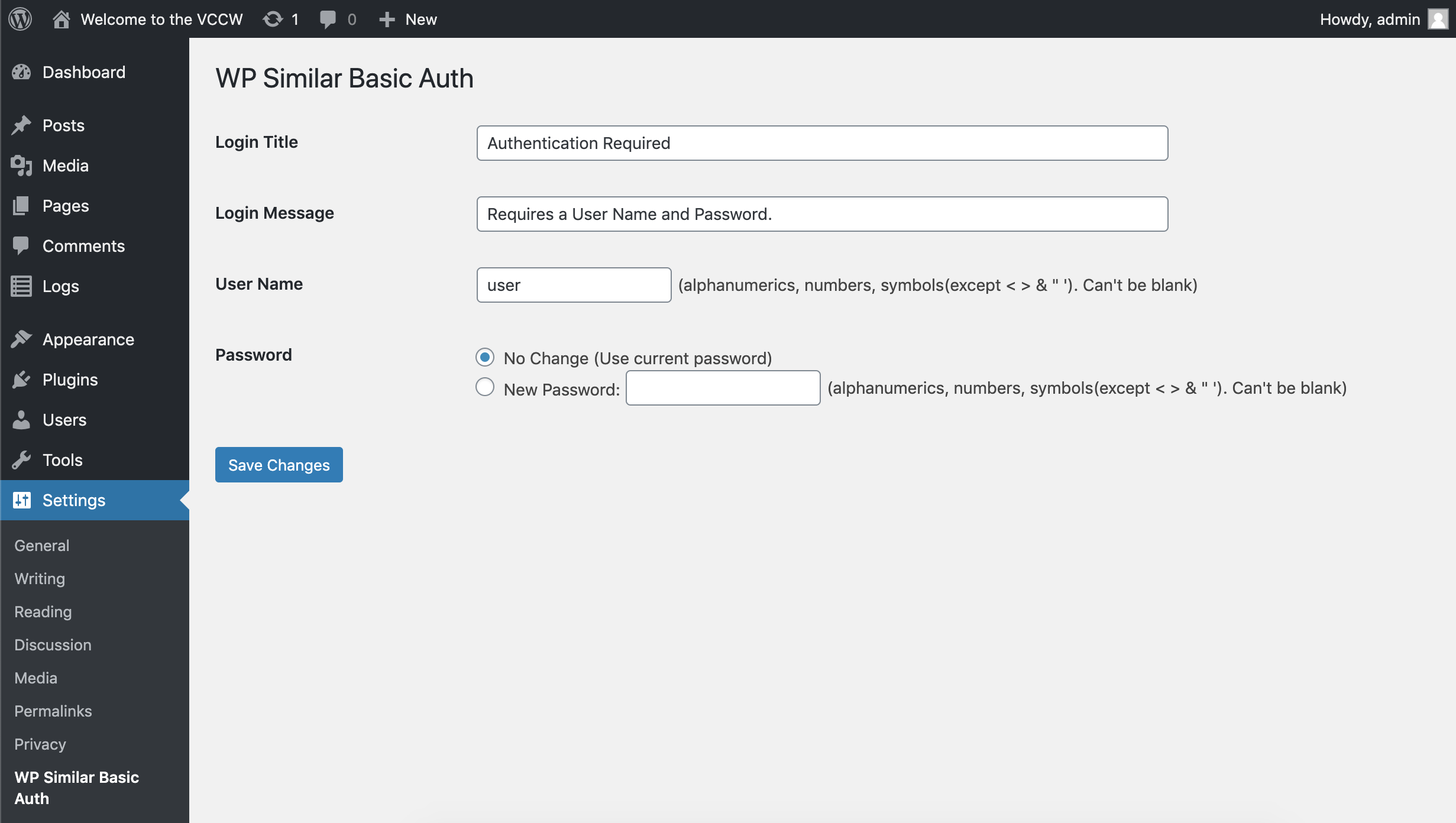
Settings.
Changelog
See the release history.