

WS Image Alt Text Generator
Automatically generate high-quality, SEO-friendly alt text for your images using AI technology.
Plugin info
Maintenance & Compatibility
Maintenance score
Maintained • Last updated 148 days ago
Is WS Image Alt Text Generator abandoned?
Likely maintained (last update 148 days ago).
Compatibility
Similar & Alternatives
Explore plugins with similar tags, and compare key metrics like downloads, ratings, updates, support, and WP/PHP compatibility.
Description
Image Alt Text Generator by Winning Solutions uses advanced AI to automatically generate accurate and descriptive alt text for your images, improving both accessibility and SEO.
Key Features
- One-Click Generation: Generate alt text directly from the media library with a single click
- Bulk Processing: Process multiple images at once with the bulk action feature
- Automatic Upload Processing: Automatically generate alt text for images when they are uploaded to WordPress
- Customizable Options: Choose to generate alt text, titles, and descriptions
- Language Support: Support for multiple languages
- WordPress Integration: Seamlessly integrates with WordPress media library
Benefits
- Improved Accessibility: Make your website more accessible to visitors using screen readers
- Better SEO: Enhance your SEO with descriptive image alt text that search engines can understand
- Time Saving: Save hours of manual work with automatic generation
- Accuracy: Get high-quality descriptions using state-of-the-art AI technology
How It Works
- Install and activate the plugin
- Enter your API key in the settings page
- Configure automatic upload processing (optional) to generate alt text for new images automatically
- Select images in your media library
- Click “Generate Alt Text” on single images or use the bulk action feature
- Review and save the generated text
API Key
This plugin requires an API key to function. You can get a free API key with limited credits at alt-text-generator.com. Premium plans with more credits are also available.
Privacy Policy
Image Alt Text Generator by Winning Solutions sends image URLs to our API service for processing. The image content is analyzed by our AI models to generate descriptive alt text.
This plugin:
* Collects and processes image URLs and content for alt text generation
* Uses an API key to authenticate requests to our service
* Does not collect personal user data
* Includes a privacy policy statement that you can add to your site’s privacy policy
For more details, visit our Privacy Policy.
External services
This plugin uses Supabase Edge Functions to connect to OpenAI’s ChatGPT API for generating AI-powered alt text descriptions of images. This service is essential for the plugin’s core functionality.
What data is sent and when:
* Image URLs: The plugin sends the public URL of images to our Supabase Edge Functions when you manually generate alt text or when automatic processing is enabled for new uploads
* API Key: Your API key is sent with each request for authentication
* Language preference: Your selected language code (e.g., ‘en’, ‘de’, ‘fr’) is sent to generate alt text in your preferred language
* Generation preferences: Settings indicating whether to generate title, alt text, description, and caption
* SEO keywords: If enabled, relevant keywords from your content are sent to help generate more SEO-friendly alt text
When data is sent:
* When you click “Generate Alt Text” on individual images in the media library
* When you use the bulk action to process multiple images
* When automatic processing is enabled and new images are uploaded to WordPress
* When validating your API key in the settings
* When checking your API credits (hourly, cached)
Service provider information:
* Primary Service: Supabase Edge Functions (infrastructure)
* AI Service: OpenAI ChatGPT API (image analysis and description generation)
* Domain: lpsigsfofcsgnwkrasvn.supabase.co
* Purpose: AI-powered image analysis and alt text generation using OpenAI’s vision models
* Supabase Terms of Service: Supabase Terms of Service
* Supabase Privacy Policy: Supabase Privacy Policy
* OpenAI Terms of Service: OpenAI Terms of Service
* OpenAI Privacy Policy: OpenAI Privacy Policy
Data handling and privacy:
Our Supabase Edge Functions act as a secure intermediary that forwards your image URLs to OpenAI’s ChatGPT API for analysis. OpenAI’s ChatGPT processes the images to generate descriptive alt text but does not use this data for training their models. No personal user data beyond the API key and image URLs is transmitted. Images are processed temporarily for the purpose of generating alt text and are not stored permanently by either service.
Installation
- Upload the plugin files to the
/wp-content/plugins/ws-image-alt-text-generatordirectory, or install the plugin through the WordPress plugins screen directly. - Activate the plugin through the ‘Plugins’ screen in WordPress
- Go to Settings > Image Alt Text Generator to configure the plugin
- Enter your API key
- Configure your preferences for alt text generation
Frequently Asked Questions
Yes, you need an API key to use this plugin. You can get a free API key with limited credits at alt-text-generator.com.
Visit alt-text-generator.com to sign up for an account and get your API key.
The number of images you can process depends on your API credits. Free accounts come with limited credits, while premium plans offer more credits.
Yes, the plugin sends image URLs to our API service for processing. The image content is analyzed by our AI models to generate descriptive alt text. No personal user data is collected or stored.
Yes, this plugin is designed to be GDPR compliant. We only process image data necessary for alt text generation and do not collect personal data. You can find more information in our Privacy Policy.
Our AI models are trained on diverse datasets to provide accurate and descriptive alt text for a wide range of images. However, we recommend reviewing the generated text before using it.
Yes, the plugin generates alt text suggestions that you can edit before saving.
Yes, the plugin includes an automatic upload processing feature that can generate alt text for images as soon as they are uploaded to WordPress. This feature can be enabled or disabled in the plugin settings.
Review feed
Screenshots
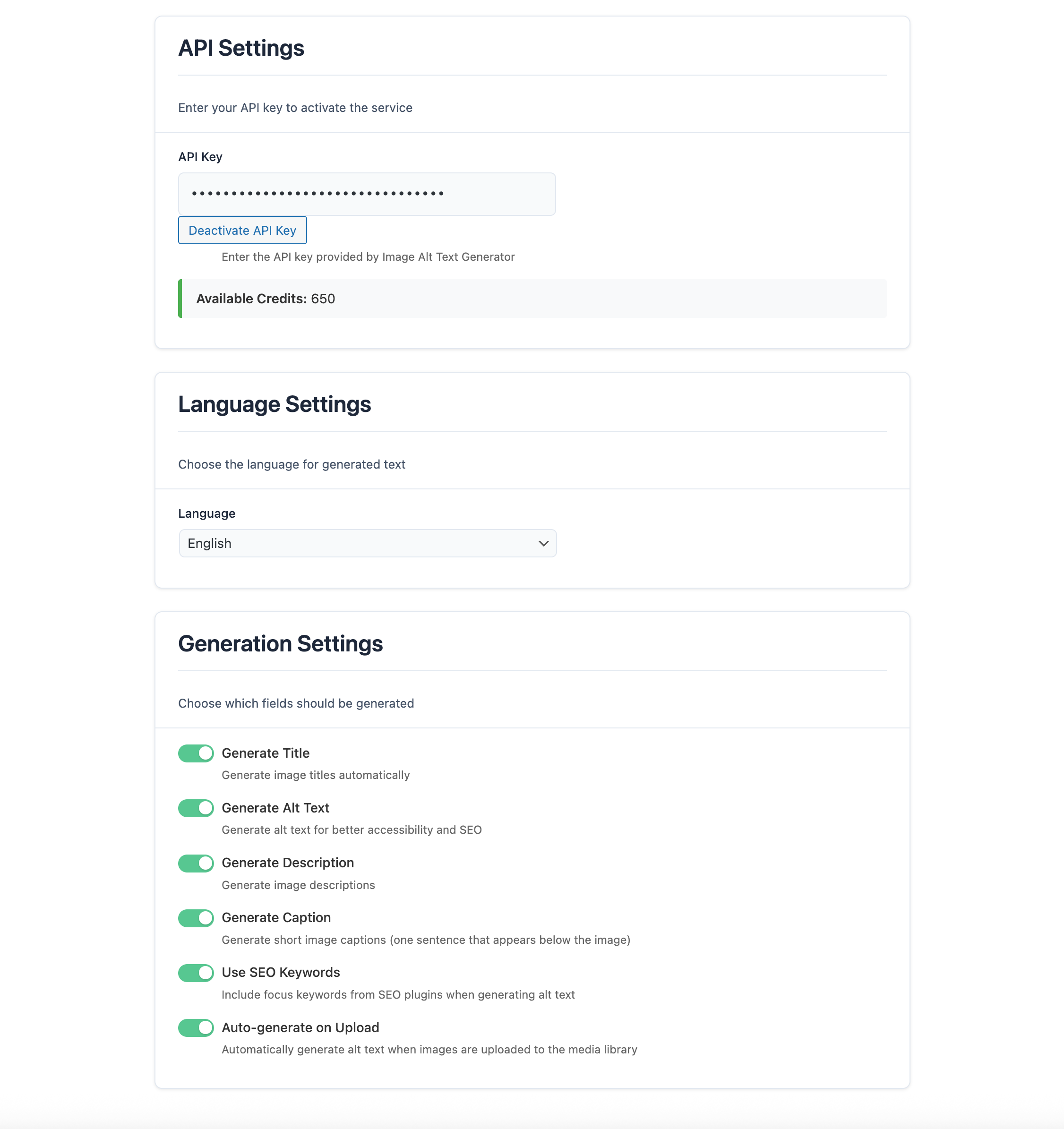
Settings page with API key configuration
Changelog
1.0.3
- Initial release