

Cache Images
Goes through your posts and gives you the option to cache all hotlinked images from a domain locally in your upload folder
Plugin info
Maintenance & Compatibility
Maintenance score
Possibly abandoned • Last updated 890 days ago • 6 reviews
Is Cache Images abandoned?
Possibly abandoned (last update 890 days ago).
Compatibility
Languages
Similar & Alternatives
Explore plugins with similar tags, and compare key metrics like downloads, ratings, updates, support, and WP/PHP compatibility.
Description
Plugin homepage | Plugin author
Cache Images is a plugin that gives users option to sideload images that are hosted on other domains to their own site. Sideloaded images are added to WordPress media library so you can use all tools related to images that you can use with images uploaded through WordPress. Image will be added as an attachment of first post where it is found, and every post where original URL is occurring will be updated with new URL. User can select from which domains to sideload images, including Blogger’s domains.
It uses AJAX so it means you can sideload large number of images even on slow servers. (AJAX functions are made by fork of code from plugin AJAX Thumbnail Rebuild)
This plugin is fully internationalized. You can find .pot file in languages folder where you should place your translation. Current translations are Serbian, Spanish, and Persian. Please send your translation by contacting author so that it can be included it in next releases.
Read more information about usage on author’s site.
Installation
- Upload
cache-imagesfolder to the/wp-content/plugins/directory - Activate the plugin through the ‘Plugins’ menu in WordPress
- Go to ‘Tools’ > ‘Cache Remote Images’ page
- Go to ‘Settings’ > ‘Media’ page to enable automatic caching
Frequently Asked Questions
Review feed
Screenshots

First screen with basic information about usage of plugin and a button Scan
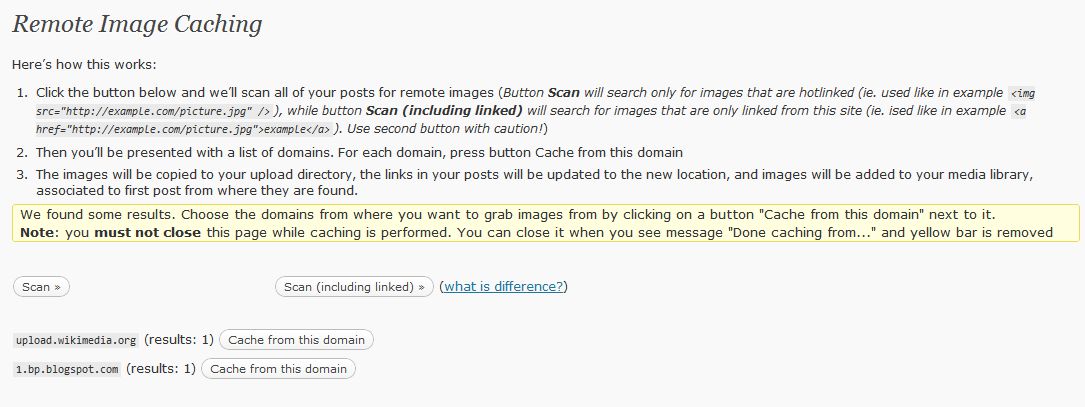
List of all domains from which there is hotlinked image

Settings for automatic caching
Changelog
3.2.2
- Fixed some potential PHP 8.x warnings.
3.2
- Adds nonce & capability checks.
- Removes functionality that triggers WP deprecated notices.
3.1
- Released on 3rd December 2010
- Tries to fix issue with bad Blogger’s URLs
- Tries to fix issue with “invalid argument for foreach” error
- Tries to fix issue with “undefined function media_sideload_image()” error
- Fixed unescaped characters in code examples
- Updated screenshot-2
3.0
- Released on 25th November 2010
- Complete ajaxification of a plugin
- Option for automatic caching on post’s saving
- Option to cache linked images
- Made standalone functions for finding and caching
- Improved documentation
- Code cleanup
- Updated Serbian and Spanish translations
2.0
- Complete rewrite of plugin
- Images are now sideloaded via built in function and added to WordPress’ media library
- Plugin now uses AJAX so it means you can cache large number of images even on slow servers
- You can now cache images from Blogger’s domains too