
Collab Notes
Collab Notes allows administrators to add private notes to pages and posts, with customizable user role permissions.
Plugin info
Maintenance & Compatibility
Maintenance score
Possibly abandoned • Last updated 421 days ago
Is Collab Notes abandoned?
Possibly abandoned (last update 421 days ago).
Compatibility
Similar & Alternatives
Explore plugins with similar tags, and compare key metrics like downloads, ratings, updates, support, and WP/PHP compatibility.
Description
Collab Notes is a simple and effective plugin to manage private notes for pages and posts directly in the WordPress admin area.
Key Features:
– Add private notes to any page or post.
– Notes are visible only in the WordPress admin area.
– Customize which user roles can add, edit, or view notes.
– An icon is displayed in the post/page list for content with notes, making it easy to identify.
– Lightweight and easy to use, with no impact on site performance.
This plugin is perfect for teams and administrators who want to keep internal notes, reminders, or task lists linked to specific content.
License
This plugin is licensed under GPLv2 or later. See https://www.gnu.org/licenses/gpl-2.0.html for details.
Installation
- Download the plugin as a .zip file or install directly from the WordPress plugin repository.
- Upload the
collab-notesfolder to the/wp-content/plugins/directory. - Activate the plugin in the WordPress admin under Plugins > Installed Plugins.
- (Optional) Configure user roles permissions under Settings > Collab Notes.
Frequently Asked Questions
By default, only administrators can see and add notes. However, you can configure user role permissions in the settings page.
Currently, notes are supported only for Pages and Posts. Support for custom post types may be added in a future update.
No, the notes are strictly for internal use in the WordPress admin area.
Yes, the plugin is designed to work with any WordPress theme since it only modifies the admin area.
Review feed
Screenshots
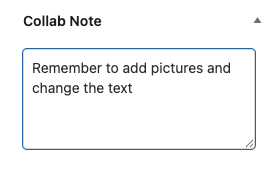
Adding a note: Add a private note directly in the post/page editor.

Post list view: See an icon for posts with notes directly in the admin list.
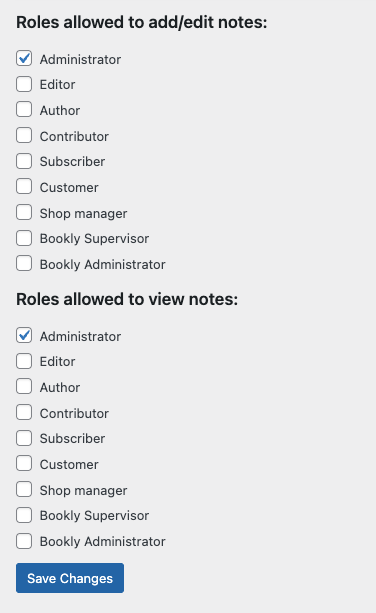
Settings page: Customize user role permissions for adding and viewing notes.
Changelog
1.3
- Added a page with the list of all notes
- Added the menu item “Collab Notes”
- General improvements
1.2.2
- Add Buy me a Coffee button
1.2.1
- Bug fixing
1.2.0
- Renamed the plugin to Collab Notes.
- Added
aria-labelsupport for accessibility. - Default permissions for administrators.
- Changed tooltip to alt text for better readability.
- Updated the icon for notes in the admin list.
1.1
- Added settings page for user role permissions.
- Customizable user roles for adding and viewing notes.
1.0
- Initial release with support for private notes on pages and posts.