

Disable Visual Editor WYSIWYG
This plugin will disable the visual editor for selected page/post..
Plugin info
Maintenance & Compatibility
Maintenance score
Possibly abandoned • Last updated 2961 days ago • 22 reviews
Is Disable Visual Editor WYSIWYG abandoned?
Possibly abandoned (last update 2961 days ago).
Compatibility
Similar & Alternatives
Explore plugins with similar tags, and compare key metrics like downloads, ratings, updates, support, and WP/PHP compatibility.
Description
This plugin will disable the visual editor for selected page(s)/post(s)/custom post types. The idea behind this came after i had to keep the html intact by the tinymce editor whenever i switched back to Visual tab in the editor.
Installation
- Upload directory
disable-visual-editor-wysiwygto the/wp-content/plugins/directory - Activate the plugin through the ‘Plugins’ menu in WordPress
Frequently Asked Questions
Installation Instructions
- Upload directory
disable-visual-editor-wysiwygto the/wp-content/plugins/directory - Activate the plugin through the ‘Plugins’ menu in WordPress
How to disable/enable wysiwyg editor for page/post?
Go to admin section where you add/edit new page/post and you will see small panel on the right called “Visual Editor” with a checkbox saying “Disable”. When you thick it and update the post, you will no longer be able to edit the page/post until you unthick and update the page/post.
Review feed
Reduces so much pain
Screenshots
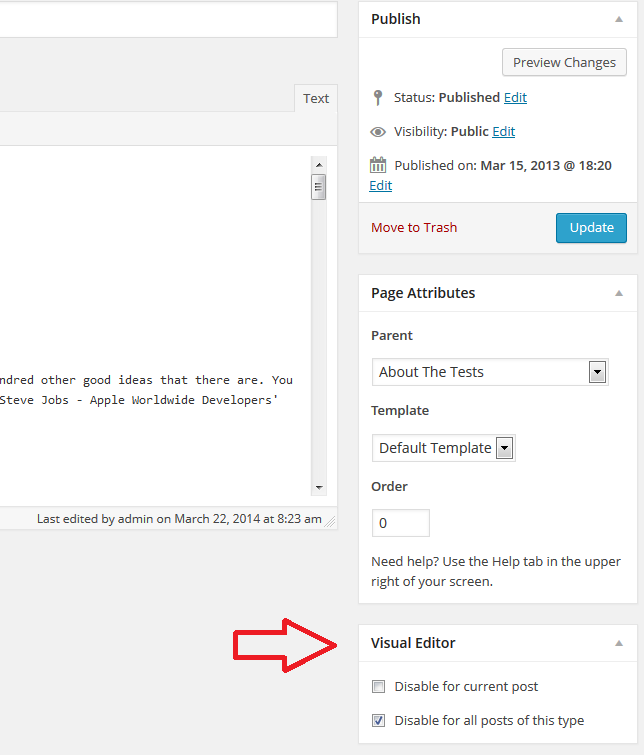
Here you can see the panel where you can disable the visual editor.
Changelog
1.7.1
- Small changes in the documentation
1.7
- Fixed visual bug for version 4.1
- Russian translation ( thanks to Aurumdao )
- Bulgarian translation
1.6
- You can now disable the editor for all posts/pages/custom post types.
1.5.2
- Only super admins can disable/enable the editor. Full screen button is now hidden when tinymce is disabled.
1.5.1
- Fixed meta-value duplication
1.5
- Custom post types and improvements
1.4.1
- Minor change
1.4
- Simplified and improved
1.3
- Quick fix for 3.3
1.2
- Quick fix for 3.3
1.1
- Quick fix for 3.2
1.0
- Released.