

Handy Archive Link
Add a convenient "View Archive" link directly from post type list screens in WordPress admin.
Plugin info
Maintenance & Compatibility
Maintenance score
Maintained • Last updated 157 days ago
Is Handy Archive Link abandoned?
Likely maintained (last update 157 days ago).
Compatibility
Similar & Alternatives
Explore plugins with similar tags, and compare key metrics like downloads, ratings, updates, support, and WP/PHP compatibility.
Description
Handy Archive Link is a simple yet powerful WordPress plugin that adds a “View Archive” button to your admin screens, making it incredibly easy to preview archive pages without having to remember URLs or navigate away from your workflow.
Key Features
- One-Click Archive Access – View archive pages directly from post type list screens
- Smart Detection – Only shows the button when an archive page exists
- Customizable Settings – Choose your preferred icon, icon position, open behavior, and disable for specific post types
- Automatic Management – Intelligently handles the default Posts type based on your Reading settings
- Developer-Friendly – Includes filters for advanced customization
- Lightweight – No bloat, just the essentials
- Translation Ready – Fully translatable
Perfect For
- Content managers who frequently preview archives
- Developers building custom post types
- Anyone who wants faster WordPress admin navigation
- Sites with multiple custom post types
How It Works
Once activated, Handy Archive Link automatically adds a “View Archive” button next to the “Add New” button on all public post types with archives enabled.
The plugin intelligently detects:
* Whether a post type has has_archive enabled
* If a “Posts page” is set in Settings > Reading (for default Posts)
* Automatically disables the button for Posts if no posts page is configured
No configuration needed – it just works! But if you want to customize, head to Settings > Handy Archive Link.
Customization Options
Open in New Tab
Choose whether archive links open in a new browser tab or the same window.
Button Icon
Select from 5 different icons:
* External Link (default)
* Eye
* Link
* Archive
* Portfolio
Icon Position
Choose whether the icon appears before or after the button text for a personalized look that matches your workflow.
Disabled Post Types
Choose which post types should NOT display the “View Archive” button. Note: The default “Posts” type is automatically disabled if no posts page is configured in Settings > Reading.
Developer Features
Handy Archive Link includes filters for developers who need advanced control:
Post Type Filters:
* handy_archive_link_show – Control button visibility per post type
* handy_archive_link_url – Modify archive URL per post type
Example usage:
// Hide button for specific post type
add_filter('handy_archive_link_show', function($show, $post_type) {
    if ($post_type === 'my_cpt') {
        return false;
    }
    return $show;
}, 10, 2);

// Custom archive URL
add_filter('handy_archive_link_url', function($url, $post_type) {
    if ($post_type === 'product') {
        return home_url('/shop/');
    }
    return $url;
}, 10, 2);

// Conditional logic based on user role
add_filter('handy_archive_link_show', function($show, $post_type) {
    if ($post_type === 'product' && !current_user_can('manage_woocommerce')) {
        return false;
    }
    return $show;
}, 10, 2);
Compatibility
Works seamlessly with:
* Custom post types created by any plugin (ACF, Metabox, Pods, Toolset, etc.)
* Any theme
* Multisite installations
* Page builders
Translations
Handy Archive Link is translation-ready and includes:
* English (en_US) – Default
* French (fr_FR) – Français
Support
For support, feature requests, or bug reports:
* Visit the support forum
* Open an issue on GitHub
Installation
Automatic Installation
- Log in to your WordPress admin panel
- Go to Plugins > Add New
- Search for “Handy Archive Link”
- Click “Install Now” and then “Activate”
Manual Installation
- Download the plugin ZIP file
- Log in to your WordPress admin panel
- Go to Plugins > Add New > Upload Plugin
- Choose the ZIP file and click “Install Now”
- Activate the plugin
Configuration
No configuration required! The plugin works out of the box.
For customization options, go to Settings > Handy Archive Link where you can:
* Choose whether to open links in a new tab
* Select your preferred button icon
* Choose icon position (before or after text)
* Disable the button for specific post types
Frequently Asked Questions
Yes! Handy Archive Link works with any public post type that has archives enabled (has_archive => true), regardless of how it was created (ACF, Metabox, code, etc.).
The button only appears if the post type has has_archive set to true. For the default “Posts” type, a “Posts page” must be set in Settings > Reading.
If you haven’t set a “Posts page” in Settings > Reading, the plugin automatically disables the button for Posts since there’s no valid archive URL to link to. Configure your posts page in Settings > Reading to enable it.
Yes! Go to Settings > Handy Archive Link to choose your preferred icon, icon position, and opening behavior.
Yes! In Settings > Handy Archive Link, you can choose whether the icon appears before or after the button text.
Yes! You can either:
1. Use the Settings page to check/uncheck post types
2. Use the handy_archive_link_show filter for conditional logic
No. The plugin is extremely lightweight and only loads on relevant admin screens.
Yes, Handy Archive Link is fully compatible with multisite installations.
Yes! The plugin is fully translatable and uses the text domain handy-archive-link.
Review feed
Screenshots
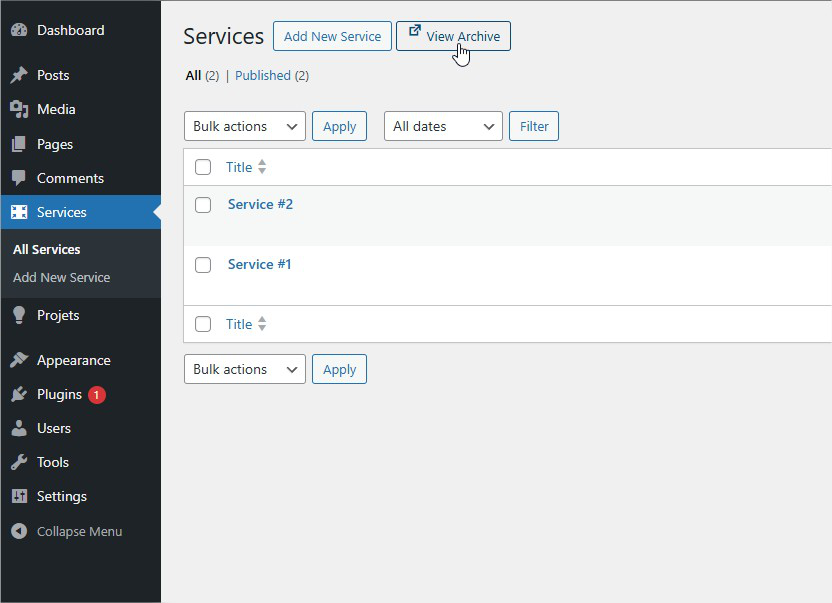
The "View Archive" button appears next to "Add New" on post type screens
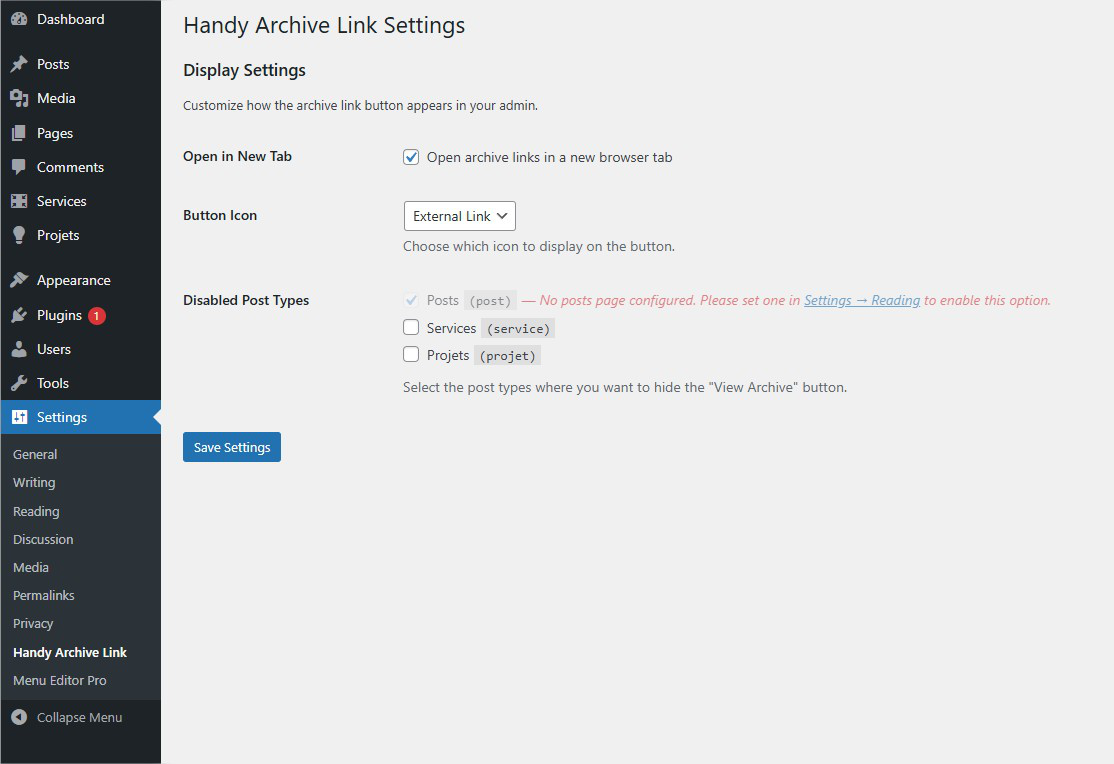
Settings page with customization options
Changelog
1.0.1 – 2025-10-20
- Add: Icon position option (before or after text)
- Improve: Better vertical alignment for icon and text
- Improve: Code structure with separated class files
- Improve: Asset management using proper WordPress enqueue functions
1.0.0 – 2025-10-09
- Initial release
- Add “View Archive” button to post type list screens
- Support for custom post types with archives
- Customizable icon and open behavior
- Settings page to disable button for specific post types
- Automatic detection and management of Posts without configured posts page
- Developer filters for advanced customization
- Full translation support