

Meerkat Markdown for AI Visibility
Generate a Markdown list of your URLs to help AI-driven tools understand your website.
Plugin info
Maintenance & Compatibility
Maintenance score
Stale • Last updated 206 days ago • 2 reviews
Is Meerkat Markdown for AI Visibility abandoned?
Likely maintained (last update 206 days ago).
Compatibility
Similar & Alternatives
Explore plugins with similar tags, and compare key metrics like downloads, ratings, updates, support, and WP/PHP compatibility.
Description
Meerkat Markdown for AI Visibility collects URLs using WordPress queries and generates an llms.txt file (short for “Large Language Models”) in the website’s root directory — optionally providing dynamic .md files — to help AI-based systems better understand and make use of the site’s content. The llms.txt is stored in the root directory. You can configure the number of URLs, set a minimum word count, and exclude specific categories or tags. File generation can be triggered manually or scheduled to run automatically.
Features
- Gathers URLs with WordPress queries; the
wp-sitemap.xmlURL is only added tollms.txtas metadata. - Creates
llms.txtwith[Title • host/path](URL): contententries. - Add a custom site description to the file header.
- Limit export to 100 entries or process all URLs.
- Posts or pages with fewer than 15 words are skipped: they do not count toward
the 100-entry limit and are omitted fromllms.txt. - Choose 30, 50, 100 words or the full text per entry.
- Exclude categories and tags.
- Sort
llms.txtentries by popularity or most recent first. - Optionally serve dynamic
.mdfiles for each page and for author, category and tag archives (adds a robots.txt rule and sitemap link). - Manual generation via the Generate Files Now button.
- Automatic WP-Cron schedule (hourly, daily, weekly, monthly or disabled) with configurable run time.
- Save settings with the Save Changes button.
License
This plugin is open source software licensed under the GPLv2 (or later). See LICENSE for the full license text.
Installation
- Upload the
meerkat-markdown-for-ai-visibilityfolder to/wp-content/plugins/. - Activate the plugin through the Plugins menu.
- Visit Settings Markdown for AI and click Generate Files Now to create the first file.
Frequently Asked Questions
Yes, the plugin has been tested with page builders such as Gutenberg, Elementor, Avada, and Divi. Specific formatting characters are removed from the content wherever reasonable and possible.
It is written to the site root directory (same level as the top-level index.php).
Use the Generate Files Now button or wait for the scheduled cron run.
Select a new frequency and click Save Changes on the settings page.
All plugin options and the llms.txt file are removed automatically.
Add the following snippet to your theme’s functions.php or a small helper plugin:
add_filter( 'mrmrkdofa_enable_dynamic_sitemap', '__return_true' );
Afterwards visit Settings Permalinks and save changes once so WordPress refreshes the rewrite rules.
Review feed
Screenshots
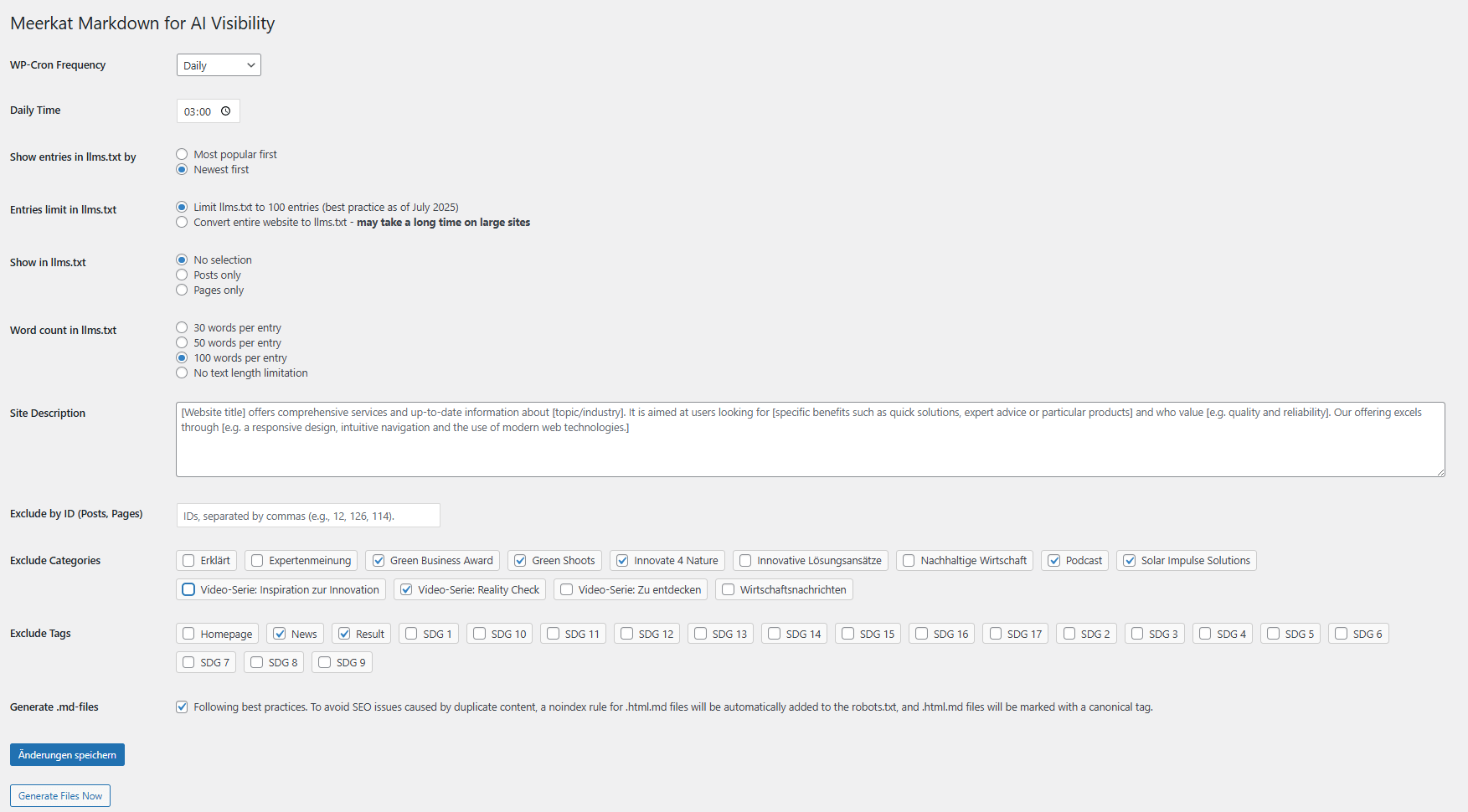
Settings page with Generate and Save Changes buttons plus cron frequency selection.
Changelog
2.0
Release date: 2025-09-08
Fundamental revision and improvement of the integration of page builders: Elementor, Divi, and Avada.
1.57
Strips remaining shortcodes (e.g. Divi modules) before adding entries to llms.txt.
1.56
Renders Divi shortcodes as HTML before adding entries to llms.txt when Divi builder is detected. Renders Divi shortcodes when detection functions are missing to avoid raw markup in llms.txt.
1.55
Adds filter mrmrkdofa_http_timeout to adjust HTTP request timeout (default 15 seconds).
1.54
Dynamic sitemap is disabled by default. Add
add_filter( ‘mrmrkdofa_enable_dynamic_sitemap’, ‘__return_true’ );
to re-enable it.
1.53
Adds filter mrmrkdofa_enable_dynamic_sitemap to disable dynamic sitemap output while keeping Markdown pages.
1.50
Adds a fallback for trailing slash settings to improve Markdown output for category, tag and author archives.
1.49
Regenerates llms.txt and html-md-sitemap.xml when posts or pages are saved or deleted.
1.48
Improves namespace detection for html-md-sitemap.xml to fix validation errors.
1.47
Fixes missing XML namespace declarations in html-md-sitemap.xml.
1.46
Adds dynamic .html.md support for author, category and tag archives.
1.45
Generates a static html-md-sitemap.xml in the uploads directory when dynamic Markdown is enabled.
1.44
Adds link to the .html.md sitemap in the success notice.
1.43
Adds option to include only posts or only pages in llms.txt.
1.42
Adds the page or post title as the first H1 heading in generated .html.md files.
1.41
Removes legacy htmlmd-sitemap_index.xml support. Use html-md-sitemap-index.xml.
1.40
Adds backward compatibility for the former htmlmd-sitemap_index.xml URL.
1.39
Adds html-md-sitemap-index.xml entry in robots.txt when dynamic Markdown is enabled.
1.38
Adds html-md-sitemap-index.xml entry in llms.txt when dynamic Markdown is enabled.
1.37
Fixes broken htmlmd sitemap links when Yoast SEO is active.
1.36
Adds htmlmd-sitemap.xml mirroring the default sitemap when dynamic Markdown is enabled.
1.35
Generates llms.txt in batches to reduce memory usage on large sites.
1.33
Adds canonical and noindex headers for dynamic Markdown pages.
1.32
Adds .md URLs to the core sitemap and sets caching headers for Markdown output.
1.31
Switches to dynamic .html.md generation.
1.30
Adds an option to exclude posts or pages by ID.
1.29
Adds an option to sort llms.txt entries by popularity or by the most recent posts. All plugin settings are now deleted on uninstall.
1.28
Adds a success message confirming creation of .html.md files.
1.27
Minor improvements and bug fixes.
1.26
Switches JavaScript localization to wp_add_inline_script.
1.25
Moves inline styles in the settings page to CSS for improved maintainability.
1.23
Removes generated .html.md files and llms.txt when the plugin is uninstalled.
1.22
Adds a ‘Disallow’ entry to robots.txt when .html.md generation is enabled to exclude these files from search engines.
1.21
Corrects the placement of .html.md files: they are now generated in the site root with hyphenated file names.
1.20
Creates a separate Markdown file with the page content for each page.
1.19
New option to exclude tags from llms.txt.
1.18
New option to exclude categories from llms.txt.
1.17
1.16
Exclude Elementor library templates from llms.txt.
1.13
Allow limiting the number of words per entry.
1.12
Use full post content instead of excerpt in llms.txt.
1.11
Reduce HTTP requests by using internal WordPress functions and streaming file output.
1.10
Option to limit Sitemap processing to first 100 entries.
1.9
Add monthly schedule option for WP-Cron.
1.8
Initial release.