

Notice Box Block
A custom Gutenberg block to create a notice box with different types like info, warning, success, and danger.
Plugin info
Maintenance & Compatibility
Maintenance score
Possibly abandoned • Last updated 522 days ago
Is Notice Box Block abandoned?
Possibly abandoned (last update 522 days ago).
Compatibility
Similar & Alternatives
Explore plugins with similar tags, and compare key metrics like downloads, ratings, updates, support, and WP/PHP compatibility.
Description
Notice Box Block is a powerful and flexible Gutenberg block that allows you to create customizable notice boxes within your WordPress posts and pages. Whether you need to display informational messages, warnings, success notifications, or error alerts, Notice Box Block has you covered.
Features:
- Four types of notices: Info, Warning, Success, and Danger.
- Easy to use with the Gutenberg editor.
- Customizable styles to fit your website’s design.
- Lightweight and fast.
How to Use:
- Install and activate the Notice Box Block plugin.
- In the Gutenberg editor, add a new “Notice Box” block.
- Select the type of notice you want to display (Info, Warning, Success, or Danger).
- Add your content inside the notice box.
- Publish or update your post/page.
Arbitrary section
Compatibility:
Notice Box Block is tested and compatible with WordPress version 5.0 and above. It requires PHP version 7.0 or higher.
Customization:
You can easily customize the appearance of the notice boxes by adding your own CSS styles. Use the class selectors such as .notice-box.info, .notice-box.warning, .notice-box.success, and .notice-box.danger to apply your styles.
Support:
For support, please visit our support forum or contact us via email at [email protected].
Credits and Acknowledgements:
This plugin was developed by Lucid Gen. Special thanks to the WordPress community for their continuous support and contributions.
Known Issues:
Currently, there are no known issues. If you encounter any bugs or have suggestions for improvements, please let us know through our support forum.
Additional Information
- This plugin is actively maintained and regularly updated to ensure compatibility with the latest WordPress releases.
Installation
- Upload the
notice-box-blockfolder to the/wp-content/plugins/directory, or install the plugin through the WordPress plugins screen directly. - Activate the plugin through the ‘Plugins’ screen in WordPress.
- Use the Gutenberg editor to add and customize your notice boxes.
Frequently Asked Questions
Simply use the Gutenberg editor to add a new block, search for “Notice Box”, and insert it into your content. You can then select the type of notice and add your content.
Yes, the plugin comes with default styles, but you can override them with your own custom CSS to match your website’s design.
You can create four types of notices: Info, Warning, Success, and Danger.
Review feed
Screenshots
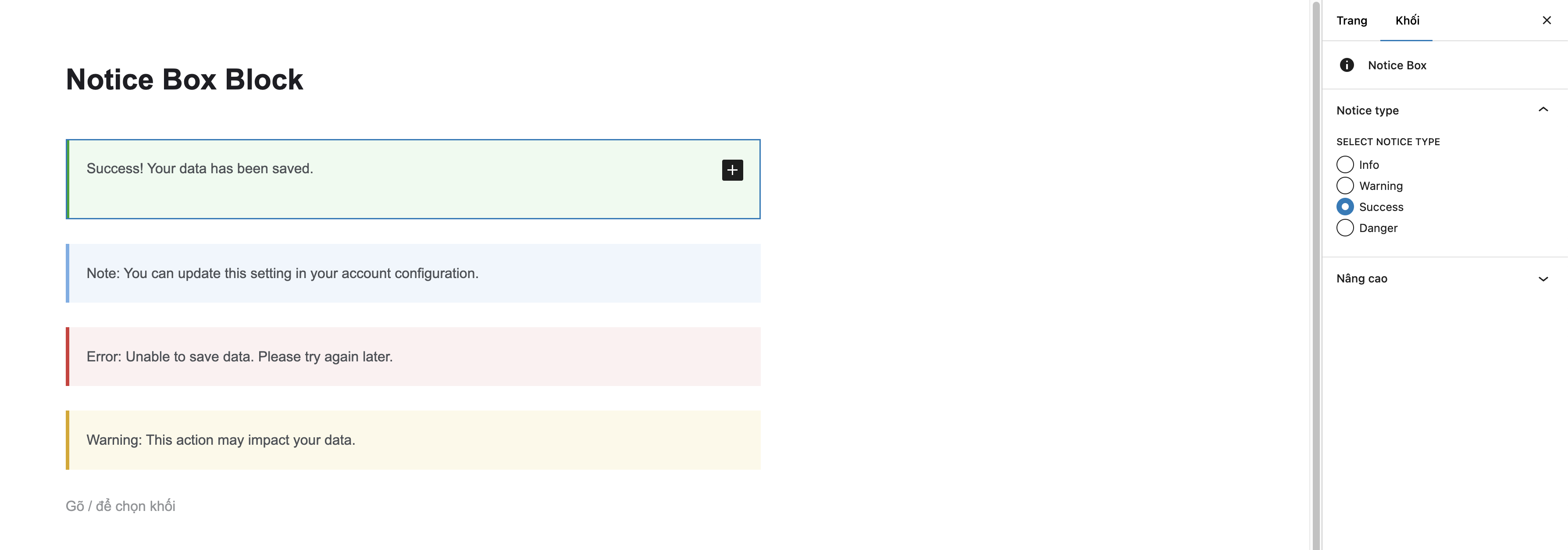
The Notice Box block in the Gutenberg editor.

The Notice Box block in the front-end.
Changelog
1.0.0
- Initial release of Notice Box Block.