

Primary Category
WordPress plugin for setting and displaying primary categories for posts and custom post types. This is a fork from Jacob McKinney's Primary Cate …
Plugin info
Maintenance & Compatibility
Maintenance score
Possibly abandoned • Last updated 3204 days ago
Is Primary Category abandoned?
Possibly abandoned (last update 3204 days ago).
Compatibility
Similar & Alternatives
Explore plugins with similar tags, and compare key metrics like downloads, ratings, updates, support, and WP/PHP compatibility.
Description
This plugin adds radiobuttons near every category (even if you add a new category) so you can choose the primary category of your post **. Selecting a primary category and updating the post saves this data into a custom field with a meta key of “primary_category”.
To display a list of all posts with a particular primary category, use the shortcode [primary-category name=”CATEGORY NAME” post_type=”POST TYPE”] where CATEGORY NAME is the name of the primary category you wish to display and POST TYPE is the custom post type name. If a name is not specified, the shortcode will default to all posts with “uncategorized” set as the primary category. images or post.
Installation
- Upload the plugin files to the
/wp-content/plugins/directory, or install the plugin through the WordPress plugins screen directly. - Activate the plugin through the
Pluginsscreen in WordPress - See the categories tab in your post or custom post edit page. Set the radiobutton near your preferred category.
Frequently Asked Questions
Installation Instructions
- Upload the plugin files to the
/wp-content/plugins/directory, or install the plugin through the WordPress plugins screen directly. - Activate the plugin through the
Pluginsscreen in WordPress - See the categories tab in your post or custom post edit page. Set the radiobutton near your preferred category.
How can I access the primary category data?
A post’s primary category is stored in the post meta under the key ‘primary_category’.
What shortcode can I use to display posts with a particular primary category?
[primary-category name=”CATEGORY NAME” post_type=”POST TYPE”]
Review feed
Screenshots
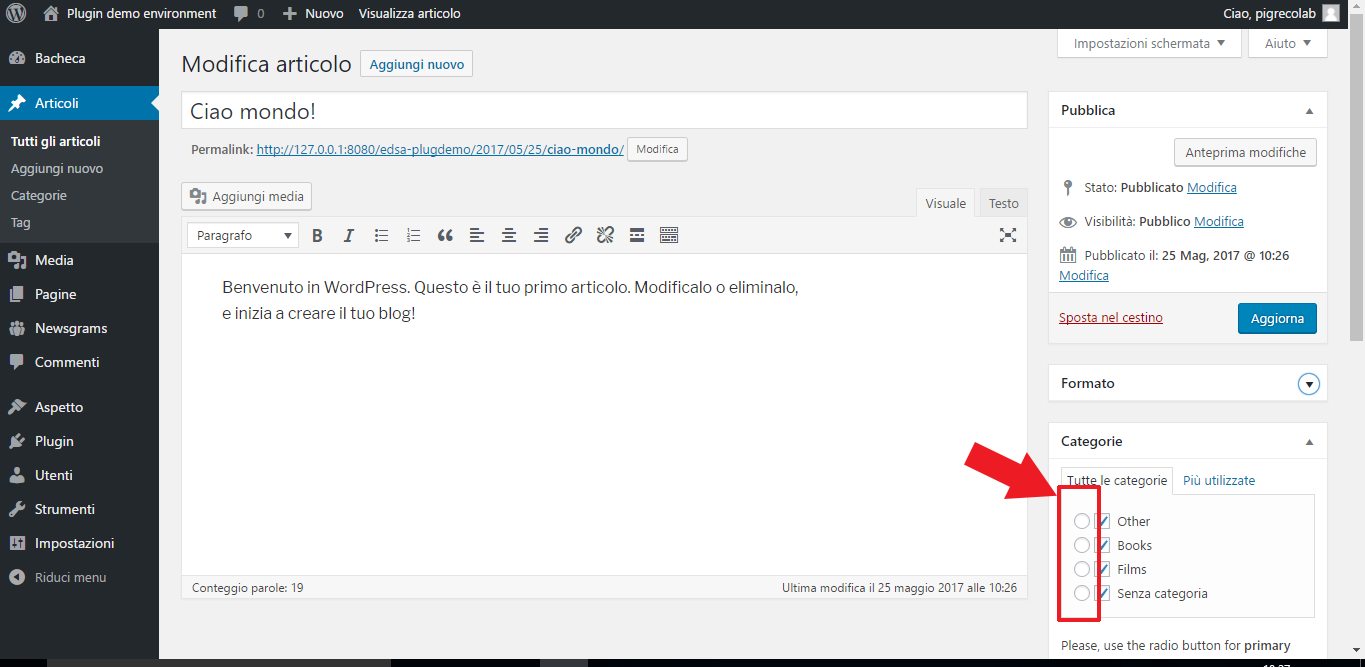
screenshot-1.png: New custom radiobutton for primary category
Changelog
1.0
- First version of the plugin