

Primary Redirect
Redirects users to a custom URL or their primary blog's dashboard after login, replacing the default WordPress behavior.
Plugin info
Maintenance & Compatibility
Maintenance score
Stale • Last updated 251 days ago • 2 reviews
Is Primary Redirect abandoned?
Likely maintained (last update 251 days ago).
Compatibility
Languages
Similar & Alternatives
Explore plugins with similar tags, and compare key metrics like downloads, ratings, updates, support, and WP/PHP compatibility.
Description
Primary Redirect is a powerful WordPress plugin that allows you to customize where users are redirected after logging in. Instead of the default WordPress behavior, you can redirect users to:
- A custom URL of your choice
- Their primary blog’s dashboard (in multisite installations)
This plugin is perfect for:
* Multisite networks where you want users to go to their primary blog
* Sites with custom dashboards or landing pages
* Improving user experience with personalized redirects
Key Features
- Custom URL Redirect: Set any URL as the post-login destination
- Primary Blog Redirect: Automatically redirect users to their primary blog’s dashboard (multisite)
- Network & Single Site Support: Works on both multisite networks and single WordPress sites
- Easy Configuration: Simple settings interface in WordPress admin
- Developer Friendly: Clean, modern code following WordPress best practices
Multisite Support
On multisite installations, you get additional options:
* Redirect users to their primary blog’s dashboard
* Network-wide settings that apply to all sites
* Override custom URLs with primary blog redirect
Single Site Support
On single WordPress sites, configure a custom redirect URL that applies to all users after login.
If you like this plugin, then consider checking out our other projects:
- Powered Cache – Caching and Optimization for WordPress – Easily Improve PageSpeed & Web Vitals Score
- Magic Login Pro – Easy, secure, and passwordless authentication for WordPress.
- PaddlePress PRO – Paddle Plugin for WordPress
- Easy Text-to-Speech for WordPress – Transform your textual content into high-quality synthesized speech with AI.
- Handywriter – AI-powered writing assistant that can help you create content for your WordPress.
- WP Accessibility Toolkit – A collection of tools to help you make your WordPress more accessible.
Installation
- Upload the plugin files to
/wp-content/plugins/primary-redirect/directory, or install through WordPress admin - Activate the plugin through the ‘Plugins’ screen in WordPress
- For multisite: Configure settings in Network Admin > Settings
- For single site: Configure settings in Settings > General
Frequently Asked Questions
Yes! The plugin works on both single WordPress installations and multisite networks.
Currently, the plugin redirects all users to the same custom URL or their primary blog dashboard. User-specific redirects are not supported in this version.
No, the plugin respects WordPress’s interim login and reauth processes and won’t interfere with them.
The plugin uses WordPress’s standard login_redirect filter, so it should be compatible with most other plugins. However, if another plugin also modifies login redirects, the last one to run may take precedence.
Review feed
Screenshots

Network admin settings for multisite installations
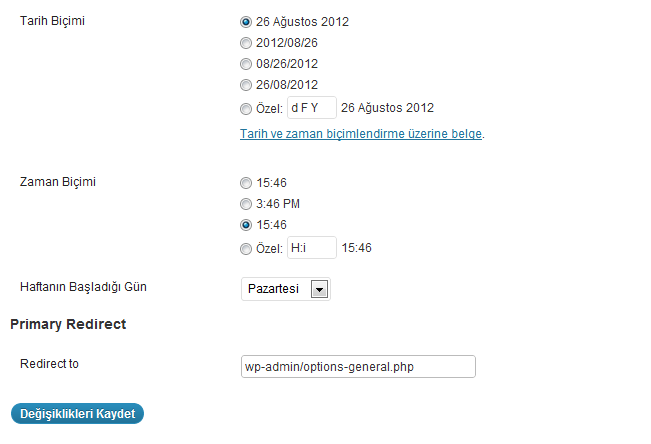
Single site settings in General options
Changelog
2.0.2 (Jul 25, 2025)
- Minor adjustments
2.0.1 (Jul 24, 2025)
- Bump tested up to WordPress 6.8
2.0 (Jul 24, 2025)
- Complete rewrite with modern WordPress best practices
- Improved security with proper input sanitization and capability checks
- Better code organization and documentation
- Updated plugin header and branding for HandyPlugins
- Improved user interface with better descriptions
- Added proper URL validation
- Enhanced multisite support
- Minimum WordPress version: 5.0
- Minimum PHP version: 7.4
1.1
- Serbo-Croatian language pack added
1.0
- Initial release