

Quick Assist AI
AI-powered assistant for troubleshooting issues, SEO recommendations, and ideas to enhance your website's performance and user experience
Plugin info
Maintenance & Compatibility
Maintenance score
Possibly abandoned • Last updated 562 days ago
Is Quick Assist AI abandoned?
Possibly abandoned (last update 562 days ago).
Compatibility
Similar & Alternatives
Explore plugins with similar tags, and compare key metrics like downloads, ratings, updates, support, and WP/PHP compatibility.
Description
The Quick Assist AI is a Free WordPress AI powered assistant plugin to hand-hold you through day to day challenges that you face running your site. Stuck on a problem and can’t seem to find a solution, open the chat window and ask away to get a quick resolution
Where can I find Quick Assist AI after installing the plugin?
Quick Assist AI will show up on the top header on the admin panel of your site. Just click and it opens the chat window on the bottom right corner for you to ask any questions. Or just click on any pre-listed question.
Ask the Quick Assist AI to give you clear instructions and help you handle various situations like:
1. Troubleshooting issues
1. Site is loading slowly
2. You made changes but they do not reflect on the website
3. Mobile site is not loading properly or is looking different from the website
4. Plugin and Theme conflicts
5. Step by step guide to deactivating and activating plugins one by one to troubleshoot issues
6. Similar such issues can be handled easily
-
SEO recommendations
- Read through recommendations by Yoast/Rank Math and give you step by step plan on what to do next
- Audit your site/page for a detailed report
- Audit your mobile site and point out anything you might have overlooked
-
Improve user experience – Get general tips and best practices on
- How can you improve the design of the homepage/any page
- How can you make your woocommerce store look even more appealing
- What else can you do to bring back customers to your store
- How can you use Elementor to add more engaging elements to your page
- Or any other design issue on your pages
-
General tips and recommendations
- Which plugins can you install for any features on your site
- Comparing pros and cons of various plugins and recommend what’s best for you
- Checking compatibility of the plugins and your theme to avoid conflict
Support
We are here to help you in case you have any concerns/questions about Quick Assist AI. You can always post a question on the forum or reach us at http://ai.com/ and we will fix any issues that you face.
If you like the experience, please don’t forget to rate us
Translations
You can ask a question in any language and get a response in that language. The default chat language is set to English. So you will see the first set of messages in English.
How does the plugin work?
We run a small AI Agent that collects data relevant to the User’s query using WordPress Rest APIs and sends it to the Quick Assist Module hosted on 159.223.2.44 which converts the data and sends it to an Open Source LLM hosted on Hugging Face along with predefined system prompts. The response received from the AI model is then sent back to the user via the 3rd party module. During this entire flow of information, none of the user’s personal information is shared with/stored at hugging-face.
Privacy Policy
Quick Assist AI only stores the questions asked by users in the chat. We do not store any other user information like email id, website name, location or any other personal information. The questions stored help us troubleshoot issues and make the plugin better for you.
Installation
Frequently Asked Questions
Yes, the plugin has been thoroughly tested for any security vulnerabilities and is safe for use
Review feed
Screenshots

Chat introduction

Quick Assist AI on the Admin Dashboard

Question and response in Italian - Compare Yoast and Rank Math
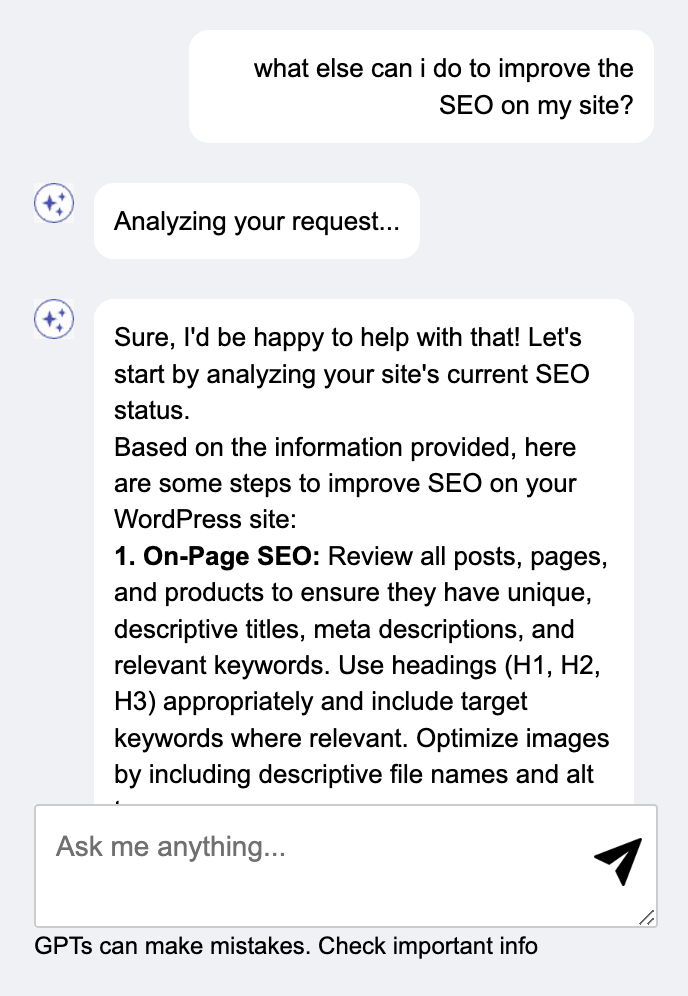
Chat response to SEO recommendations
Changelog
1.2
- Minor bug fixes
- Add a quick access bubble for the assistant at the bottom right corner