

Notifications on Discord for Woocommerce
Notifications on Discord for Woocommerce will send a notification to your chosen Discord channel, notifying you of a new order or order status change.
Maintenance 22/100962d since update
Active installs
200
Downloads
5,252
Reviews
2
Age
5.2y
Plugin info
Total downloads: 5,252
Active installs: 200
Total reviews: 2
Average rating: 5
Support threads opened: 0
Support threads resolved: 0 (0%)
Available in: 2 language(s)
Contributors: 2
Last updated: 8/14/2023 (962 days ago)
Added to WordPress: 1/29/2021 (5 years old)
Minimum WordPress version: 5.4
Tested up to WordPress version: 6.3.0
Minimum PHP version: 7.1
Maintenance & Compatibility
Maintenance score
Possibly abandoned • Last updated 962 days ago • 2 reviews
22/100
Is Notifications on Discord for Woocommerce abandoned?
Possibly abandoned (last update 962 days ago).
Compatibility
Requires WordPress: 5.4
Tested up to: 6.3.0
Requires PHP: 7.1
Similar & Alternatives
Explore plugins with similar tags, and compare key metrics like downloads, ratings, updates, support, and WP/PHP compatibility.
Order Notifications for WooCommerce
Rating 0.0/5 (0 reviews) • Active installs 50
Notifications on Discord for Easy Digital Downloads
Rating 5.0/5 (1 reviews) • Active installs 10
Hey Notify
Rating 5.0/5 (5 reviews) • Active installs 200
WC Sale Discord Notifications
Rating 5.0/5 (5 reviews) • Active installs 100
Init Pulse For Discord – Webhooks, Roles, Instant
Rating 0.0/5 (0 reviews) • Active installs 0
ExpressTechSoftwares Discord Add-on for Paid Memberships Pro
Rating 4.3/5 (20 reviews) • Active installs 800
Description
Send notifications from your Woocommerce store to your chosen Discord channel.
Notifications on Discord for Woocommerce allows you to receive discord notifications for each Woocommerce order status.
Installation
Download, Install and Activate!
- Go to Plugins > Add New to find and install Notifications on Discord for Woocommerce.
- Or, download the latest version of the plugin, then go to Plugins > Add New and click the “Upload Plugin” button to upload your .zip file.
- Activate the plugin.
Complete the Initial Plugin Setup
- Visit Intro to Webhooks to create a webhook in Discord.
- Copy the webhook and login to your WordPress dashboard.
- Go to Settings > Discord Notifications and enable the status you’d like to be notified for followed by entering in your Webhook URL.
Frequently Asked Questions
Discord won’t accept notifications from an offline site. Be sure to send your discord notifications from an online site that is publicly accessible.
Review feed
No reviews available
Screenshots

Discord Notifications Settings Page
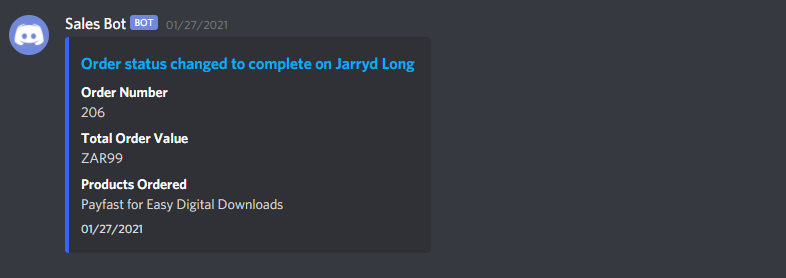
Example of a Discord Notification In Your Chosen Channel
Changelog
1.0.1
- Updated Tested Up To’s for Core and WooCommerce
1.0.0
- Initial Release, Lets Do This!