

Sold Unit Display for Woocommerce
Sold Unit Display for Woocommerce is the plugin to show total product sold number and unit (for purchased products) on your Woocommerce shop page and …
Plugin info
Maintenance & Compatibility
Maintenance score
Possibly abandoned • Last updated 1715 days ago
Is Sold Unit Display for Woocommerce abandoned?
Possibly abandoned (last update 1715 days ago).
Compatibility
Similar & Alternatives
Explore plugins with similar tags, and compare key metrics like downloads, ratings, updates, support, and WP/PHP compatibility.
Description
This plugin is simple and strength forward to use.
It can display total product sold number like ‘Sold x units’ on Woocommerce shop.
This plugin also can display total product sold plus unit on Woocommerce single product page also.
Sold Unit Display for Woocommerce has the following options to configure.
- Enable/Disable on Single Product Page
- Enable/Disable on Product List/Archive Page
- Hide if product has zeros sales
- Background Color and Text Color control
- Margin and Padding Control
- Work with latest woocommerce version 5.4.x.
Any suggestion or feedback are always welcome.
Installation
Frequently Asked Questions
We tested with latest version of Woocommerce (5.5.x). However, you can also use with older version of woocommerce.
Go to menu Woocommerce Settings under Products tab in section ‘Unit Sold Display’.
Normally it would update along with the cache system expired. You can try clear your system cache to see the update. We does not use realtime ajax to read database since it is performance hoc.
Review feed
Screenshots
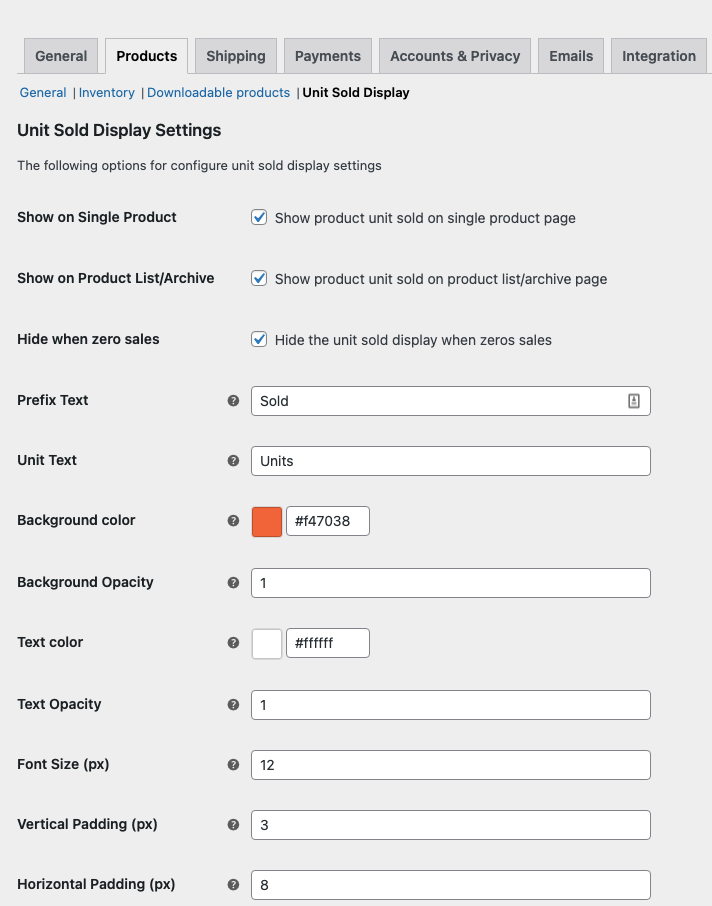
WC Unit Sold Display Settings.

Unit Sold Display Frontend on Single Product.

Unit Sold Display Frontend on Product Archive.
Changelog
1.0.1
- Test with WordPress 5.8.
1.0.0
- stable tag and release.
0.0.9
- Initial version.