

Webhook for Bricks Forms
Adds form ID and webhook URL pairs to trigger specific webhooks on Bricks form submissions, with debug options.
Plugin info
Maintenance & Compatibility
Maintenance score
Stale • Last updated 258 days ago • 1 reviews
Is Webhook for Bricks Forms abandoned?
Likely maintained (last update 258 days ago).
Compatibility
Similar & Alternatives
Explore plugins with similar tags, and compare key metrics like downloads, ratings, updates, support, and WP/PHP compatibility.
Description
Webhook for Bricks Forms allows you to easily configure form ID and webhook URL pairs to trigger custom webhooks on Bricks form submissions. Features include:
* Add and manage form-webhook pairs via the admin panel.
* Debug mode for testing webhook responses.
* Logs form submissions for troubleshooting.
This plugin is designed for seamless integration with Bricks Builder and ensures secure and optimized performance.
Video Tutorial – Webhook For Bricks Forms Setup Guide
Try Webhook For Bricks Forms in a Sandbox
Bricks 2.0
Bricks 2.0 has native webhook support, but the custom action that is needed for this plugin still works and functions and as such I intend to continue to maintain it given I have it on a fair number of sites.
Notes
If you encounter any issues or have suggestions, feel free to reach out via the plugin support forum.
Installation
- Upload the plugin files to the
/wp-content/plugins/webhook-for-bricks-formsdirectory or install the plugin through the WordPress plugins screen directly. - Activate the plugin through the ‘Plugins’ screen in WordPress.
- Go to the ‘Webhook for Forms’ submenu under the Bricks menu to configure settings. – Instructions here: https://github.com/stingray82/webhooks-for-bricks-forms/blob/main/README.md
Frequently Asked Questions
Bricks Builder is a powerful WordPress site builder. This plugin extends its functionality by integrating webhook triggers for forms.
Enable debug mode in the plugin’s settings page to log form submissions and webhook responses for troubleshooting.
Yes, the plugin is fully translatable and includes a text domain webhook-for-bricks-forms.
Yes, the plugin is currently fully compatible and tested with 2.0
Review feed
Screenshots
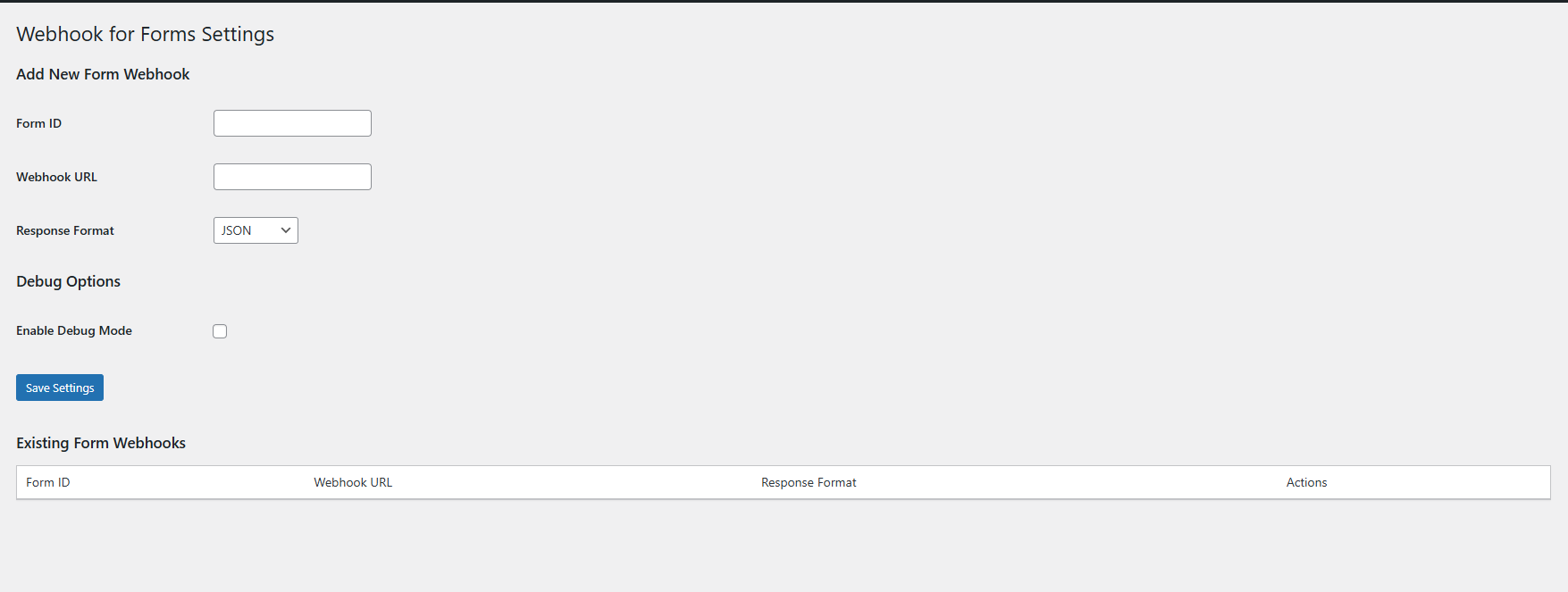
Plugin settings page for managing webhooks and debug options. Webhook for Bricks Forms Plugin Dashboard

Example Form ID Example Form ID in the backend
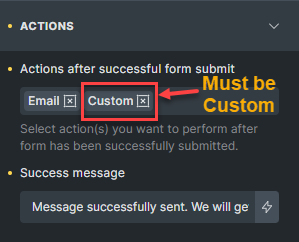
Action Must be Custom Action Must be Custom 4.Example of Matches webhook Pair Example of Matches webhook Pair



Changelog
2.0
- Test Release Automation & Video Recording
- Pushed Version Number to Match Base Bricks Version 2.0
1.4.2
- Test Release Automation
1.4.1
- Fix Version Issue
1.4
- Bump Version Number
- Tested to 6.8.2
- Tested with Bricks 2.0
1.31
Fixed Multisite Redirection issue replaced with JS
1.3
- Updated Debug Options
- WordPress.org Changes
- Added edit option rather than just the save over option
- Name confirmed to webhook-for-bricks-forms
1.2
- Warning Breaking Changes – Migration needed to new data options
- Added Option for JSON and Formdate sending of data
1.1
- Added support for translations using the
webhook-for-bricks-formstext domain. - Improved security with input sanitization and validation.
- Resolved a linter warning related to unsanitized nonce usage.
- Updated debug mode to be conditionally active and wrapped in secure logic.
- Enhanced escaping for admin page outputs to meet WordPress security standards.
1.0
- Initial release with basic functionality for managing form-webhook pairs.
- Added debug mode to log webhook responses and form submissions.