

Weekly Planner
Weekly Planner is a highly customizable plug-in that makes it easy to keep track of weekly events and display them on your website.
Plugin info
Maintenance & Compatibility
Maintenance score
Possibly abandoned • Last updated 6124 days ago
Is Weekly Planner abandoned?
Possibly abandoned (last update 6124 days ago).
Compatibility
Similar & Alternatives
Explore plugins with similar tags, and compare key metrics like downloads, ratings, updates, support, and WP/PHP compatibility.
Description
Weekly Planner is a highly customizable plug-in that makes it easy to keep
track of weekly events and display them on your website. Weekly Planner
features a colorful, easy-to-read display for your readers, along with very
easy-to-use admin interface that makes it easy to add and remove appointments
while providing maximum flexibility, allowing you to change virtually every
color without any need to modify the CSS itself.
Originally developed for a client who gave private music lessons and wanted
an easy way to keep her current schedule updated, this plug-in is useful for
anyone who wants to keep a schedule of weekly appointments, such as classes
or tutoring sessions.
Many thanks to Kieran O’Shea (http://www.kieranoshea.com) for his/her
excellent Calendar plug-in, which served as a foundation for this plug-in
from both a technical and design standpoint.
Find any bugs, or have any suggestions? E-mail me at
reidmichaeljames (at) gmail dot com.
Installation
- Upload
planner.phpto/wp-content/pluginsdirectory - Activate the plugin through the ‘Plugins’ menu
- There will be a new “Planner” item in your menu bar that you can use
to manage your events, style, etc. - To add the planner to a post, simply add
{PLANNER}and the plugin will
replace it with a copy of the weekly planner.
Frequently Asked Questions
How do I display the planner?
Make sure the plug-in is activated, then insert {PLANNER} into a blog post.
Review feed
Screenshots
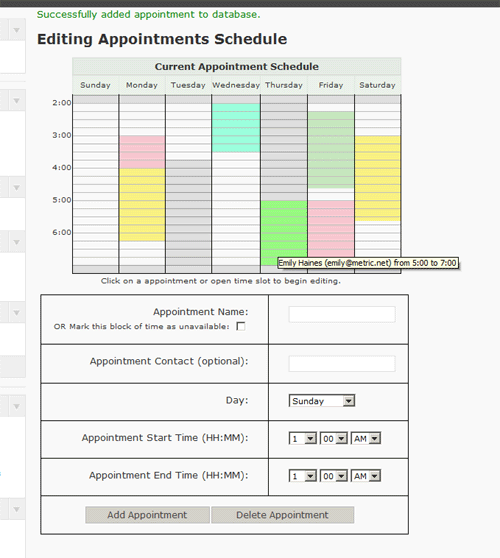
Image of the planner display, through the admin interface.
Changelog
1.0
- Initial release.