

WideAccess Accessibility Widget
WideAccess Accessibility Widget makes websites more accessible and more compliant with WCAG and ADA.
Plugin info
Maintenance & Compatibility
Maintenance score
Actively maintained • Last updated 83 days ago • 1 reviews
Is WideAccess Accessibility Widget abandoned?
Likely maintained (last update 83 days ago).
Compatibility
Similar & Alternatives
Explore plugins with similar tags, and compare key metrics like downloads, ratings, updates, support, and WP/PHP compatibility.
Description
WideAccess is a simple but effective web accessibility solution designed to make your website inclusive and compliant with international standards.
With one-click activation, you can make your website more accessible and more compliant with WCAG 2.1 AA, ADA, AODA, ACA, EAA, and Section 508 requirements — no coding required.
Our accessibility widget provides 23 tools + 5 ready-to-use profiles that allow every visitor to personalize their browsing experience. From text magnifiers and dyslexia-friendly fonts to color contrast controls and keyboard navigation, WideAccess empowers all users to access your content comfortably.
Whether you manage a small website or a large business platform, WideAccess offers a fast, simple, and effective path to accessibility compliance.
💖 Show You Care
Demonstrate that your brand genuinely values accessibility and inclusivity by providing an experience that supports every user’s needs.
Accessibility Made Simple for WordPress
⚙️ One-Click Setup
Activate accessibility on your website instantly by only clicking on it.
🔒 GDPR-Compliant
WideAccess does not collect any user data and is fully compliant with GDPR regulations, ensuring 100% data protection for your visitors.
🎨 Custom Branding
Personalizations to match your website’s design and brand identity:
– default language
– colors
– icons
– positioning
– hide WideAccess Logo
🌐 Multi-Language Support
Available in 40+ languages, ensuring a seamless experience for global audiences.
⚡ Lightweight & Fast
Optimized for performance — WideAccess loads asynchronously after all website content is fully loaded, ensuring your site speed is not affected.
📝 Accessibility Statement Generator
Automatically create a professional accessibility statement for your website.
If your website is missing a statement, WideAccess will generate one for you to quickly fill the gap and stay compliant.
Modules
Accessibility Tools (23 included):
Text & Spacing:
✅ FREE – Bigger/Smaller Text – Adjust text size for better readability.
✅ FREE – Wider/Tighter Line Height – Adjust line spacing to improve readability.
✅ FREE – Wider/Tighter Letter Spacing – Modify spacing between letters for readability.
✅ FREE – Readable Font – Use a clearer, more readable font.
💎 PRO – Text Magnifier – Increase the size of selected text for easier viewing.
✅ FREE – Text Align – Adjust text alignment to suit text layout for each individual.
💎 PRO – Dyslexia Font – Switch to a font designed for dyslexic readers.
💎 PRO – Text-to-Speech – Read website content aloud.
Visual Adjustments:
✅ FREE – High Contrast – Enhance contrast for better visibility.
✅ FREE – Grayscale – Switch display to black and white.
✅ FREE – Low Saturation – Adjust color saturation for easier viewing.
✅ FREE – High Saturation – Adjust color saturation for easier viewing.
✅ FREE – Hide Images – Remove distracting images for focus.
Navigation & Focus:
✅ FREE – Big Black/White Cursor – Enlarge the cursor for better visibility. Two options provided for better contrast for any website.
💎 PRO – Reading Black/White Line – Highlight the current line while reading. Two options provided for better contrast for any website.
✅ FREE – Focus Tunnel – Highlight specific areas for attention.
✅ FREE – Highlight Links – Make clickable links easier to spot.
💎 PRO – Mute Sounds – Silence distracting audio.
💎 Accessibility Profiles
👁️🗨️ Low Vision – Enhances website’s visuals
⚡ Seizure & Epileptic – Clear flashes & reduces color
🎯 ADHD Friendly Mode – More focus, less distractions
🗣️ Blindness Mode – Text-to-speech capability
🧠 Cognitive Impairment – Simplifies content, enhances readability
Supported Languages
🇺🇸 English
🇩🇪 German
🇪🇸 Spanish
🇫🇷 French
🇮🇹 Italian
🇵🇱 Polish
🇸🇪 Swedish
🇫🇮 Finnish
🇵🇹 Portuguese
🇷🇴 Romanian
🇸🇮 Slovenian
🇸🇰 Slovak
🇳🇱 Dutch
🇩🇰 Danish
🇬🇷 Greek
🇨🇿 Czech
🇭🇺 Hungarian
🇭🇷 Croatian
🇧🇬 Bulgarian
🇳🇴 Norwegian
🇹🇷 Turkish
🇮🇩 Indonesian
🇯🇵 Japanese
🇰🇷 Korean
🇨🇳 Chinese
🇦🇪 Arabic
🇮🇳 Hindi
🇺🇦 Ukrainian
🇷🇸 Serbian
🇦🇿 Azerbaijani
🇻🇳 Vietnamese
🇲🇰 Macedonian
🇦🇲 Armenian
🇮🇱 Hebrew
🇵🇰 Urdu
🇹🇭 Thai
Reliable Support
Our team provides responsive support to help you configure, customize, and maintain your accessibility setup at every step.
Installation
FREE:
- Download the plugin
- Install the plugin into your WordPress project
- Ready to go (customize if needed)
PRO:
- Download the plugin
- Install the plugin into your WordPress project
- Ready to go (customize if needed)
- Sign up on WideAccess
- Onboard domain of your website and make a payment via Stripe
- Go to Dashboard -> Widget -> Select your domain and copy license key
- Use license key and domain name to activate license inside plugin.
- Enjoy the PRO tier.
❗ Important: If you uninstall the plugin or deactivate your license, make sure to visit WideAccess and unsubscribe your website from the PRO plan.
Activating the license in the plugin only enables the premium service. As per WordPress Plugin Guideline, all paid services must be managed outside the plugin.
For more details, please visit WideAccess Manual
Frequently Asked Questions
Installation only takes a couple of minutes. Simply download the plugin and activate it.
No personal data is stored. The widget runs entirely on the client side, ensuring full privacy and GDPR compliance.
Absolutely. The plugin provides full customization for your personalized branding so you can adjust colors, positioning, icons, and more to match your brand experience.
Yes, PRO version has a 7-day trial.
WideAccess aligns with WCAG 2.1 AA, ADA, Section 508, and other international standards to help your website stay compliant worldwide.
No. WideAccess widget loads asynchronously after all website content is fully loaded, ensuring your site speed is not affected.
Yes. Visitors can instantly switch between 40+ supported languages directly from the widget interface.
Yes. The built-in statement generator creates professional accessibility statements.
Our team offers live chat, email, and scheduled consultations to help with installation, customization, and ongoing optimization.
Review feed
Screenshots

WideAccess Accessibility Widget
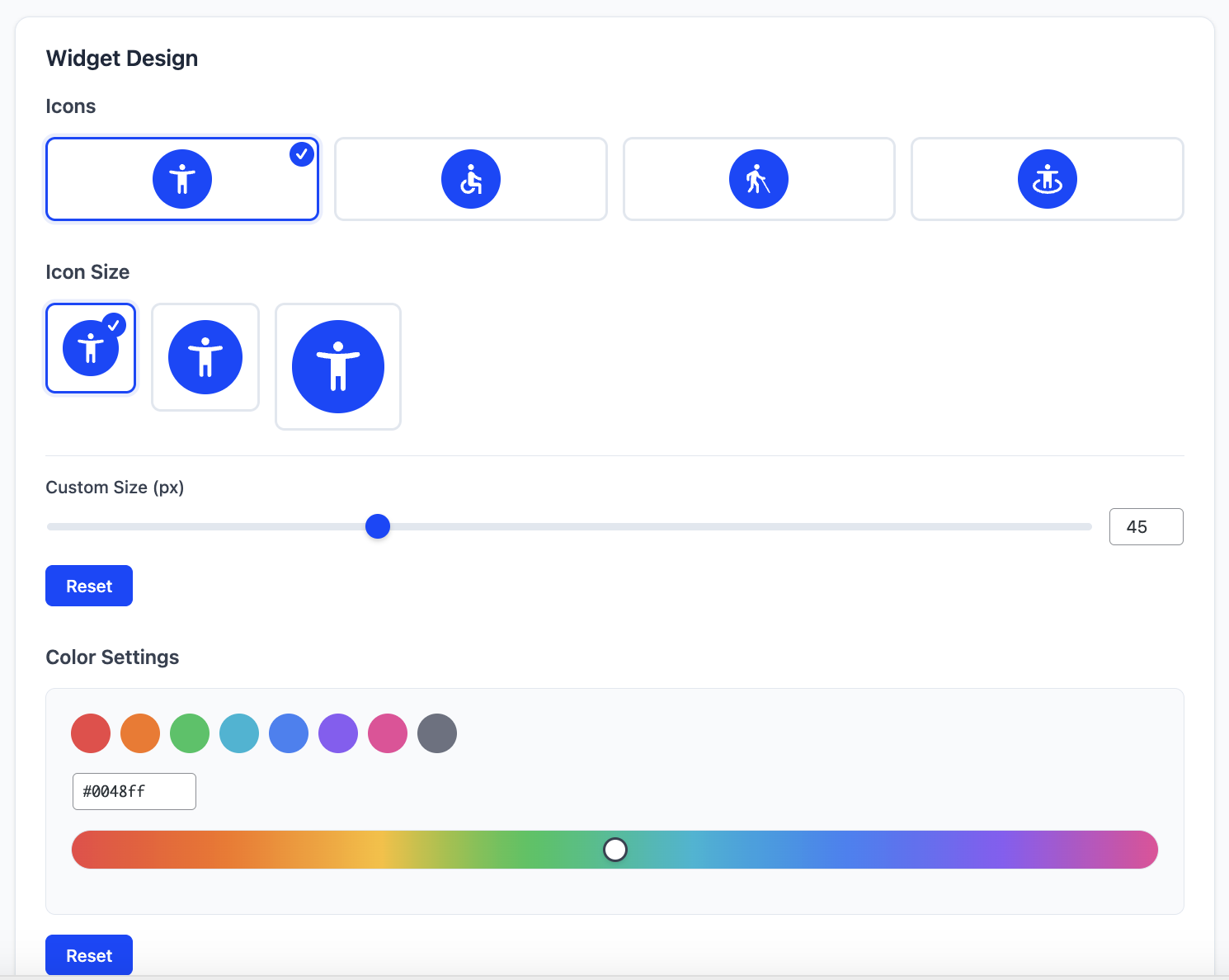
Brand customization: icon, size, colors

Widget settings: language, logo
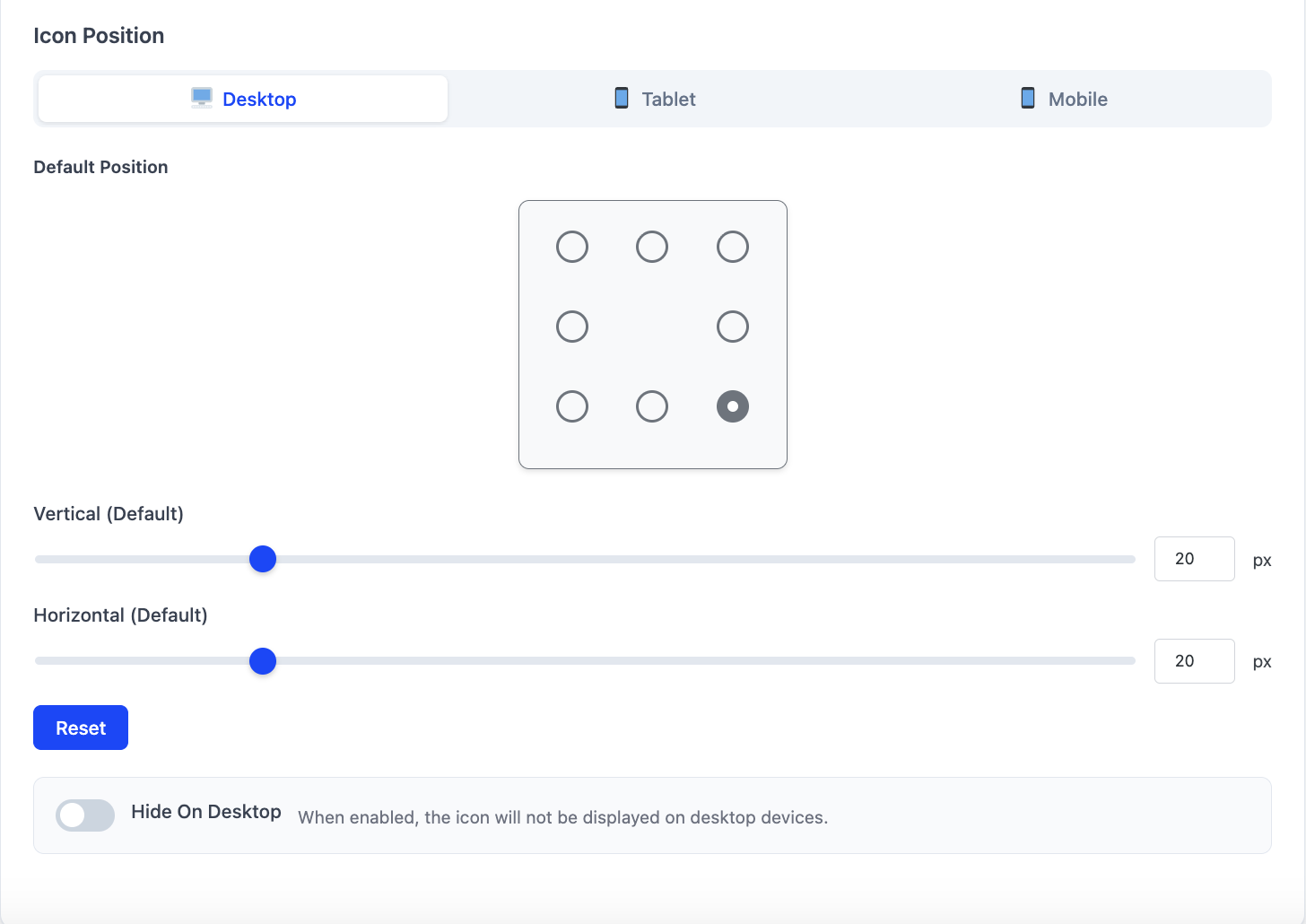
Widget settings: icon positioning on different devices
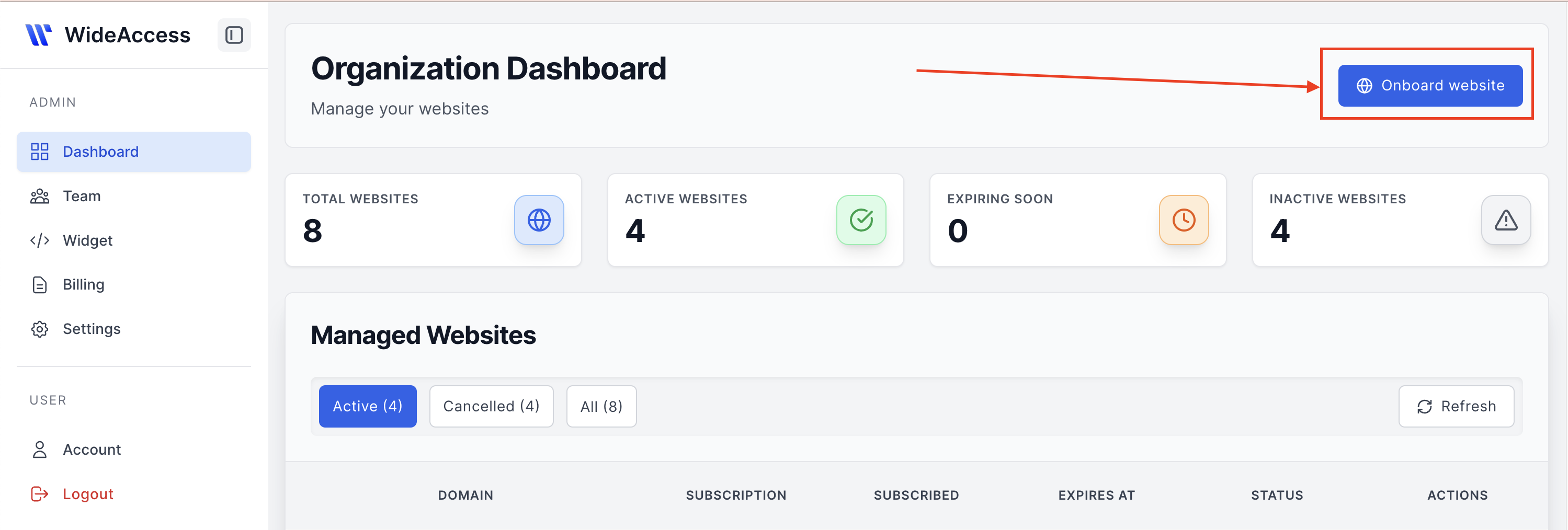
How to onboard a domain for PRO version: Click on Onboard Website at wideaccess.ca
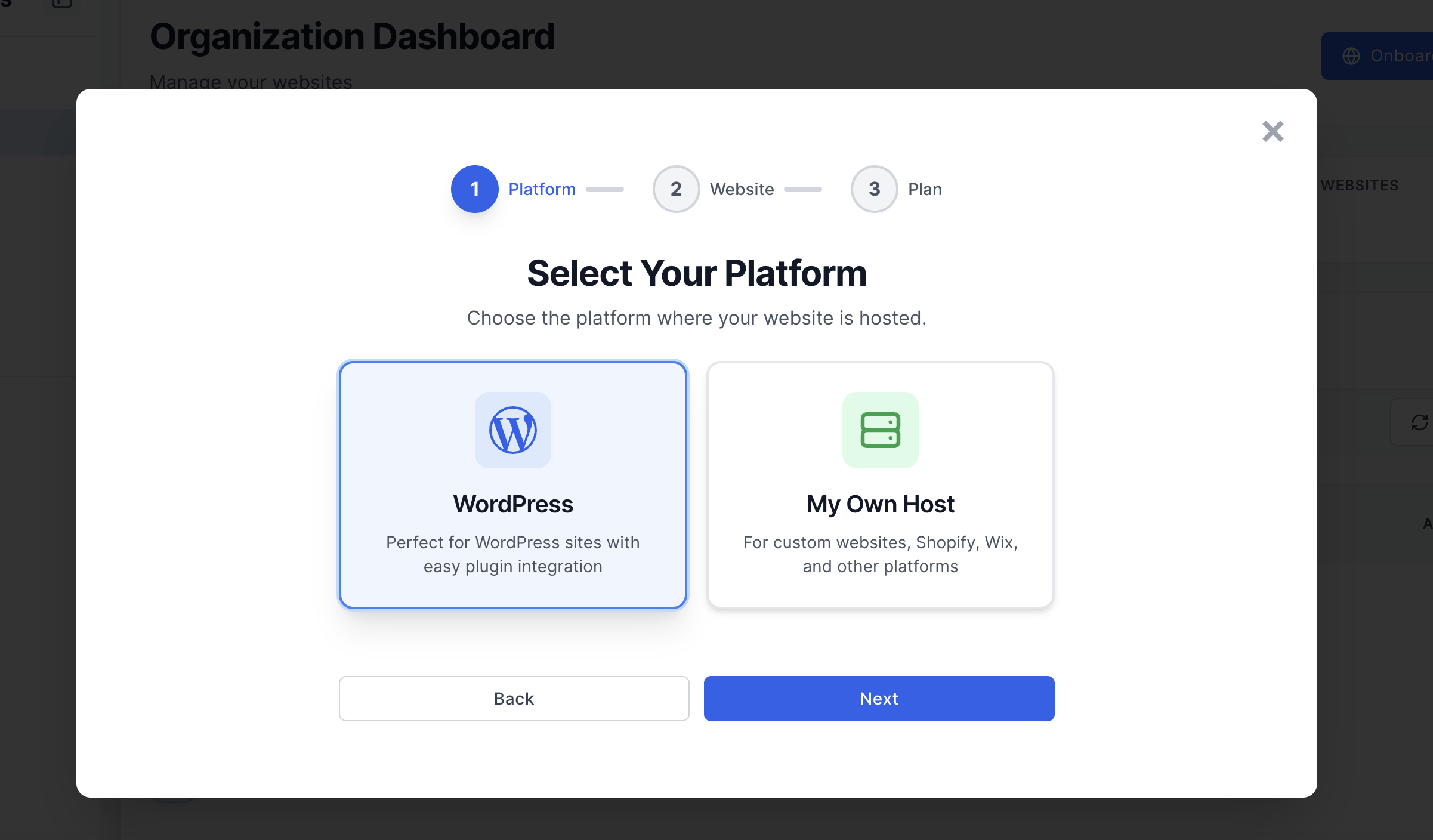
How to onboard a domain for PRO version: Select WordPress as platform
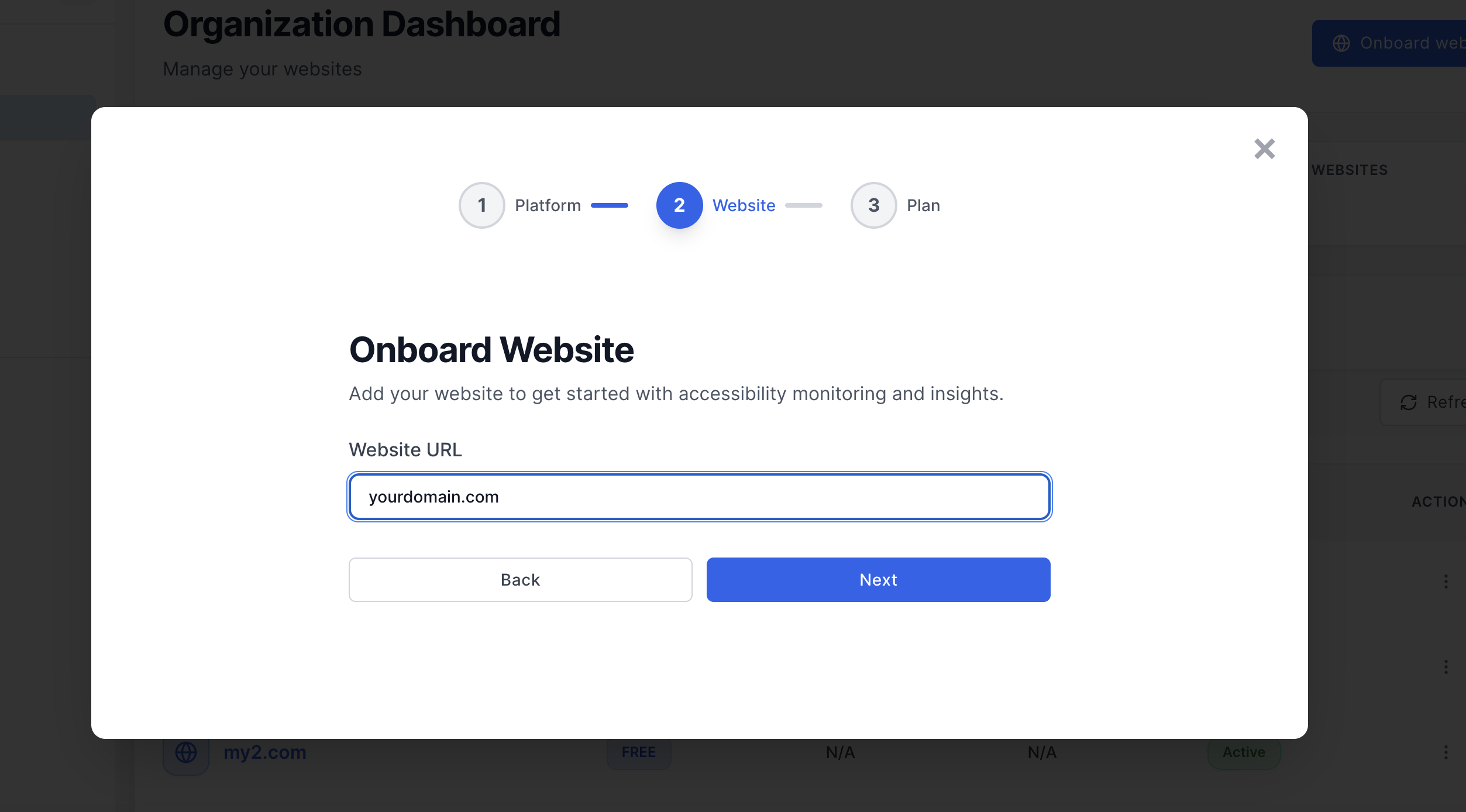
How to onboard a domain for PRO version: Enter your domain
Changelog
1.0.0
- Release Date