

WP Event Calendar
WP Event Calendar is the best way to manage events in WordPress!
Maintenance 22/1003400d since update
Active installs
30
Downloads
8,860
Reviews
2
Age
10.6y
Plugin info
Total downloads: 8,860
Active installs: 30
Total reviews: 2
Average rating: 4.5
Support threads opened: 0
Support threads resolved: 0 (0%)
Available in: 2 language(s)
Contributors: 3
Last updated: 12/9/2016 (3400 days ago)
Added to WordPress: 8/19/2015 (10 years old)
Minimum WordPress version: 4.7
Tested up to WordPress version: 4.8.27
Minimum PHP version: f
Maintenance & Compatibility
Maintenance score
Possibly abandoned • Last updated 3400 days ago • 2 reviews
22/100
Is WP Event Calendar abandoned?
Possibly abandoned (last update 3400 days ago).
Compatibility
Requires WordPress: 4.7
Tested up to: 4.8.27
Requires PHP: f
Languages
Similar & Alternatives
Explore plugins with similar tags, and compare key metrics like downloads, ratings, updates, support, and WP/PHP compatibility.
Shortcode for Current Date
Rating 5.0/5 (115 reviews) • Active installs 10,000
Current Date Shortcode For WordPess
Rating 5.0/5 (1 reviews) • Active installs 3,000
Current Year Shortcodes
Rating 5.0/5 (3 reviews) • Active installs 1,000
WP-Archives
Rating 5.0/5 (1 reviews) • Active installs 100
Category Archives
Rating 5.0/5 (1 reviews) • Active installs 90
Current Year, Month, Date & Time WordPress Shortcodes – Date Updater
Rating 0.0/5 (0 reviews) • Active installs 80
Description
WP Event Calendar is the best way to manage events in WordPress!
We know you have your choice of calendar & events plugins. We appreciate you giving this one a try, and we hope you really love it!
Details
- Seamlessly integrates into WordPress’s dashboard interface
- Month, week, and day list-table views
- Organize events by type, category, & tag
- Easily & logically paginate through date ranges
- Safe, secure, & efficient
- Full of developer hooks for integration with other plugins & themes
- Integrates with User Groups, Alerts, Activity, and Profiles
Works great with
Installation
- Download and install using the built in WordPress plugin installer.
- Activate in the “Plugins” area of your admin by clicking the “Activate” link.
- No further setup or configuration is necessary.
Frequently Asked Questions
Does this create new database tables?
No. It uses WordPress’s custom post-type, custom taxonomy, and metadata APIs.
Does this modify existing database tables?
No. All of WordPress’s core database tables remain untouched.
Where can I get support?
- Basic: https://wordpress.org/support/plugin/wp-event-calendar/
- Priority: https://chat.flox.io/support/channels/wp-event-calendar/
Where can I find documentation?
http://github.com/stuttter/wp-event-calendar/
Review feed
joelworsham
Easy to use, lightweight, magnificant
I really like this plugin! It's super lightweight, yet functional and powerful. It's perfect as a standalone solution, with some custom theme templates, or as a starting point for building a more powerful, streamlined calendar system.
Knut Sparhell
Well coded, structured and lightweight for event management
Very good base for developers. Very extendable and filterable.
This doesn't give you front end calendar, but it takes well care of the management and display of calendar(s) from admin side. Extends WP_List_Table class for calendar views.
Lacks Location as taxonomy, but such can easily be added.
I combine this with Genesis Custom Blocks to make front end views, single event, list and calendars.
Screenshots
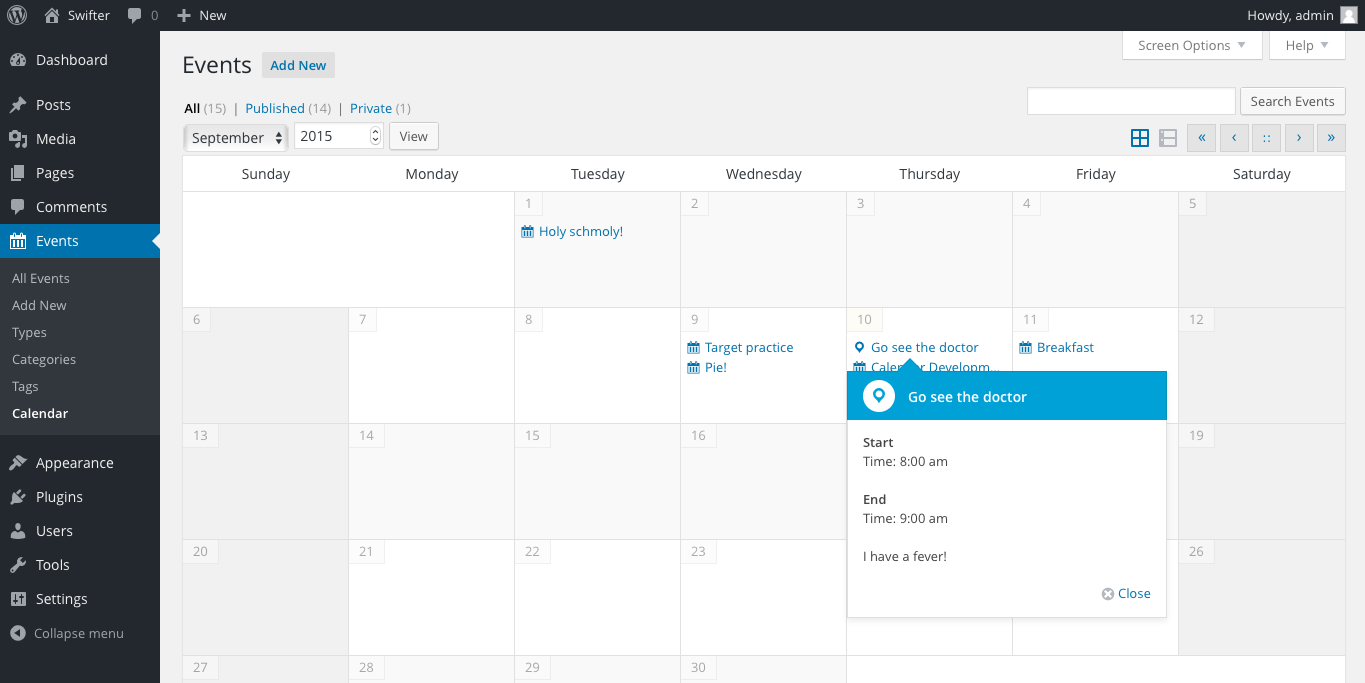
Month View

Week View

Metabox

Date Picker
Changelog
[1.1.0] – 2016-12-09
- Improved editor metabox experience
- Fix bug caused when relocating the “Details” metabox
[1.0.0] – 2016-09-07
- Improved support for mu-plugins location
- Improved performance of all ranged calendar queries
- Updated plugin file organization structure
[0.4.0] – 2016-05-12
- More improvements to capability mappings
- Support for additional post types
- Helper functions for iCal integration
- Query functions
[0.3.1] – 2016-05-03
- Fix capability regression in 0.3.1
- Add contextual help to Calendar page
[0.3.0] – 2016-03-30
- Improve capability mapping
- Improve TinyMCE compatibility
- Update calendar styling
[0.2.4] – 2016-02-05
- Dropdown select elements for hours & minutes
[0.2.3] – 2016-02-01
- Rename metabox titles
- Make “Location” optional
- Add revision support to events
- General code & styling clean-up
[0.2.2] – 2016-01-10
- Improve support for all-day & multi-day events
- Improve month, week, and day views
- Improve contrast of current & active items
[0.2.1] – 2015-12-30
- Improve taxonomy & status filtering
[0.2.0] – 2015-11-30
- Add “Day” view
- Improve “Month” view
[0.1.10] – 2015-11-30
- Filter events by registered taxonomy
[0.1.9] – 2015-11-16
- Move events to “Passed” status twice daily
[0.1.8] – 2015-9-10
- Added week view
- Added persistent pagination for mode, status, & search
- Added styling for a few event types
- Added help text
- Added legend in help text area
[0.1.7] – 2015-9-8
- Updated date-picker styling
[0.1.6] – 2015-9-7
- Sort by start, end, and repetition
[0.1.5] – 2015-9-6
- All-day events
[0.1.4] – 2015-9-5
- More flexible mapped capabilities
[0.1.3] – 2015-9-4
- Revert role & capability changes
[0.1.2] – 2015-9-3
- Remove dependency
- Start, end, repeat, & expiring events
- Date picker
- Cleanup
[0.1.1] – 2015-9-2
- Show pointers on event clicks
- Add flexible methods for pointers output
- Add actions & filters
- Rename main class to be for month-only view
- Use new icon for private posts
[0.1.0] – 2015-9-1
- Initial release