

WP Global Site Tag
Global Site Tag (gtag.js) is a new Google Analytics replacement – giving you better control while making implementation easier. Using gtag.
Plugin info
Maintenance & Compatibility
Maintenance score
Stale • Last updated 335 days ago • 3 reviews
Is WP Global Site Tag abandoned?
Likely maintained (last update 335 days ago).
Compatibility
Similar & Alternatives
Explore plugins with similar tags, and compare key metrics like downloads, ratings, updates, support, and WP/PHP compatibility.
Description
Global Site Tag (gtag.js) is a new Google Analytics replacement. WP Global Site Tag provides a framework for streamlined web page tagging – giving you better control while making implementation easier. Using gtag.js lets you benefit from the latest tracking features and integrations as they become available. This is the WordPress version.
To use gtag.js to track your site, install the plugin and activate.
- Simple to install and use even your clients can do it
- Configure multiple Google Analytics properties
- Minified version of the code is injected for faster loading times
- Built using WordPress best practices and standards
- Great for marketing agencies and individuals
Supercharge Your GTM Setup with gtag
Wondering if you can make the most of gtag and set up Google Tag Manager (GTM) simultaneously? Heck yeah, you can!
Setting up GTM with gtag is a breeze. Just swap out that initial GA_TRACKING_ID with your GTM container ID, and you’re good to go. You can still keep the universal analytics tag running smoothly within GTM, all while having gtag in the mix.
How to use Global Site Tag
To use gtag.js to track your site, install the plugin. Replace GA_TRACKING_ID with the tracking ID of the Google Analytics property you want to send data to.
Why use Global Site Tag
Global Site Tag streamlines tracking across all Google products, including their measurement, conversion tracking, and remarketing products. Global Site Tag is the new replacement for old Google Analytics script.
Difference between Universal Analytics & Global Site Tag
There are few differences you need to know before thinking of migrating to Global Site Tag.
Install:
Universal Analytics(analytics.js) is only used for installing Google Analytics, and global tag can be used to install multiple tools like, GA and GTM.
Tracking:
Universal Analytics uses trackers(ga(‘create’, ‘G-XXXXX-Y’, ‘auto’);) to send pageviews to Google Analytics while gtag send pageviews to GA property identified by the GA_Tracking_ID(gtag(‘config’,’GA_Tracking_ID’)).
Use:
Global Site Tag can be used for conversion tracking and remarketing while universal analytics can’t.
Installation
Follow these steps to install the plugin on your site.
- Upload
wp-global-site-tagfolder to the/wp-content/plugins/directory - Activate the plugin through the ‘Plugins’ menu in WordPress
Frequently Asked Questions
Review feed
Screenshots
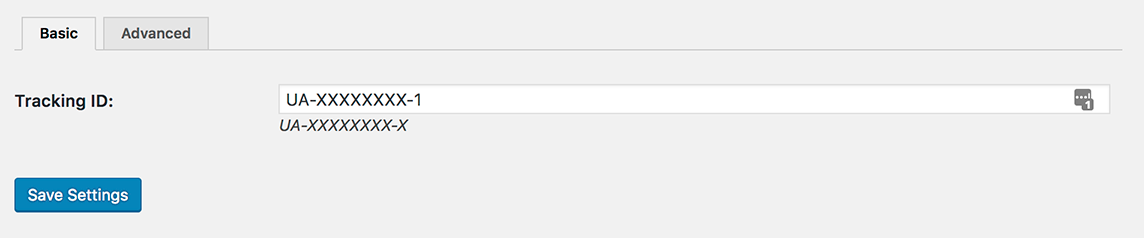
Paste your Tracking ID and you are set to go

Advanced editor for those who need it

Changelog
1.0
- First Release
1.0.2
- Testing on WordPress 5.0. Version number bump.
1.0.3
- Added settings hyperlink to the plugins page.
- Move settings page under Settings.
- Add update/install handlers.
- Add new screenshot.
1.0.5
- Updated label
1.0.6
- Added mime type
1.0.7
- remove warning message